Icons for new programs are installed underneith a fence.

When I install a new program, if it installs a shortcut icon it goes to the upper left corner of my screen under a fence that is there. I actually didn't notice this at first then I saw something sticking out of the edge. Not a huge deal, I just have to move the fence over and then drag my icon to where I want it. Am I missing a setting here?

Thanks
4,437 views 4 replies
Reply #1 Top

Hello,
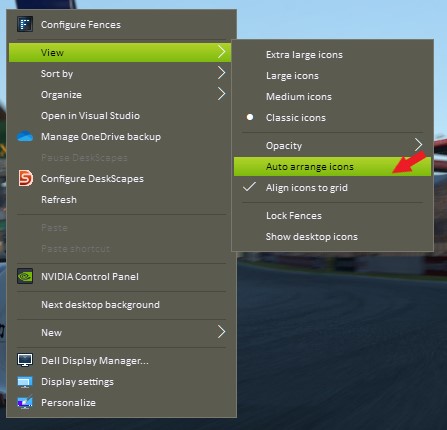
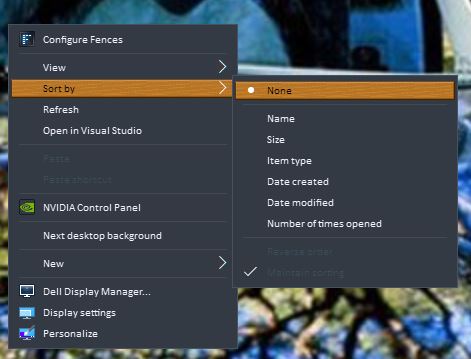
Sorry to hear you are having issues. Please try, right click on desktop-> Sort by -> None. Also View-> Auto arrange Icons (un-select)

Thanks
Basj,
Stardock Community Assistant.

Reply #3 Top

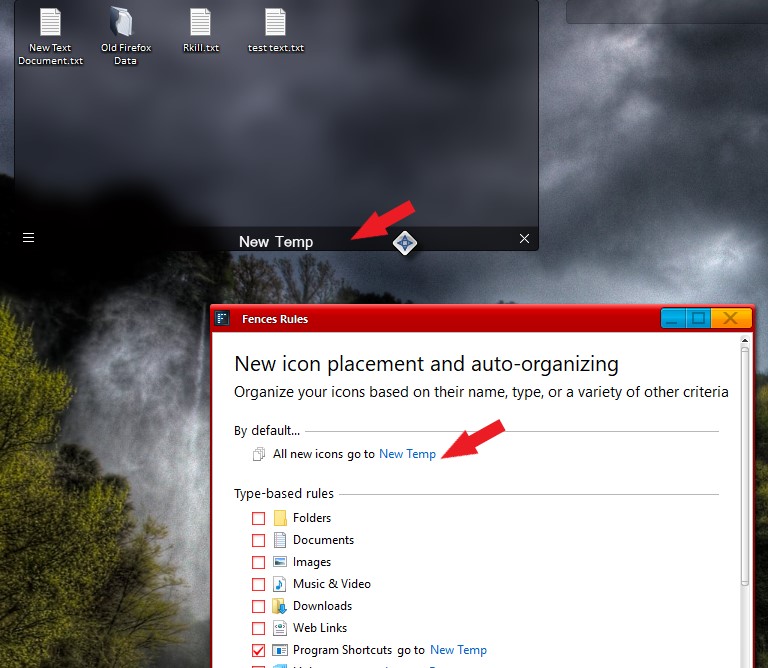
If that don't work. I would like to suggest, you can create a new Fence and name it "new things" or whatever you like. And set rules to that Fence so that all new icons/programs/documents in your desktop will be send to that Fence. So now you know where all the new things goes. Something like screenshot below.

Thank you,

Basj,
Stardock Community Assistant