
spacing

Hi, 

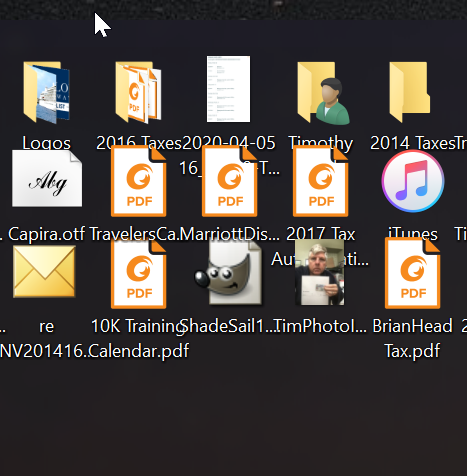
My icons on my desktop are overlapped. This problem seems to be intermittent, so, sometimes the spacing is good, but it reverts to overlap sometimes. This happens at all sizes (Classic, Medium, Large, Extra Large). Icons spaced incorrectly 
4,029 views 3 replies
Reply #1 Top

Hello,
Sorry to hear you are having issues. More information on your system please.

  1. Windows 7,8,10 or 11? and its version number please. Use Windows own "Winver.exe" to get Windows full version numbers.
  2. Fences versions
  3. Resolution and scaling on your monitors.

Thanks
Basj,
Stardock Community Assistant.

Reply #2 Top

Hi,

I am using Windows 10. Version 20H2.

Fences version 3.1.3.3

I have dual monitors. My main monitor is a 31" LG (LG HDR 4K) running @ resolution of 3840 x 2160. My second monitor is a 24" Acer (H243H) running @ 1920 x 1080.


Right now, it is running fine. But, as mentioned, it sometimes goes berzerk and overlaps like shown in the photo above.

Reply #3 Top

Hello,

What is your monitors scaling? 100%,125%,150%? etc. What happen when it goes berserk? After reboot? After playing a game? Watching videos?

Thank you,

Basj,
Stardock Community Assistant