
How do I keep my fences from moving around?

Hi,

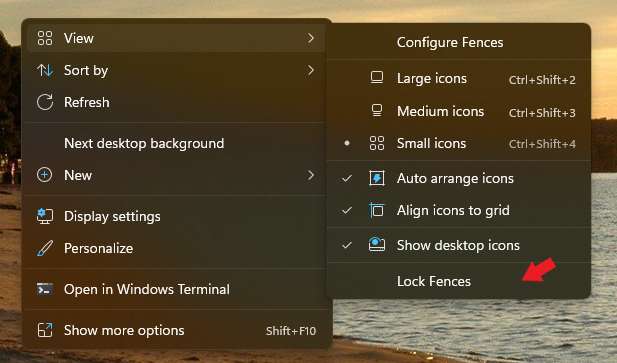
I know this sounds like a simple question, but I swear that the option to lock my fences has disappeared from right clicking it and going to view. I recently upgraded to a new version (4.0.0.3) and I cannot find an option to lock my fences down. This wouldn't matter too much, but when I boot up my pc, my fences like to move to one of my non primary monitors. Reloading a snapshot of them does not help and just re-organizes them on the non primary monitor despite the snapshot clearly showing them on my main monitor. I just want them to stay where they are.

4,472 views 2 replies
Reply #1 Top

Hello,
Sorry to hear you are having issues. You on, Windows 10 or 11? and its full version numbers please. If on Windows 11 the "Lock Fences" is slightly different location than Windows 10.

Also "Lock Fences" is hidden, if you choose Show Labels to "Never" (Under Color & Appearance tabs->Show Labels)

For your second issue, how do you connect those monitors? HDMI, DP, USB?

Thanks
Basj,
Stardock Community Assistant.

Reply #2 Top

Ok that makes a lot of sense. I am on windows 11 and made some regestry changes so the "more options" menu would come up by default when I right click as I frequently use them. I'm hoping just locking them will fix it, but I won't know for sure until later. 

I have 3 monitors. One connected via displayport, another with a vga to DP adapter, and one with hdmi.