Fences not staying hidden after reboot

Lately when I restart/powercycle Windows 11, my fences are not staying hidden/hiding. This started with version 3 in the last couple of weeks, so I uninstalled and upgraded to 4 and the problem persists. I've uninstalled and reinstalled both versions, to no avail.

I see that Fences is started 2 times (plus 1 for hotkey support), is this normal?


4,666 views 5 replies
Reply #1 Top


I see that Fences is started 2 times (plus 1 for hotkey support), is this normal?

End of quote

Yes this is normal.

as far as hidden you need to double click on the desktop to hide the fences .

Reply #2 Top

Fences used to keep the last state (until last week) after a reboot, i.a.w. if they were hidden when the reboot started, they'd be hidden when the desktop got loaded again. I know about the double click thing, use it all the time. |-)  

Reply #3 Top

Hello,
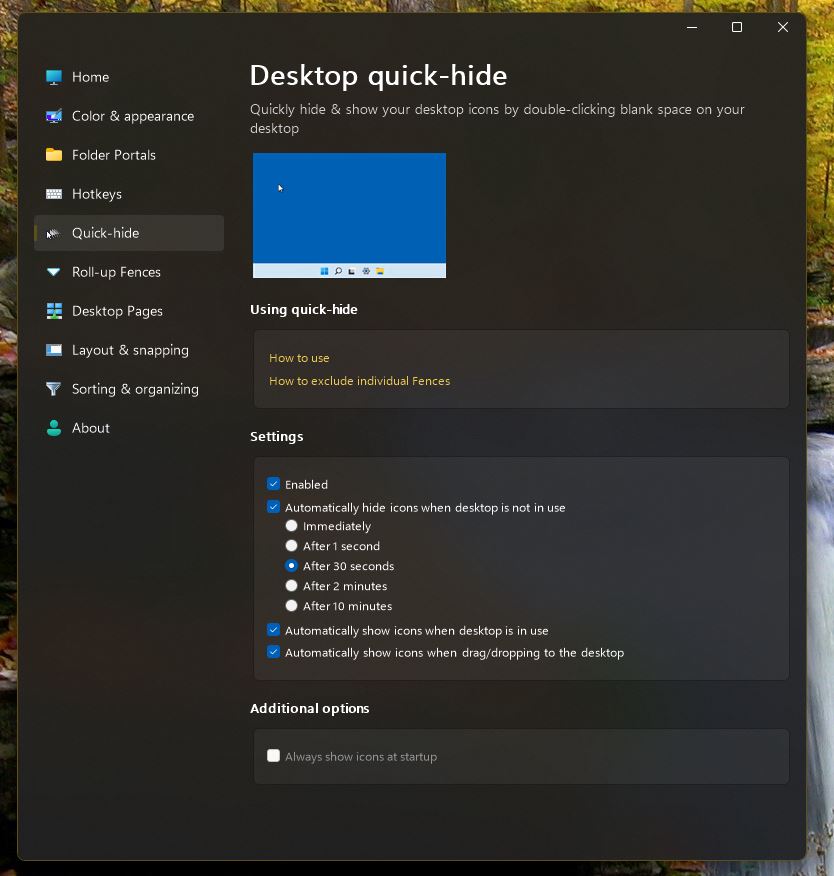
Sorry to hear you are having issues. What is your Fences setting on Quick-hide? Mine is as below and desktop icons and Fences keep hidden until I click on desktop

Thanks
Basj,
Stardock Community Assistant.

Reply #4 Top

I prefer to have them show on a double click and I hide them again manually, when I want to. Settings are as follows:

Reply #5 Top

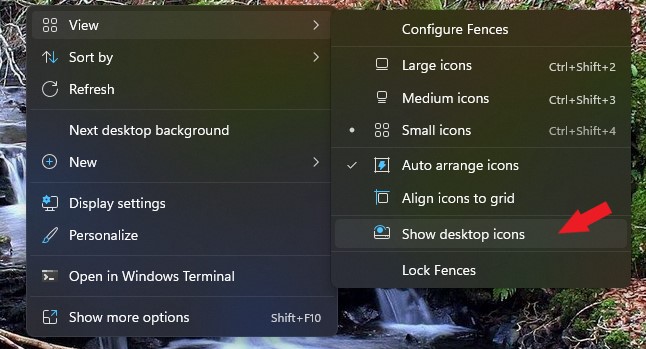
Try un-tick "Show Desktop Icons" on Windows setting. Refer below.

Thank you,

Basj,
Stardock Community Assistant