
start button in start 11 in windows 11 preview
selection does not load
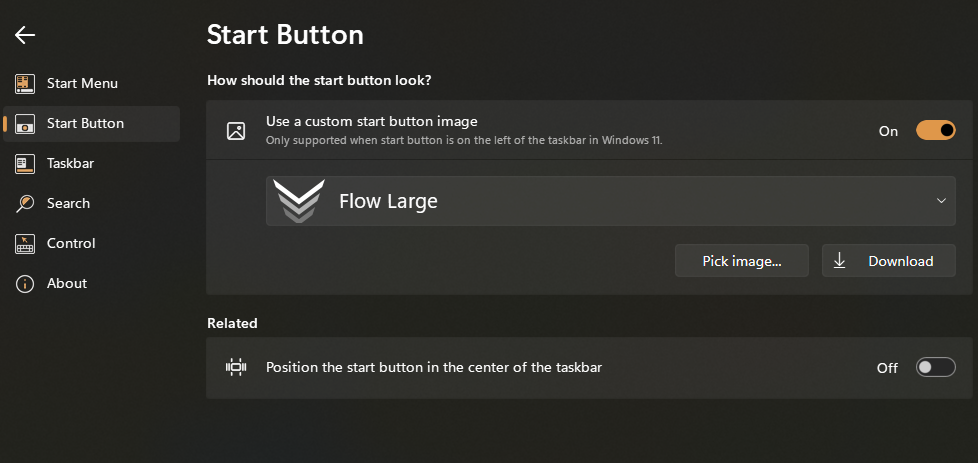
Even though I select a new start button it does not load. Start is at the left end of task bar so should show but does not.
selection does not load
Even though I select a new start button it does not load. Start is at the left end of task bar so should show but does not.
Hello,
Sorry to hear you are having issues. It is best to not to run Windows 11 preview edition, since it will give some issues. Try using official release edition for best stability. Anyway, do provide information to help us understand your issue better.
Thanks
Basj,
Stardock Community Assistant.
Windows 11 Home OS
21H2 version
9/23/2021 installation date
22000.466 build OS
Windows Feature Experience Pack 1000.22000.466.0
start 11 version 1.11
Still need this and also we note that you're running Insider preview Windows, which is not a stable official release version. Could you revert back to Windows 11 official release version and retest this.
Thank you,
Basj,
Stardock Community Assistant
No can not revert and have had no other issues.

Hello,
I have forward your problem/question to Stardock Support Team for their assistance. Please keep an eye on this thread for any updates. We appreciate your feedback and patience.
Basj,
Stardock Community Assistant
Please try purge and reinstall steps as mentioned here: [link]. Just make sure to redownload the latest version from your account. Reboot after the purged. Reinstall, and Reboot again after the installation. Retest it. Report back here.
Thank you,
Basj,
Stardock Community Assistant
Welcome Guest! Please take the time to register with us.