Cannot add icon to fence.

When updating a program, old icon is removed from fence but new icon is generated outside fence and I cannot move it into the fence where the previous one was located. Fence appears to be locked from adding icons.

Ver. 4.0.0.3

11,307 views 13 replies
Reply #1 Top

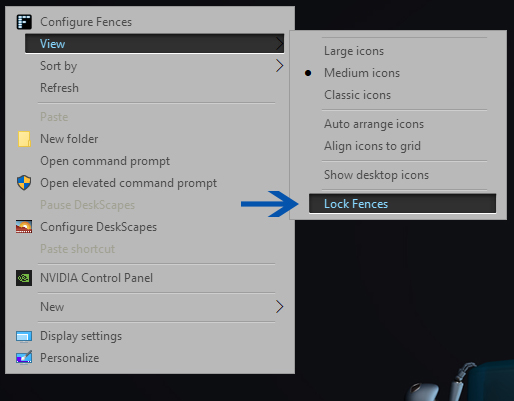
Can you please right click on your desktop and see if "Lock Fences" is ckecked?

Reply #2 Top

"Lock Fences" is not checked. When I try to drag an icon from outside the fence into the fence it just pops back out.

This is windows 11 if that matters.

Reply #3 Top

Have you tried to right click the fence, click "Sort by" and uncheck "Maintain Sorting" if that is selected?

Reply #4 Top

Have unchecked maintain sorting. Still cannot move icons into the fence.

Reply #5 Top

Would like to know if you're using a software that introduce desktop element into your system, which could conflict with Fences. For example, "360 Total Security" install its own desktop organizer, and that causing issue with Fences.

For reference : https://forums.stardock.com/494957

Thank you,

Basj,
Stardock Community Assistant

Reply #6 Top

Don't think so. Problem didn't happen until latest release of Fences.

Reply #7 Top

Details on you system please.

  1. Windows 7,8,10 or 11?
  2. Windows full version numbers. You can use Windows own Winver.exe to get those.
  3. What version of Fences you use before upgrading to V4? And those version was working?

Thank you,

Basj,
Stardock Community Assistant

Reply #8 Top

Fences V 4.0.03 - Windows 11 Home 21h2 - Same issue cannot create (or drag, or copy) a new item into an existing Fence.. everything goes to the desktop.  Last working version was Fences v 3 on  Win 10.. Would a downgrade to Fences V3 work?

- EDIT - a reinstall seems to have fixed it..


Reply #9 Top

Quoting hac2, reply 8

Fences V 4.0.03 - Windows 11 Home 21h2 - Same issue cannot create (or drag, or copy) a new item into an existing Fence.. everything goes to the desktop.  Last working version was Fences v 3 on  Win 10.. Would a downgrade to Fences V3 work?
End of hac2's quote

Hello,
Sorry to hear you are having issues. Check if your Fences is lock. Please unlock and try again.

Basj,
Stardock Community Assistant.

Reply #10 Top

It seems HAC2 is having the same problem as me. I checked and Fences is unlocked.

Reply #11 Top

Quoting weinandy, reply 10

It seems HAC2 is having the same problem as me. I checked and Fences is unlocked.
End of weinandy's quote

Quoting hac2, reply 8

- EDIT - a reinstall seems to have fixed it..
End of hac2's quote

weinandy, Have you tried uninstall, reboot, and reinstall.

Thank you,

Basj,
Stardock Community Assistant

Reply #12 Top

Yes, and that corrected problem.


Thank you all.

Reply #13 Top

Great, glad it get corrected.

Thank you,

Basj,
Stardock Community Assistant