Locked fences in Fences 4

Hi all,

I have installed the last version of Fences 4.

In the previous versions of Fences, it was possible to lock/unlock the fences on the screen. I can't find the same functionnality within Fences 4.

Could you help me please?

BR,

Michel

14,285 views 14 replies
Reply #1 Top

Hello,
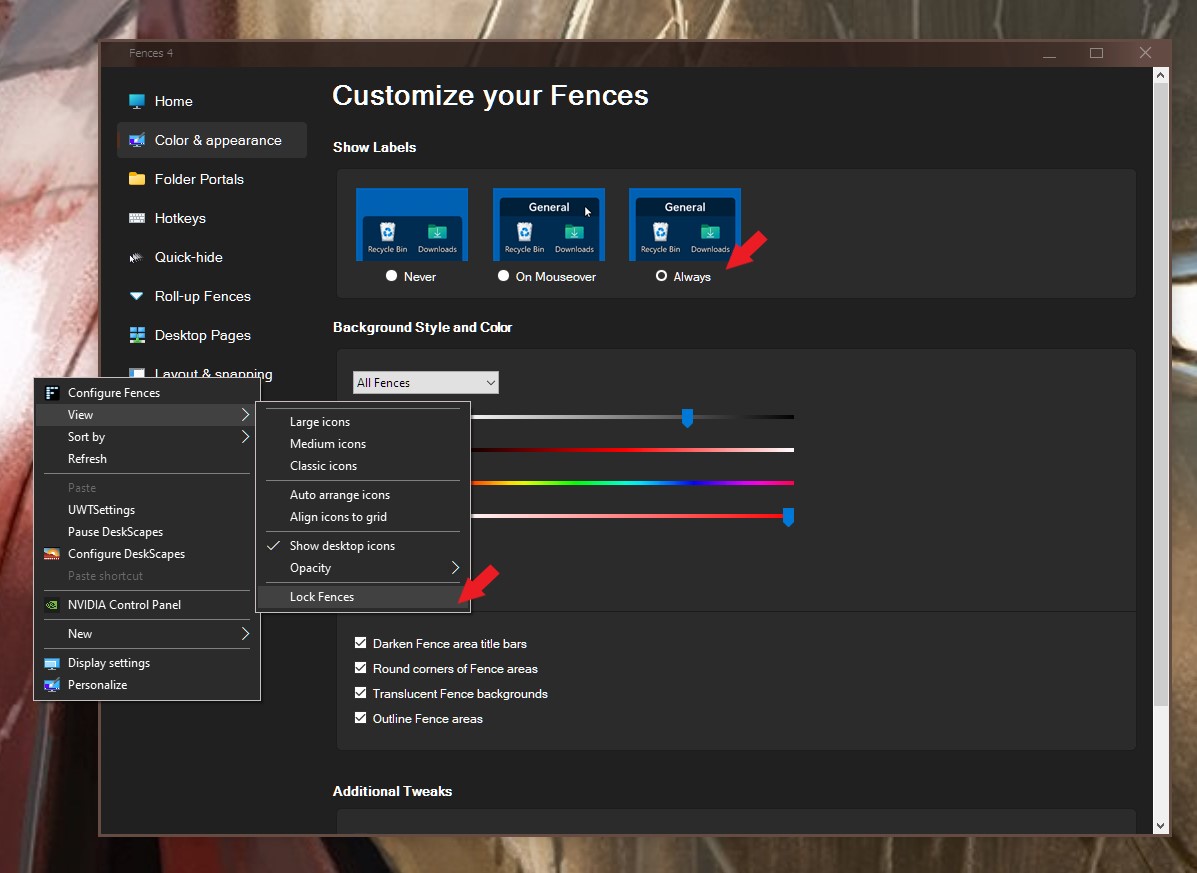
Sorry to hear you are having issues. Please refer to screenshot below. But, if you set your Fences Show Labels to "Never" The Lock Fences does not appear.

Thanks
Basj,
Stardock Community Assistant.

Reply #2 Top

Hello Basj and thanks a lot for the answer.

But are you realy within the version number 4 of Fences?

From my PC, this interface is this one bellow (excuse me but in French ;-)) :

and I don't find the right menu to lock/unlock...

BR,

Michel

Reply #3 Top

Hello,

I am on Fences 4. Anyway, please check if you have set the Show Labels to "Never". If yes, please set to "On Mouseover" or "Always" and check if the Lock Fences appear on your right click->View menu.

Thank you,

Basj,
Stardock Community Assistant

Reply #4 Top

Hello Basj,

I have selected "No Never", "On mouseover" and finally "Always". Each time, I don't see the lock/unlock fuction:


Honestly, when I have installed Fences4, all the fences were locked and impossible to move.

After one hour, I have found an unlock function (but unfortunatly it's impossible to me to know I did). A this moment, the fences were unlocked and I have moved them without issues.

Now, I try to find again this lock/unlock function and I am not enable to find... :-(.

BR,

Michel


Reply #5 Top

Quoting Pegase35, reply 4

Now, I try to find again this lock/unlock function and I am not enable to find.
End of Pegase35's quote

You should be able to right-click on your desktop to View

scroll down till you see Lock Fences if it's checked they are

Locked if you un check it then they are not Locked .

Reply #7 Top

Hello,

Can you post another screenshot but this time set the show level to "always". After that is done, do the right click again and show up if the Lock Fences still missing. Something like my screenshot below.

Thank you,

Basj,
Stardock Community Assistant

Reply #8 Top

Hello Basj,

According to your request:

YES :-).

Thanks a lot Basj but a visible help about this point in the menu would be a good idea ;-).

Have a nice day to you.


Michel


Reply #9 Top

Note : there is a known issue that the "lock fences" is missing when "Never" is use for that Show Labels option. Hopefully it get resolve on the next update.

Thank you,

Basj,
Stardock Community Assistant

Reply #12 Top

Quoting software28, reply 11

hello  , after 4.0 update   I can't  unlock Fences any more .

Please help
End of software28's quote

Hello,
Sorry to hear you are having issues. What error you see when you try to unlock it? Also, need few more information from you.

  1. Your Windows full version numbers. Use Winver.exe to get it.
  2. Fences full version numbers

Thanks
Basj,
Stardock Community Assistant.

Reply #13 Top

Hi,

Fences 5.04 doesn't show the locked option either, please take a look at it.

Windows11 22H2
Fences 5.04

Reply #14 Top

Quoting lanadel20, reply 13

Hi,

Fences 5.04 doesn't show the locked option either, please take a look at it.

Windows11 22H2
Fences 5.04
End of lanadel20's quote

Yes, this is known. It was taken off by Dev since the old "Locked Fences" do not actually fully locked the Fences other than you can not move the Fences, you still can add or move the icons position etc. But if you wish to have it back you can refer here: https://support.stardock.com/space/SHC/1621360668/Show+'Lock+Fences'

Thank you,

Basj,
Stardock Community Assistant