(very) Smal title bar
from  Stardock Forums
Stardock Forums
Hi everyone !
my title bar is very small. Does anyone have the same problem ?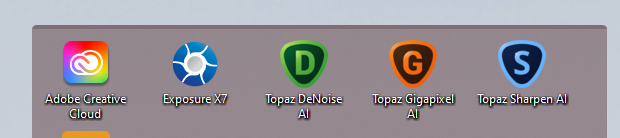
Windows 11 / Fences 4.003

 Stardock Forums
Hi everyone !
my title bar is very small. Does anyone have the same problem ?
Windows 11 / Fences 4.003
Hello,
Sorry to hear you are having issues. Does restore layout snapshot help?
Thanks
Basj,
Stardock Community Assistant.

Please try purge and reinstall steps as mentioned here: [link]. Just make sure to redownload the latest version from your account. Reboot after the purged. Reinstall, and Reboot again after the installation. Retest it. Report back here.
Thank you,
Basj,
Stardock Community Assistant
I used Purge_Fences, I reboot, I downloaded Fences from the website, I reboot. It's always the same, but I wonder if it is not the character font that has disappeared.
Please try the following:
-For Win8/10/11 Users: Open the Start Screen, and type 'cmd'. Right-click on the search result and select 'Run as administrator' from below.
-Type: sfc /scannow
-Wait for the scan to complete (this can take several minutes)
Some help on how this looks should you need it:
If the SFC finds errors, but cannot fix them, please also run the following command in the same command prompt window:
dism.exe /online /Cleanup-Image /RestoreHealth
Some help on how this looks should you need it:
https://www.windowscentral.com/how-use-dism-command-line-utility-repair-windows-10-image
The above command should assist with replacing any damaged or problematic system files. Please note, however, since it may require restoring certain files, this process can take some time and you will need to be patient until it has completed.
Please let me know whether this resolves your problem or if you have any additional questions.
Thank you,
Basj,
Stardock Community Assistant
no problem in windows. What font name in title bar does Fences use? (I installed SuiteCase, and by sample I had need to reinstall Segoe_fluent.ttf it had removed).
That might be it. Please reinstall all Windows 11 default fonts.
Thank you,
Basj,
Stardock Community Assistant
Also, you can try to apply different font by using this option.
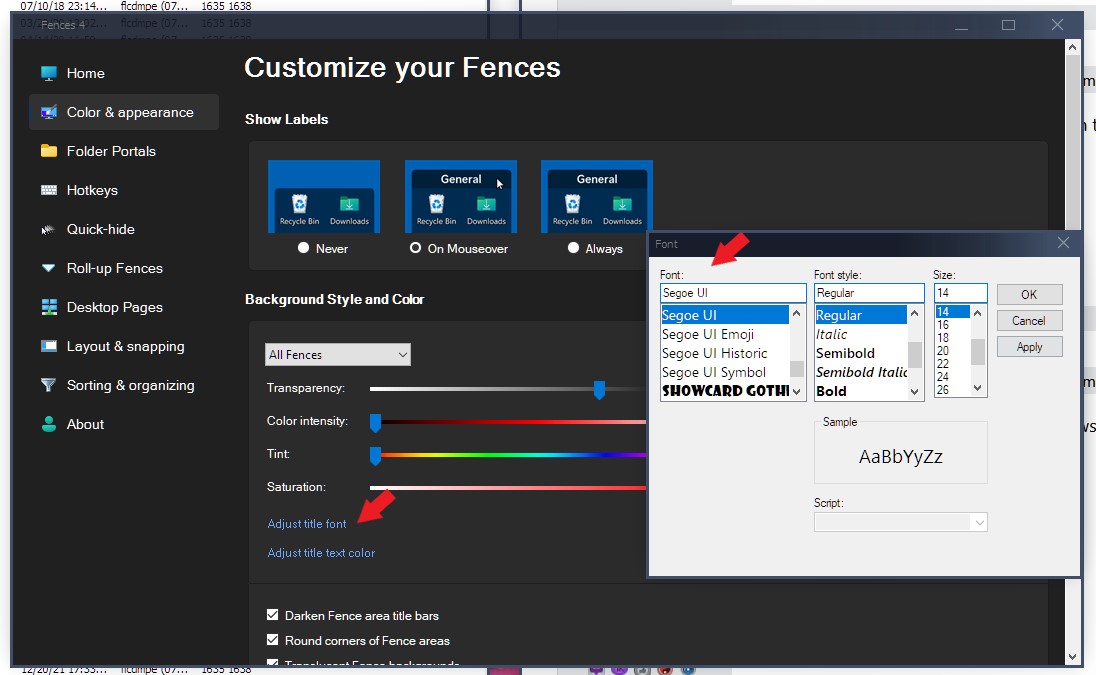
Thank you,
Basj,
Stardock Community Assistant
Which works? The reinstall Windows 11 fonts or changing the other font of choice?
Thank you,
Basj,
Stardock Community Assistant
Great, glad it get solved.
Thank you,
Basj,
Stardock Community Assistant
Welcome Guest! Please take the time to register with us.
Select a reason for giving karma:
You're about to visit an external site:
Sign up here to get the latest news, updates, and special offers delivered directly to your inbox.