
Fences 3 no more filtering

Hi there,

My fences 3 which I have paid for, stopped applying filtering rules and I cannot restore that feature. And not only that. I cannot add anymore filtering rules to custom files, when I click on the hyperlink "Chhose a Fence" in the filtering window, It doesn't give me the option for selecting the target fence while instead it gives me only either the option to delete the rule or a grayed out text (see attached images).
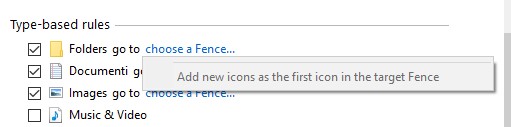



This is really frustrating.

Can Anyone help on this issue. Any feedback would be appreciated.

Thanks

5,677 views 5 replies
Reply #1 Top

Hello,
Sorry to hear you are having issues. Please try purge and reinstall steps as mentioned here: [link]. Just make sure to redownload the latest version from your account. Reboot after the purged. Reinstall, and Reboot again after the installation. Retest it. Report back here.

Thanks
Basj,
Stardock Community Assistant.

Reply #2 Top

Hi, and thanks for your support.

The purge solved the problem at first. But then when I created my 4th fence it stopped working again.

What I've noted is that putting a pipe character ("|") as a separator in the fence's name (for instance: ".Doc | .Xls | .Ppt"), that killed the option to assign a new fence to apply the rule to.

This bug can be reproduced. Removed the pipe, the rule could be assigned again, and so on.

Glad I somehow noted this and solved it. You should implement a workaround for this.

Thanks anyway for the support.

All the best.

Reply #3 Top

Hello,
I have forward your problem/question to Stardock Support Team for their assistance. Please keep an eye on this thread for any updates. We appreciate your feedback and patience.

Basj,
Stardock Community Assistant

Reply #4 Top

Hi,

thanks for forwarding the issue. Just to integrate on the above, also the special character "&" happens to make folder choosing unavailable.

Best, 

Reply #5 Top

Hello,

Sorry to hear you are having trouble.

Thank you for the report.  I have placed an internal ticket to have it looked at.

Internal ref: FEN-119

Sean Drohan
Stardock Support Manager