
fences locked at 2 columns?

I've been using Fences for years. All of a sudden today, my fences appears to be locked to 2 columns minimum. If I shrink the width to less than 2 columns, the icons on the right don't re-align to the single column (see image). If I expand it to 3 columns, the icons re-align properly, just not if I go to less than 2 columns. If I create a new fence, it behaves the same.

I was running Fences 3.13 and upgraded to Fences 4 beta 1 to see if it resolved the issue but it did not have any effect. Any ideas what to check to see why this fence and new fences are behaving this way? I can't find anything in the settings which would cause this.

FYI I upgraded to Windows 11 a couple weeks ago but the issue seems to have just started this morning.

14,695 views 23 replies
Reply #1 Top

Hello,

Sorry to hear you are having issues.

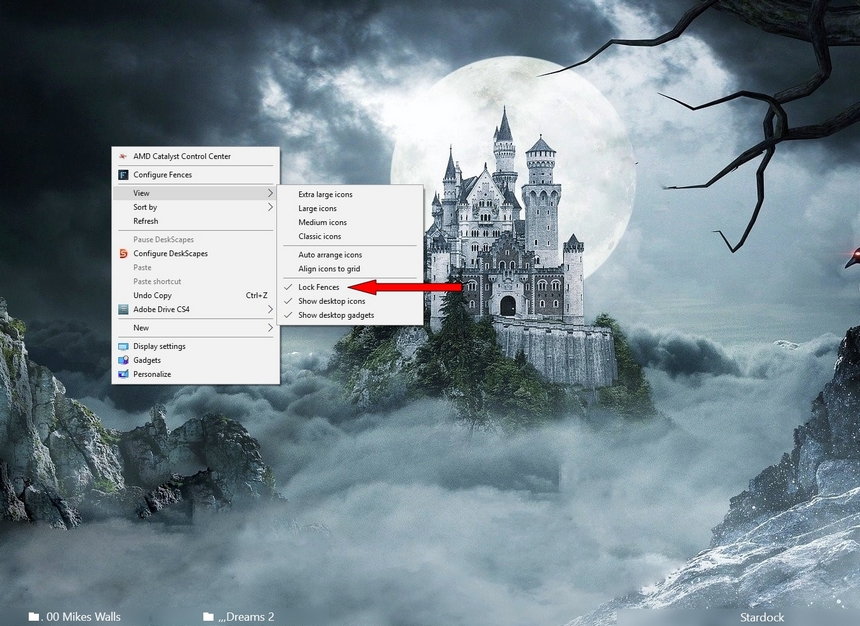
Double check your desktop go to View and scroll down and see

if Lock Fences is checked if so uncheck it see if that works .


AzDude
Stardock Community Assistant

Reply #3 Top

Did you try restoring a Snapshot when  it was right ?

Reply #4 Top

Restoring a snapshot in Fences 4 gave me an error so I just uninstalled it and went back to Fences 3. Restoring a snapshot from 2 days ago did not resolve the issue.

Reply #6 Top

It did not work. After running the bat file, rebooting, and reinstalling Fences 3, I created a new fence and put some icons in it and they did not re-align when shrinking the fence to 1 column.

Reply #7 Top

Hello,

I have forwarded your report to the Stardock support team for their review and recommendations.

Please keep an eye on this thread for any updates.

We really do appreciate your feedback, thanks.

Reply #8 Top

Hello,

Sorry to hear you are having trouble.

When any Fence has focus (clicked) and you use Ctrl + Middle mouse wheel up\down to resize the icons in it, does it affect what happens for your issue?

Sean Drohan
Stardock Support Manager

Reply #10 Top

Quoting Mezlo, reply 9

It resizes all icons on the desktop but did not resolve the issue.
End of Mezlo's quote

Are you still on Fences 4 (important that you are)?

Sean Drohan
Stardock Support Manager

Reply #12 Top

Quoting Mezlo, reply 11

No, I reinstalled 3.13 after running the purge.
End of Mezlo's quote

If possible, please reinstall Fences 4 as Fences 3 is unlikely to get any further updates.

Sean Drohan
Stardock Support Manager

Reply #14 Top

Hello,
Sorry to hear you are having issues. Would also like to know your Scaling factor/s for the monitor/s ie 100%,125%,150% etc.

Thanks
Basj,
Stardock Community Assistant.

Reply #15 Top

I have 3 monitors @ 1920x1080, 100% scaling, small icons. My video card is a NVIDIA GeForce GTX 1050 and I'm running studio driver 472.47.

I just discovered that if I set the icon size to medium or large, they re-arrange properly, but not if the icon size is small.

Reply #16 Top

Quoting Mezlo, reply 15

I have 3 monitors @ 1920x1080, 100% scaling, small icons. My video card is a NVIDIA GeForce GTX 1050 and I'm running studio driver 472.47.

I just discovered that if I set the icon size to medium or large, they re-arrange properly, but not if the icon size is small.
End of Mezlo's quote

On Windows 11, I could not reproduce what you are reporting on my 2 monitor system:

https://cdn.stardock.us/support/uploads/2021-11-19_11-15-20.mp4

If you unplug all but 1 monitor, does it still happen?

You did reboots after each install, yes?

What is the exact version of Win 11 (winver.exe) you are running?

Do you have 'auto-arrange icons' \ 'aligned to grid' on, and if not, does it change anything if enabled?

Sean Drohan
Stardock Support Manager

Reply #17 Top

I did reboot after each install. Windows version is 22000.318. Toggling 'auto-arrange icons' and 'align icons to grid' did not affect the issue.

Reply #18 Top

Quoting sdRohan, reply 16

If you unplug all but 1 monitor, does it still happen?
End of sdRohan's quote

That is also to say, unplug, not just turn off.

Sean Drohan
Stardock Support Manager

Reply #20 Top

Quoting Mezlo, reply 19

I unplugged all but one monitor but it did not make any difference. Attached is a video demonstrating the issue.
End of Mezlo's quote

We are at a loss, Mezlo...  If you change your DPI (text size), does it change it?

Sean Drohan
Stardock Support Manager

Reply #22 Top

Did you ever manually edit Windows with regards to icon spacing, Mezlo?

Sean Drohan
Stardock Support Manager

Reply #23 Top

Quoting sdRohan, reply 22

Did you ever manually edit Windows with regards to icon spacing, Mezlo?
End of sdRohan's quote

I don't recall ever doing that.

FYI I ended up putting my Windows 10 drive back in my system which doesn't have this issue.