Update to Fences 3.13 stops with errror message

several times the same problem occurs

Hello, when updating fences 3 to 3.13 I always get the error message:
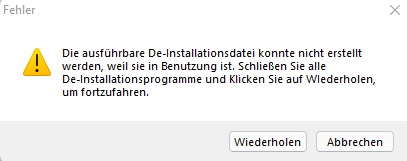
There is no second installation or de-installation running, so I need help to fix this problem.

Im am using Win11pro, 22000.282.

Thanks for any hinks, Arnd

7,754 views 9 replies
Reply #1 Top

Hello,
Sorry to hear you are having issues. Need to know if this issue happen when you download and install using Object Desktop or you download directly from your account : https://store.stardock.com/myaccount/products ?

Thanks
Basj,
Stardock Community Assistant.

Reply #3 Top

Please try purge and reinstall steps as mentioned here: [link]. Just make sure to redownload the latest version from your account. Reboot after the purged. Reinstall, and Reboot again after the installation. Retest it. Report back here.

Thank you,

Basj,
Stardock Community Assistant

Reply #4 Top

Hello Basj,

sorry, there was no change with reinstall and install & update to 3.13. Here is the content of troubleshooting.log from today:


---------------------------------------------------------
----------Stardock Fences Debug Information Log----------
---------------------------------------------------------
Please submit this file to [email protected], along
with a description of the problem you experienced. Please
put 'Fences Debug Info' as the subject of this email.
---------------------------------------------------------
       Thank you for your help improving Fences!
---------------------------------------------------------
OS Info:    Microsoft Windows NT 10.0.22000.0 64bit
Timestamp:    02.12.2021 15:32:26
Fences Ver:    3.0.9.11
DDock Info:    1801144 - 25.05.2018 22:46:42
DDock64 Info:    3324856 - 25.05.2018 22:46:42
FenceUI Info:    4854200 - 25.05.2018 22:46:42
Addl Info:    None
---------------------------------------------------------


*********************************************************
012E6516X - UI-Language: de-DE
012E6554X - FencesUI Start - /verifyintegrety
          - Fences Version: 3.0.9.11
          - 02.12.2021 15:32:15
012E6564X - UI-Language: de-DE
012E65B2X - FencesUI Start - /saswelcome
012E6804X - UI-Language: de-DE
012E6842X - FencesUI Start - /updateconfig
012E68BFX - FencesUI End   - /verifyintegrety
012E692CX - UI-Language: de-DE
012E696BX - FencesUI Start - /fixpermissions
012E6A36X - UI-Language: de-DE
012E6A65X - UI-Language: de-DE
012E6AC3X - FencesUI Start - /changedresolutions
012E6B6FX - FencesUI End   - /changedresolutions
012E6BADX - UI-Language: de-DE
012E6BFBX - FencesUI Start - /takeinitalsnapshot
012E6BFBX - FencesUI End   - /takeinitalsnapshot
012E6C69X - FencesUI End   - /fixpermissions
012E6EABX - FencesUI End   - /updateconfig
012E6F37X - UI-Language: de-DE
012E6FB4X - FencesUI Start - /initalsetup
012E8C35X - FencesUI End   - /saswelcome
012EAEF0X - FencesUI End   - /initalsetup
0000B1BCX - UI-Language: de-DE
0000B304X - UI-Language: de-DE
0000B342X - FencesUI Start - /verifyintegrety
          - Fences Version: 3.0.9.11
          - 02.12.2021 15:34:28
0000B352X - UI-Language: de-DE
0000B390X - FencesUI Start - /saswelcome
0000B49AX - UI-Language: de-DE
0000B4D8X - FencesUI Start - /fixpermissions
0000B565X - FencesUI End   - /fixpermissions
0000B5E2X - FencesUI End   - /verifyintegrety
0000B68EX - UI-Language: de-DE
0000B769X - UI-Language: de-DE
0000B798X - FencesUI Start - /initalsetup
0000DE3AX - FencesUI End   - /saswelcome
00028831X - UI-Language: de-DE
00037291X - UI-Language: de-DE
000372C0X - FencesUI Start - /pulse
00037744X - FencesUI End   - /pulse
00050249X - FencesUI End   - /initalsetup
000502D6X - UI-Language: de-DE
00050305X - FencesUI Start - /fromwelcome
000F79BBX - FencesUI End   - /fromwelcome


Best regards, Arnd

Reply #5 Top

I am sorry, did you run the purge part? It is not the same as uninstall and reinstall.

Thank you,

Basj,
Stardock Community Assistant

Reply #7 Top

Hello,

I have forwarded your report to the Stardock support team for their review and recommendations.

Please keep an eye on this thread for any updates.

We really do appreciate your feedback, thanks.

Reply #8 Top

Hello,

Sorry to hear you are having trouble.

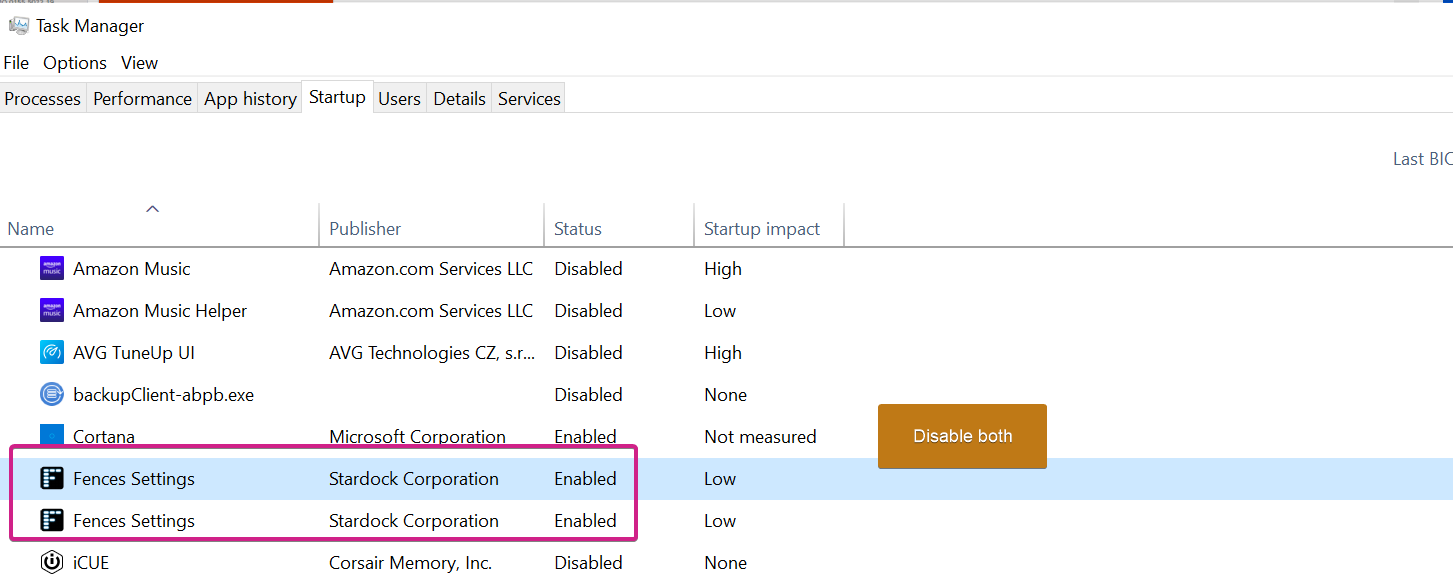
Disable Fences from your startup:

Reboot.

Try to install again.

Sean Drohan
Stardock Support Manager

Reply #9 Top

Hello Sean, thanks for your advice. Now it worked - disabled in Start Menu, purged the old installation and reinstalled a former version (9.5.) After this the update to 3.13 worked fine.

So the problem is solved.

Best regards, Arnd