
Lost Fence Group, Shows up on Win10 Boot Up for Second..

So a few weeks back I made a new fence group and then an hour later noticed it was missing. I assumed I accidentally deleted it or didn't lock it. When I went to make new desktop icons for the group I noticed (2) next to each icon title. Therefore realized it is still being recognized in the system but is not displaying. I unlocked the existing fences and moved them to see if it was beyond an existing one. No luck. Yet when I reboot it will show the fence for maybe 10-15 seconds then it disappears. Anyone seen this before? On version 3.1.3.3 Daily backup doesn't help me as this was weeks ago I created it and been putting it off until now as I been busy.  Appreciate any help. 
6,065 views 5 replies
Reply #1 Top

Hello,
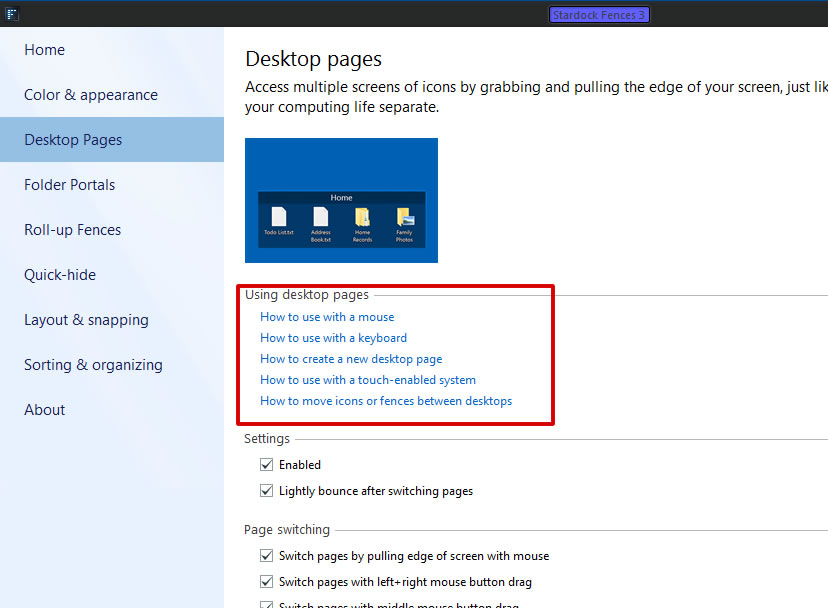
Sorry to hear you are having issues. It might only be that your missing Fence was moved accidentally to another Fences Desktop page. You can learn to navigate Fences Desktop pages or you can also totally disable it and see if that missing Fence move back to your main Desktop page. Please refer to screenshot below for Fences desktop pages. To disable Desktop pages you just need to "un-tick" the Enable box.

Thanks
Basj,
Stardock Community Assistant.

Reply #3 Top

Awesome, you found it. Actually, Fences desktop page is really a great tool. I have 2 pages.. where all my media and Game fences goes there and another page for all my work Fences in there.

Thank you,

Basj,
Stardock Community Assistant

Reply #4 Top

Hi, I too have this problem. My "Enable" option, from the screenshot above, is/was already unchecked.

I have three monitors, all the same resolution, same brand, same model. I am using six Fences on each monitor (three top, three bottom). I have been using this configuration without an issue for some time, until last week.

When I start my computer, one Fences (right monitor, top left Fence) shows up for a brief second but disappears completely from view and is inaccessible. It's not hidden, moved, rolled up, overlapped, etc. It's just not there. I have tried restoring a correct snapshot, and again, it shows up for a brief instant then disappears.

However, I have a discovered a workaround to bring it back, which is to "sign out" of Windows 10 (not restart) and then sign back in. My missing Fence reappears and will stay on my desktop... until I leave my computer and the monitors shut down (black screen). When I return to my pc and move my mouse, my monitors come back on and all my Fences return EXCEPT this one I have a problem with. Once again, I have to sign out of Windows 10 and sign in back to restore my errant Fence.

Is there something I am doing wrong here? Do I need to redo all my Fences from scratch? Uninstall and reinstall? Is there another fix to this, other than signing out and in again (which is inconvenient)? I have not experienced this problem until last week.

I am using Fences 3.1.3.3. Thanks so much for your help!

Reply #5 Top

Quoting koala1356, reply 4

Hi, I too have this problem. My "Enable" option, from the screenshot above, is/was already unchecked.

I have three monitors, all the same resolution, same brand, same model. I am using six Fences on each monitor (three top, three bottom). I have been using this configuration without an issue for some time, until last week.

When I start my computer, one Fences (right monitor, top left Fence) shows up for a brief second but disappears completely from view and is inaccessible. It's not hidden, moved, rolled up, overlapped, etc. It's just not there. I have tried restoring a correct snapshot, and again, it shows up for a brief instant then disappears.

However, I have a discovered a workaround to bring it back, which is to "sign out" of Windows 10 (not restart) and then sign back in. My missing Fence reappears and will stay on my desktop... until I leave my computer and the monitors shut down (black screen). When I return to my pc and move my mouse, my monitors come back on and all my Fences return EXCEPT this one I have a problem with. Once again, I have to sign out of Windows 10 and sign in back to restore my errant Fence.

Is there something I am doing wrong here? Do I need to redo all my Fences from scratch? Uninstall and reinstall? Is there another fix to this, other than signing out and in again (which is inconvenient)? I have not experienced this problem until last week.

I am using Fences 3.1.3.3. Thanks so much for your help!
End of koala1356's quote

I don't think your issue is same with the OP issue. It is best if you post your issue in a new thread so we can help you from there.

Thank you,

Basj,
Stardock Community Assistant