
Fence not working after update new version

I had troubles with Fences after updating to 0.96[b].016 this morning and I have tried a few things but it doesn't seem like the problem is fixed? When I right click-drag, there's no selection rectangle on my desktop until releasing the mouse button--normally you can draw freehand too! Then when trying to double-click onto an empty space of my desktop that has fences created from before, nothing happens either. It seems as if Fences isn't running though because normally all these options are available in contextual menus for shortcuts (Exclude form quick hide...) or through opening up the control panel via shortcut at least...

I'm sorry to hear that I've been unsuccessful in resolving your issue. What you should do is uninstall and reinstall the application, as well as reboot your computer a few times before contacting me back with an update on how things are going for you since then.

I understand it can be frustrating when we're unable to fix something ourselves; however, please keep trying until there's no other option left available so that at least one of us has tried their best!

Thanks in advance.

Peteewilkinson
7,690 views 8 replies
Reply #1 Top


I had troubles with Fences after updating to 0.96[b].016
End of quote

Hello,
Sorry to hear you are having issues. But, not really sure about those numbers. The latest version now is 3.13 (3.1.3.3). Please re-download from your account and try install again. https://store.stardock.com/myaccount/products

Thanks.
Basj,
Stardock Community Assistant.

Reply #2 Top

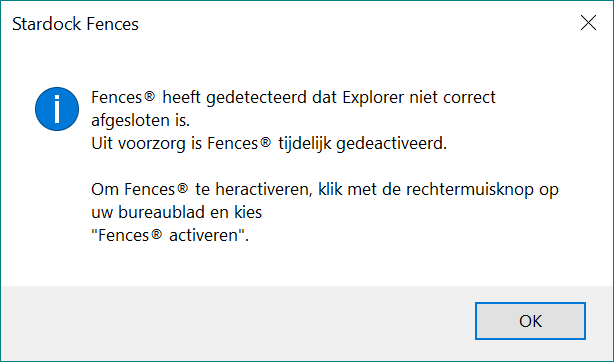
I am on the newest version (3.1.3.3) and also having trouble using fences:

Already restarted pc but that does not help. I keep getting the above dialogbox

Reply #3 Top

Quoting info136, reply 2

I am on the newest version (3.1.3.3) and also having trouble using fences:
End of info136's quote

Hello,
Please try purge and reinstall steps as mentioned here: https://forums.stardock.com/486084/fences-support-faq#reinstalling. Just make sure to re-download the latest version from your account. Reboot after the purged. Reinstall, and Reboot again after the installation. Retest it. Report back here.

Reply #5 Top

Quoting info136, reply 4

The hyperlink to the bat-file does not work. Can you copy-paste the code here?
End of info136's quote

It working for me. Please try different browser or different system.

Thank you,

Basj,
Stardock Community Assistant

Reply #6 Top

Tried Chrome, Firefox and Edge on two machines, just cannot download the bat-file


Reply #8 Top

Quoting 06scooter60, reply 7

My fences quick find no longer works with version 4... VERY sad!
End of 06scooter60's quote

Hello,
Sorry to hear you are having issues. Please elaborate, what don't work and you're on Windows 10/11? More details please.

Thanks
Basj,
Stardock Community Assistant.