Overlapping icons and other problems with scaled high-res display

Fences does not handle scaled high-res displays correctly - several issues

Fences 3.0.9.11 on Windows 10 Home 21H1

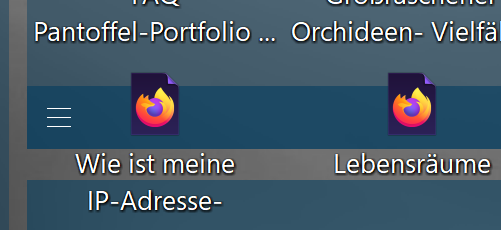
My Laptop (Asus with Core i7-1165G7, integrated graphics) his as 13.7" Display with a 3300x2200px resolution. To be able to read the text correctly, the display needs to be scaled to 225 or 250%. With this scaling set, Fences ha several issues:

1. Icons overlap with the "tile bar":

2. Fences which are hidden (only Title bar shown) still show the icons on the desktop. Some icons are even above the title
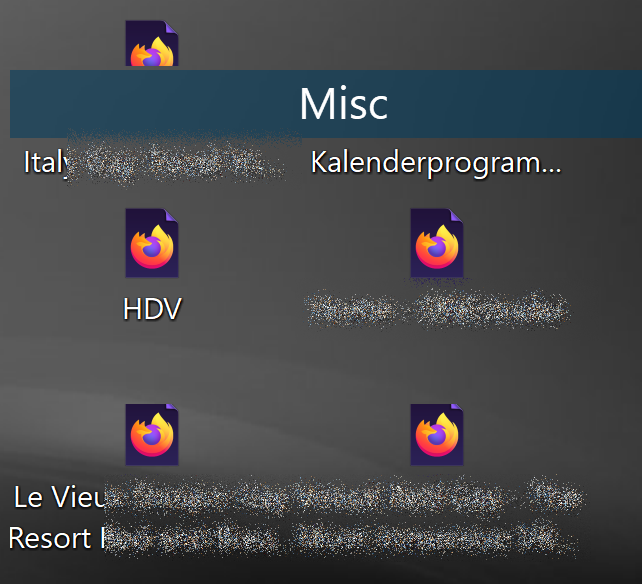
This does not happen with all fences - just some.

If I set the scaling to 200% all works fine!

Any idea how to solve this?

7,093 views 7 replies
Reply #1 Top

Hello,
Sorry to hear you are having issues. Have you tried the latest version Fences V3.12 Beta?

Thanks
Basj,
Stardock Community Assistant.

Reply #2 Top

No - I have not. How do I get this version?

Reply #3 Top

There are instructions on how to get the Fences V3.12 Beta in the initial post of this thread.

https://forums.stardock.com/506115

Thank you,

Basj,
Stardock Community Assistant

Reply #4 Top

Hi - I downloaded the beta. It's a little better, but nor solved:

Reply #5 Top

Quoting rhonsberg, reply 4

Hi - I downloaded the beta. It's a little better, but nor solved:


End of rhonsberg's quote

This screenshot is on how many percent scaling? And what is the size of the icons? What happen if you set the icon size to "Classic Icons"?

Thank you,

Basj,
Stardock Community Assistant

Reply #6 Top

Hi. Tried classic icons and all other sizes: same problem. Scaling is 225% , same problem with recommended 250%. 200% works - but fonts are too small to read on the high-dpi display.