Cant enter product key

button does not work

When I try to activate on what should be my primary computer all I can do is use as secondary. The enter product key does not work. I have uninstalled reinstalled no resolution. I even completely reinstalled my os from scratch and still cant click on product key. Can't use trial either. The only button that works is purchase now. 


Windows 10

4,301 views 5 replies
Reply #1 Top

Hello,

Sorry to hear you are having issues.

see if this link works for you https://forums.stardock.com/486311/accounts-and-activation-support-faq#activateproduct

remember to activate use the email you bought the product with

if PayPal use that email.


AzDude
Stardock Community Assistant

Reply #2 Top

Give me a break. Did you even read what my issue was? Where in that link does it at all discuss the fact that the ENTER PRODUCT KEY BUTTON DOES NOT WORK! Cant activate if you can't press the button!

Reply #3 Top

this type and quality of support is why I wanted a refund. Did not even read my issue just gave a canned reply. 

Reply #4 Top

Hello,

I have forwarded your report to the Stardock support team for their review and recommendations.

Please keep an eye on this thread for any updates.

We really do appreciate your feedback, thanks.

Reply #5 Top

Quoting cdndenver, reply 2

Give me a break. Did you even read what my issue was? Where in that link does it at all discuss the fact that the ENTER PRODUCT KEY BUTTON DOES NOT WORK! Cant activate if you can't press the button!
End of cdndenver's quote

Quoting cdndenver, reply 3

this type and quality of support is why I wanted a refund. Did not even read my issue just gave a canned reply. 
End of cdndenver's quote

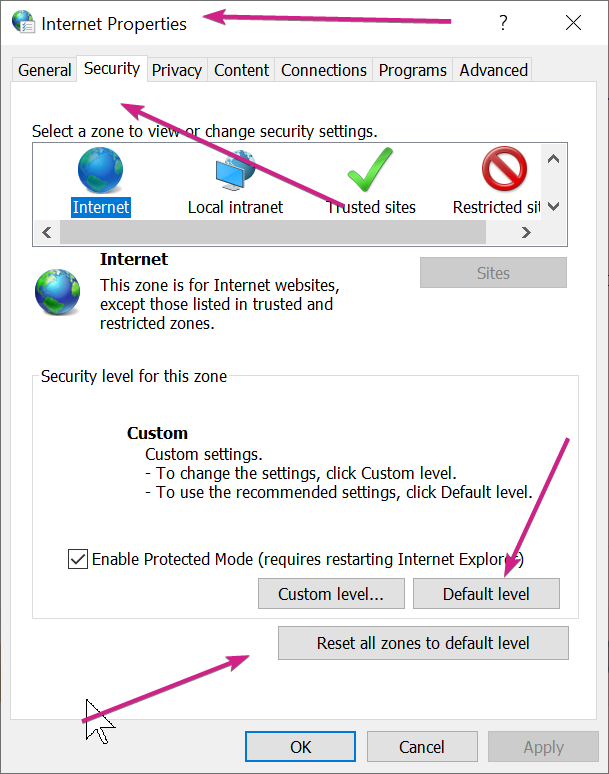
AzDude was on the right track (and that needs to be appreciated, sdndenver) but this would be more appropriate for the restriction you have on your PC that is not allowing the button to be used (yes, its because of a setting you have on your PC).

There are two ways to fix it.

1) Stop the restriction:

2) Activate via command line:
https://forums.stardock.com/486311/accounts-and-activation-support-faq#activatecommandprompt

Sean Drohan
Stardock Support Manager