
Start10 crashes Windows 10 File Explorer


My environment is:

  • Start10 1.96
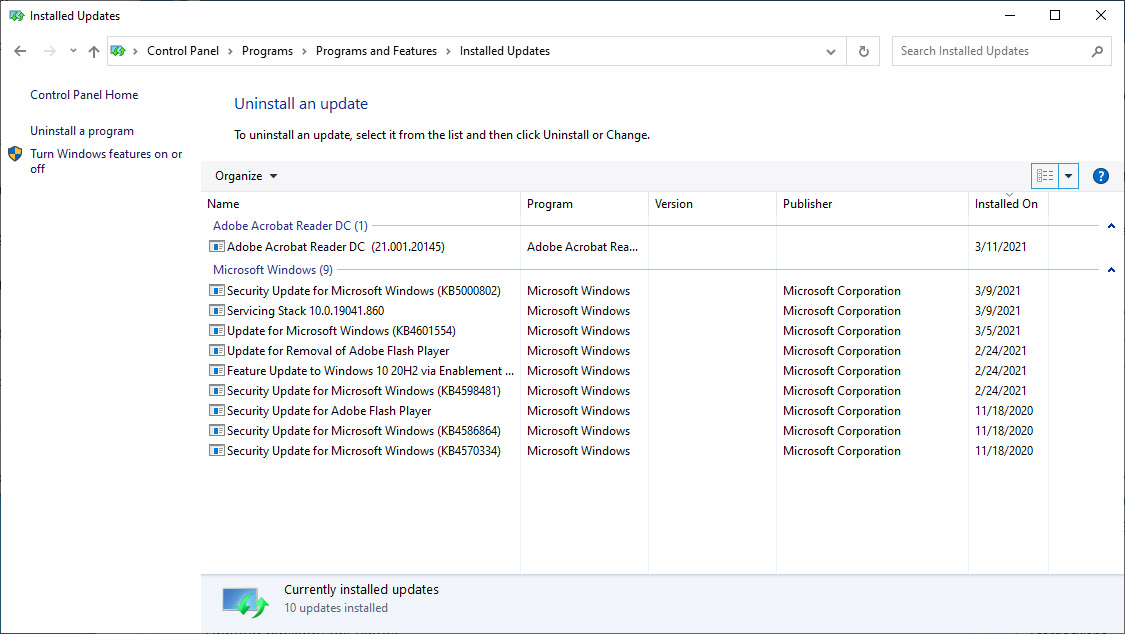
  • Windows 10 20H2 (OS Build 19042.867) with updates in image at bottom of post

After the system has been up for some time, many operations in Start10 cause Windows Explorer to crash and restart. These include seemingly any item in the Universal Applications menu, but also some shortcuts on the right hand side of the menu, e.g. Documents. (The actual operation I'm attempting also fails, i.e., in lieu of the app I've chosen in the menu starting up, Explorer crashes.) Left-side menu options don't seem to cause a problem; likewise I can access "Windows 10 Menu" and start any apps I was trying to access in Universal Applications.

Rebooting Windows cures the problem for awhile, but it comes back; the same with uninstalling and reinstalling Start10. When the problem next comes back I'll try and determine more exactly which actions in Start10 trigger the problem.

Here's an error log from Event Viewer. It always fails with the same offset and exception code.

Faulting application name: explorer.exe, version: 10.0.19041.844, time stamp: 0x5d74feca
Faulting module name: ntdll.dll, version: 10.0.19041.844, time stamp: 0x60a6ca36
Exception code: 0xc0000409
Fault offset: 0x000000000008c57f
Faulting process id: 0x25c0
Faulting application start time: 0x01d7191639ca86ed
Faulting application path: C:\Windows\explorer.exe
Faulting module path: C:\Windows\SYSTEM32\ntdll.dll
Report Id: 035fd0f3-9264-4a22-bb79-df2aae7f0f98
Faulting package full name:
Faulting package-relative application ID:
3,958 views 9 replies
Reply #1 Top

Hello,
Sorry to hear you are having issues. Please try purge and reinstall steps as mentioned here: https://forums.stardock.com/486022/start10-support-faq#reinstalling. Just make sure to re-download the latest version from your account. Reboot after the purged. Reinstall, and Reboot again after the installation. Retest it. Report back here.

Thank you,

Basj,
Stardock Community Assistant

Reply #2 Top

Basj,

Thanks for the reply! I've followed the purge and reinstall instructions. I've left all the settings as default, and waiting to see what happens next.

Dave

Reply #3 Top

OK, problem has returned. First occurence (that I noticed anyhow) was when I tried to visit Documents. Now the Documents link works OK, but all the links I've tried in Universal Applications cause a crash, and even some of the left-hand links (frequently used applications) do too. I imagine there's some setting on my end (not in Start10) that Start10 isn't anticipating?

Reply #4 Top

Need to know, what crash, Windows crash? Explorer crash or the application you tried open from Start10 crash?

Thank you,

Basj,
Stardock Community Assistant

Reply #5 Top

Sorry -- Explorer crashes, same offset and exception code.

Reply #7 Top

Well, the problem did not show up on the new admin account... indicating that it's something in my personal setup. (It's also vanished from my personal setup for the time being as well; it's being intermittent.) I have NOT yet done the cleanboot, since the problem didn't follow me to the new account. I do have a lot of software installed in my personal setup, and many apps do things like install context menus in Explorer. I'm waiting to see what happens next and will follow any advice you have. Thanks for your help!

Reply #8 Top

Hi... after having some other issues (a couple of system hangs) I think the problem is something other than Start10. I've reinstalled Windows and of course the problem is gone. Thanks again for your help!

Reply #9 Top

Great, glad it get resolved.

Thank you,

Basj,
Stardock Community Assistant