
3.55 version no longer has KVM Sidebar?

KVM sidebar option missing.

Windows  Home

20H2

19042.746


Multiplicity

3.55 Build 00101.kvmpro


KVM no longer has option for sidebar?  It still has the "or" option, but nothing is shown.  In addition, computers are no longer shown in the list that typically appears at the bottom of the page.  However, if I use the shortcut (Ctrl + Shift + Left), computers are shown as before and I am able to view/connect.  Restarting Multiplicity did not solve the problem.  Thanks for any help.  
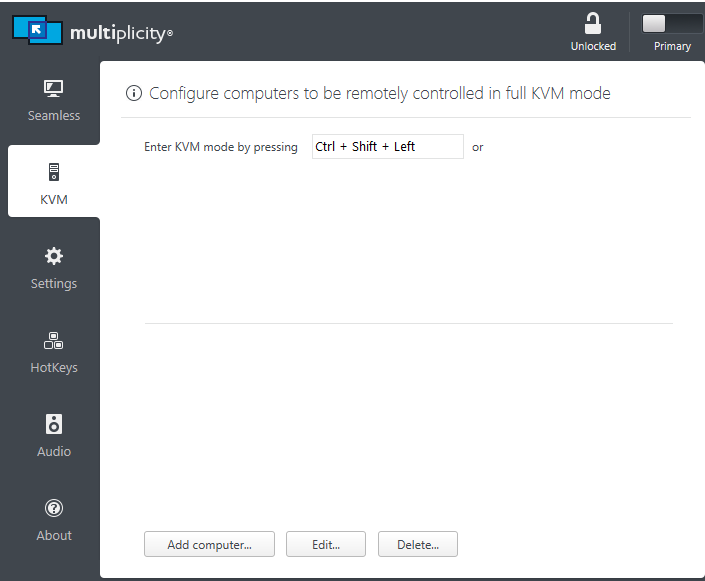
 

KVM sidebar option not shown.

5,803 views 7 replies
Reply #1 Top

Update:  If I use the shortcut to open the KVM Window (the one w/ Quick Connect at the bottom) then open the settings, the options appear as before (sidebar option and list of computers).  Still not so when opening from the system tray.  

Reply #2 Top

Hello,
I have forward your problem/question to Stardock Support Team for their assistance. Please keep an eye on this thread for any updates. We appreciate your feedback and patience.

Basj,
Stardock Community Assistant

Reply #3 Top

Hello,

Sorry to hear you are having trouble.

KVM no longer has option for sidebar?  It still has the "or" option, but nothing is shown.  In addition, computers are no longer shown in the list that typically appears at the bottom of the page.  However, if I use the shortcut (Ctrl + Shift + Left), computers are shown as before and I am able to view/connect.  Restarting Multiplicity did not solve the problem.  Thanks for any help.  
End of quote

They are there still, its just your MP ui is messed up.  If you scale down your DPI, can you see it then?

Sean Drohan
Stardock Support Manager

Reply #5 Top

Got an alert when you posted @frivolous13 and thought I would follow-up.  My dpi was set correctly and it still did not resolve the problem.  However, re-installing and then re-booting seemed to fix the issue.  Hope that's helpful.  

Reply #7 Top

Hello,

Sorry to hear you are having trouble.

This:

https://forums.stardock.com/486104/multiplicity-support-faq#reinstalling

Then this:

https://forums.stardock.com/503946/page/1/#3800716

On each PC.

Sean Drohan
Stardock Support Manager