
WindowBlinds breaks Windows Explorer for some reason

WindowBlinds breaks Explorer

Yes, this actually happened. I was installing WindowBlinds and then when I applied the "Presicion" theme, the taskbar started to have random light blue spots on some buttons on the taskbar. And shortly after that, explorer restarted itself. So I decided to restart my PC, and is still happens! Then I restarted explorer again. I still encountered the same problems! I tried to right-click the taskbar to change some taskbar settings that probably might work, the right-click menu showed this:
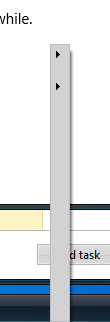
Broken taskbar right-click menuAnd yeah, I was pretty surprised when I saw that. And also, the taskbar now looks like this:

Yes, this a real screenshot. And here's a note: I applied a crack to WindowBlinds

And if anyone knows how to fix this, please reply to this post.

3,964 views 2 replies
Reply #1 Top

Hello,
Sorry to hear you are having issues. Need to know more on your issue.

  1. Windows version, please use Winver.exe to get full version numbers.
  2. Windowblinds version.
  3. And here's a note: I applied a crack to WindowBlinds
    End of quote
    What do you mean by this?

Thanks
Basj,
Stardock Community Assistant.

Reply #2 Top


Yes, this actually happened. I was installing WindowBlinds and then when I applied the "Presicion" theme, the taskbar started to have random light blue spots on some buttons on the taskbar. And shortly after that, explorer restarted itself. So I decided to restart my PC, and is still happens! Then I restarted explorer again. I still encountered the same problems! I tried to right-click the taskbar to change some taskbar settings that probably might work, the right-click menu showed this:

Broken taskbar right-click menuAnd yeah, I was pretty surprised when I saw that. And also, the taskbar now looks like this:

Reduced 43%
Original 1919 x 25

Yes, this a real screenshot. And here's a note: I applied a crack to WindowBlinds

And if anyone knows how to fix this, please reply to this post.

End of quote

Just so we are clear here, you are using a cracked copy of WindowBlinds and are reporting a bug?

A bug which is probably because you are using a cracked version of WindowBlinds.