Hi,
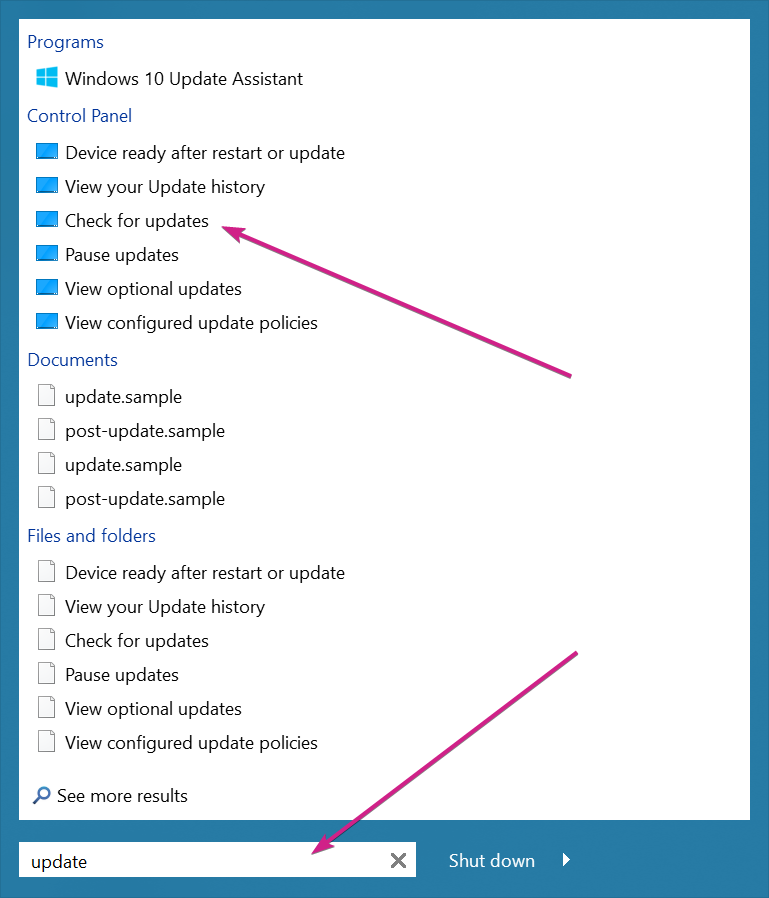
If I type "update" then yes "check for update" does actually come up in the results. I won't include a screenshot, my search results are similar to yours.
I guess I was expecting a similar search result to the Windows 10 built in, where I only have to type "up" and "Check for updates" is the first result. I could just hit the Windows key, type "up" and hit enter. With Start10 I have to spell out more of the word and then it's not even the first result.
I still can't get "add or remove programs" to come up in results, nor "mobile hotspot", no matter what I type in.
So I guess there are 2 issues:
1. It would be nice if the search was a little more intelligent with its matching and sorting. I guess the built in Windows 10 search ranks results higher if you click on it more often? I really like the menu style and customization options with Start10, but I feel like the Windows 10 search gives me the results I want better. It would be nice to get the best of both worlds, if possible.
2. Start10 seems to be missing some search results that come from Windows Settings (press Windows key + I). In addition to "add or remove programs" and "mobile hotspot", another example is "find my device". Also, if I search for "fonts", Start10 will show the old fashioned fonts list from Control Panel, while Windows 10 now has a newer fonts window.
My Windows version is 20H2, build 19042.746
Cheers


 Stardock Forums