
( Solved ) Can't Access Windows Administrative Tools from Start10 v 1.95 Side Bar.

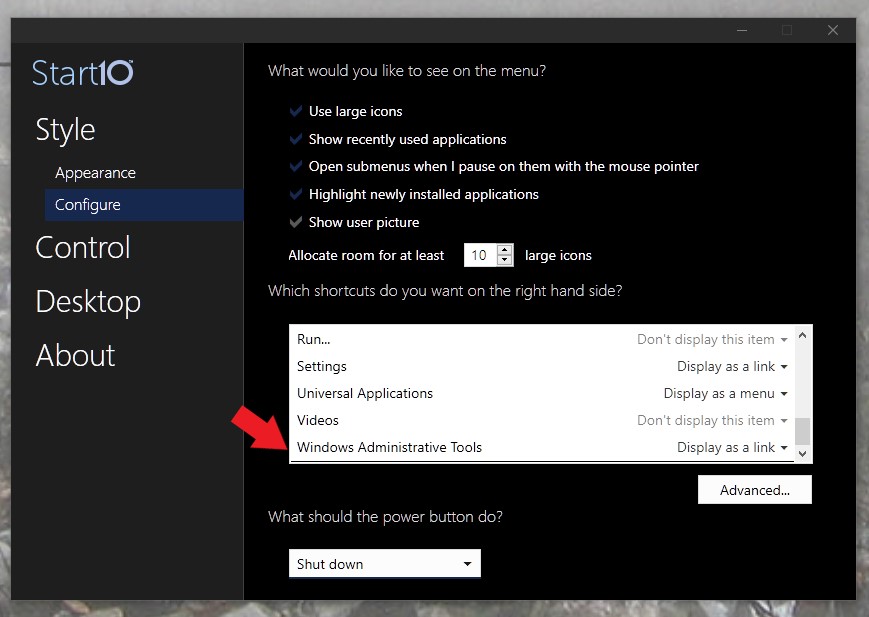
Start Configuration Settings

Can't Access Windows Administrative Tools from Start10 v 1.95 Side Bar. Link to "Windows Administrative Tools" being requested is C:\ProgramData\Microsoft\Windows\Start Menu\Programs\Administrative Tools. This doesn't exist. Windows Administrative Tools is located at C:\ProgramData\Microsoft\Windows\Start Menu\Programs\Windows Administrative Tools and in the Control Panel\"Administrative Tools". How can this be fixed?
2,965 views 9 replies
Reply #1 Top

Hello,
Sorry to hear you are having issues. Need to know more on your issue.

  1. Windows version, please use Winver.exe for full version numbers.
  2. How do you create that link into Start10? Its on left panel or on the right panel?
  3. Did you use this option?

Thanks
Basj,
Stardock Community Assistant.

Reply #2 Top

Windows 10 Pro, Version 20H2, OS Build 19042.685

Link was on right Panel. 

I tried both Options Link and Menu.  Link option Idenitified Location that could not the accessed [C:\ProgramData\Microsoft\Windows\Start Menu\Programs\Administrative Tools] and Menu option produces No Response. The Start Menu Panel, the Program shortcut for Windows Administrative Tools produces a List [i.e., a menu].

On my other PC, the link ID is to [...\Control Panel/Administrative Tools]. The other PC has the exact same OS. Both have Start10 v1.95.

Reply #3 Top

Please do the purge and reinstall Start10, as mentioned here https://forums.stardock.com/486022/start10-support-faq#reinstalling . Just make sure to reboot after the purge, re-download your Start10, reinstall that, and reboot again. Retest and report back.

Thank you,

Basj,
Stardock Community Assistant

Reply #5 Top

I've just tested that it link at it working for me. Might be your AV/Security software is blocking bat files. Please try to disable it or try download from different system.

Thank you,

Basj,
Stardock Community Assistant

Reply #6 Top

I tried it both on Edge and Chrome Browsers. Error Is "This site can’t be reached". Firewall is not blocking.  I still can't get  to The Bat file.

Reply #7 Top

Google says "It means that the website prevented Google from creating a page description, but didn't actually hide the page from Google".

Reply #9 Top

I downloaded the Bat File and opened it with Notepad.  The Commands didn't make any sense to me.

So, I tried using Command Prompt in Admin Mode, with the sfc /scannow command.  It found errors and corrected them.  When I Checked the "C:\ProgramData\Microsoft\Windows\Start Menu\Programs" folder an Administrative Tools Folder had been added. I tried the Start10 Right Pane "Windows Administrative Tools" choice and lo and behold it now works. I deleted the old Windows Administrative Tools folder and the Start10 Windows Administrative Tools choice still works. O:)  

Issue now Solved