

Cant´t re-activate Multiplicity

Re-activate Multiplicity Issue

I cant re-activate Multiplicity on Steam after reinstall Windows.


Im getting this error:

"Multiplicity could not be activated due to an existing activation on another computer"

5,394 views 9 replies
Reply #1 Top

Hello,

Sorry to hear you are having issues.

LINK https://forums.stardock.com/486311/accounts-and-activation-support-faq#steamkey

Link https://forums.stardock.com/486311/Accounts-and-Activation-Support-FAQ#deactivateproduct

see if these links help 


AzDude
Stardock Community Assistant

Reply #3 Top

Hello,

Sorry to hear you are having trouble.


I cant re-activate Multiplicity on Steam after reinstall Windows.

Im getting this error:

"Multiplicity could not be activated due to an existing activation on another computer"
End of quote

And you did a new download \ install of Multiplicity in Steam, yes.. it was not from a backup or anything, correct?

If its a new download (needs to be), what is the full version \ build number on the 'About' tab on the Multiplicity config you are trying to make a Primary?

Was any other PC you were using a Primary while you were waiting to format \ work on this PC?

Sean Drohan
Stardock Support Manager

Reply #4 Top

Hi sdRohan,

yes, I did a new download / reinstall of Multiplicity in Steam on my new PC. 

The version is "3.5" and the build number is "00096.stm". I also tried to download Multiplicity directly from Stardock. But this didn“t work either.

I installed Multiplicity on my old pc and the program worked perfectly there. Before I reset it, Multiplicity was set to Primary.

Reply #5 Top

Quoting Inf8th8253, reply 4

I also tried to download Multiplicity directly from Stardock.
End of Inf8th8253's quote

You don't want to do that...

Please uninstall all the MP installations you have.  Reboot and reinstall from Steam.  If you get an activation prompt, post and image of it please.

Sean Drohan
Stardock Support Manager

Reply #6 Top

Unfortunately, uninstalling and rebooting did not work either.

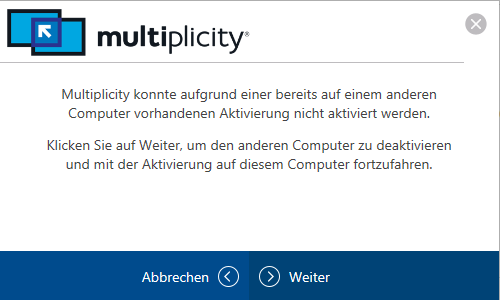
The activation prompt is in German:

Translation: 

Multiplicity could not be activated due to an existing activation on another computer.


Click Next to deactivate the other computer and continue activating on this computer.

-> When I click the Next button, nothing happens.

Reply #7 Top

Quoting Inf8th8253, reply 6

-> When I click the Next button, nothing happens.
End of Inf8th8253's quote

When you click it does the prompt go away or it stays there?

Along with that, find me your actual SteamID. Private Message it to me, you will see that option by clicking my username.  You can get your SteamID here:

https://steamidfinder.com/

Sean Drohan
Stardock Support Manager


Reply #9 Top

Quoting Inf8th8253, reply 8

The activation prompt stays there.

I sent you a private message.
End of Inf8th8253's quote

It was reset and you seem to be working now.

Thank you for your patience.

Sean Drohan
Stardock Support Manager