How to change the color of "windows tab"

Hello

I'm a French user, sorry for my English. 

I have looking for this for days and no way to find... I would like to change the background of "usual windows tab" I don't know exactly how it can be named.

For instance, when you right click on a folder / properties --> it opens a windows with several tabs. And these tabs remains white, no way to change it even changing everything in the "change system colors" options in windowBlinds. The general windows color (usually white) don't change anything either. 

It's a big problem for me because I made a dark skin so the window text must be bright... but a bright text isn't readable on such white tabs.

Any idea ?


thank you very much 

3,767 views 6 replies
Reply #1 Top

Hello,
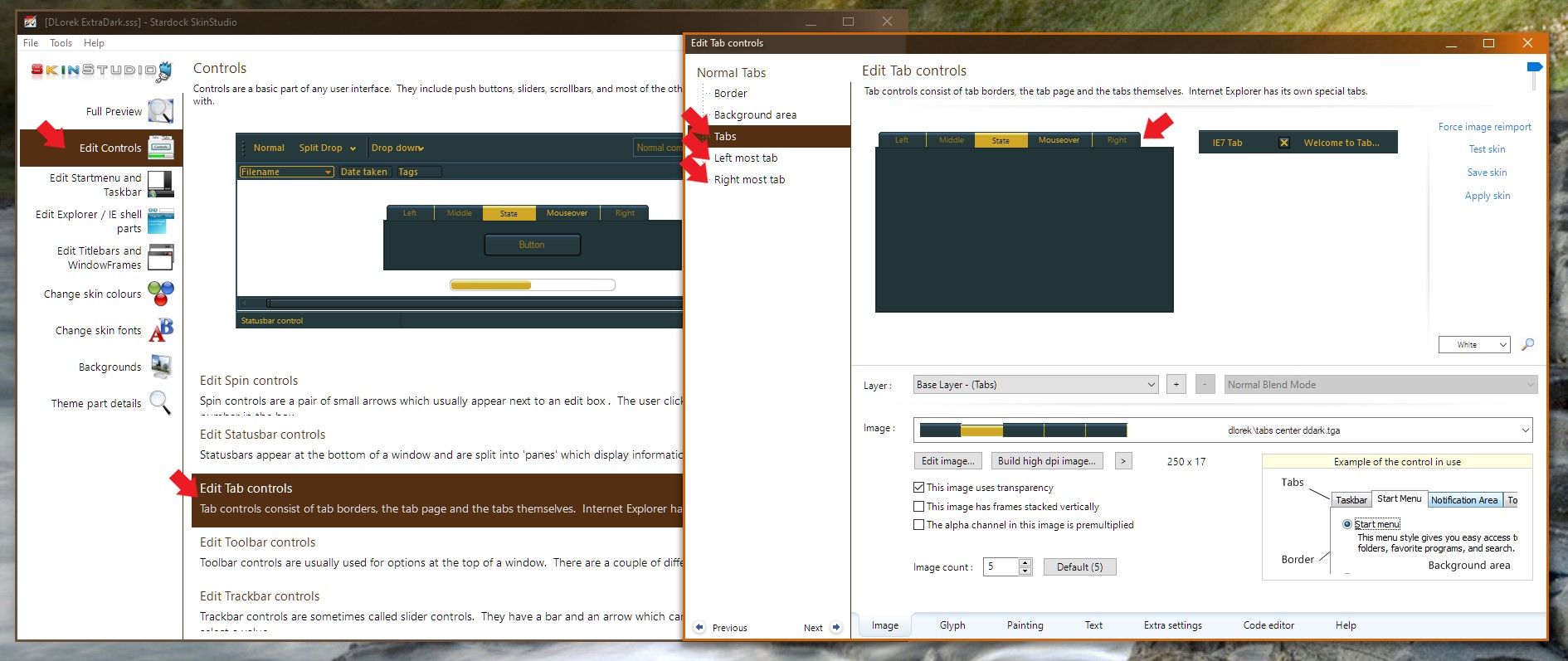
Sorry to hear you are having issues. You can change the Windows tabs in Windowblinds theme via Skinstudios : Please refer the screenshot below :

Note: you can download Skinstudio using this link : https://stardock.cachefly.net/SkinStudio_10_setup_sd.exe


Basj,
Stardock Community Assistant.

Reply #2 Top

thank you for your answer but I was not talking about Skinstudio. I just use Windowblinds, I'm just modifying an existing skin and I was talking about the color modifications you can do into Windowblinds. There are a lot of windows colors you can adapt... but not the tab ?! 

alex

Reply #3 Top

I wonder what theme you are using to have a dark skin yet the tabs stay white? And if its your own, how you manage to do so without using Skinstudio?

Thank you,

Basj,
Stardock Community Assistant

Reply #4 Top

I already created themes in the past but it's so big work... So now I just adapt existing themes. In windowblinds it's easy to manage colors : "modify style / change system colors" So you can change all system colors manually. Ok you can't modify shapes etc... But usually it's enough to adapt skins to what you want. I just want to now "what color change the tabs ?" but it seems not possible because I really made a lot of tests...   


maybe not possible without skinstudio... but the tab colors should be there.... ;)

Reply #5 Top

The tab is an image, just like the taskbar is.  The system color changes do not change the color of images.  You would need to change the image as basj has shown in Reply #1.