
Search in start menu doesn't show anything

Hi,

so for quite some time now I have had a problem on my desktop PC (whereas on my surface tablet it works for some reason), I got Start10 installed on both. the bottom left search bar never shows any programs i have installed. I can for example type WORD and nothing appears, despite a Microsoft Word shortcut being in start\programs. It indexes system stuff like control panel and the modern UI apps are also showing, but not anything I have installed as regular program.

I tried searching for an answer a while back and found the hint to rebuild the search index. Did that, didn't help.

What else can I try?
2,496 views 6 replies
Reply #1 Top

Hello,
Sorry to hear you are having issues. Something look like this thread : https://forums.stardock.com/490478

As mentioned, in that thread, have you triad using Windows 10 build in search engine and see if it work? If that work without issue, and you have done the re-indexing steps.

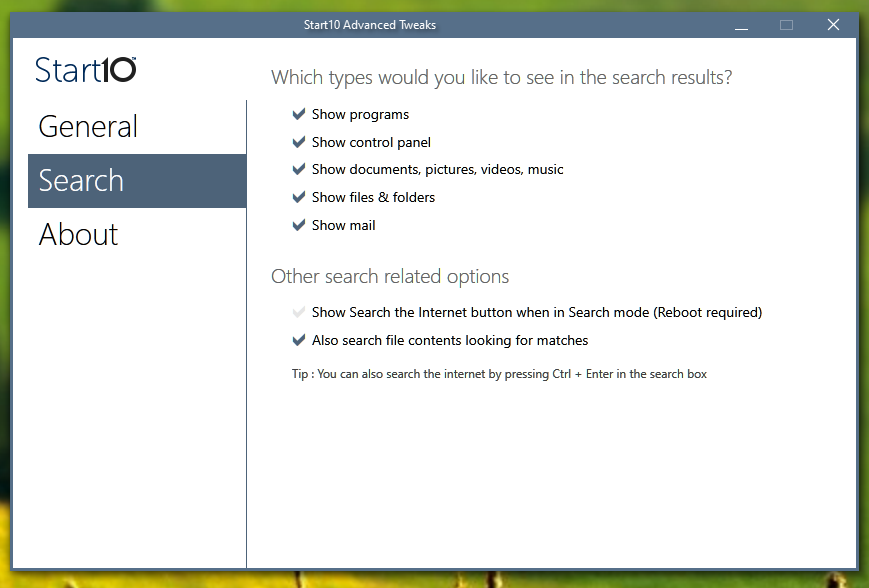
And please check your Start10 tweak and all the optioned are ticked. "C:\Program Files (x86)\Stardock\Start10\Start10tweak.exe"

Thanks

Basj,
Stardock Community Assistant.

Reply #2 Top

Same issue as in the thread that you linked - windows search bar shows everything just fine, Start10 search doesn't, but I already did the reindexing.

I didn't know about the Start10tweak tool, but it looked like this by default.

Reply #3 Top

Please try the purge and reinstall steps as mentioned here : https://forums.stardock.com/486022/start10-support-faq#reinstalling

Just make sure to re-download the latest version from your account. Reboot after the purge, reinstall using the installer you just download. Reboot again and retest. Report back.

Thank you,

Basj
Stardock Community Assistant.

Reply #5 Top

Quoting basj, reply 1

As mentioned, in that thread, have you triad using Windows 10 build in search engine and see if it work?
End of basj's quote

BTW, this is working? Correct?

Please try clean boot. https://forums.stardock.com/486022/start10-support-faq#cleanboot

Try it and report back.

Thank you,

Basj
Stardock Community Assistant.