Ctrl Alt Del Bug?

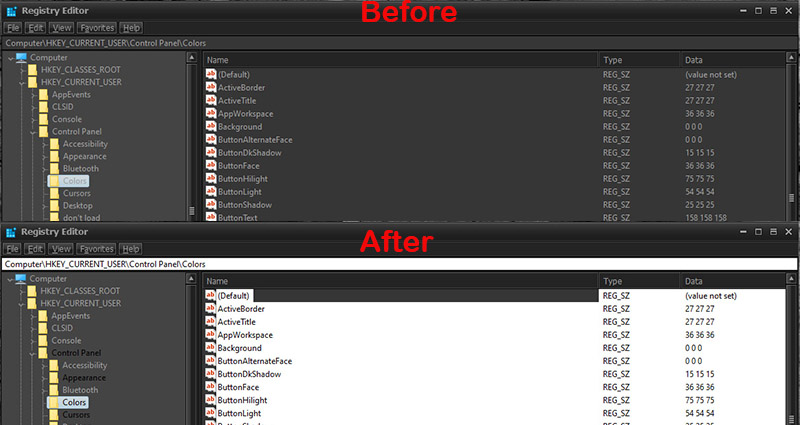
HI everyone,   Not sure if this is a bug or I am doing something wrong but if I hit Ctrl Alt Del for any reason the skinning on Notepad, Regedit, Task manager all screw up and start going haywire.  I've tried several skins that do this but my current favorite is Dark Mod by Vad_M.  Basically all the dark parts of the skin on those apps start disappearing and become back to default windows colors until eventually all the skinning is gone. But win10 file explorer is unaffected.  I'm on Win10 1909 , WB 10.84 and it does this consistently.  The skins work fine up until I hit Ctrl Alt Del.  If I reapply the skin then everything goes back to normal and works fine up until I hit Ctrl Alt Del.  I've tried this on my Laptop and my Desktop and they both do it.    Is there another way to reapply themes without having to open up WB again? 

4,689 views 6 replies
Reply #1 Top

Hello,
Sorry to hear you are having issues. Please try the cleanboot procedure to iron out any conflicting program as mentioned here : https://forums.stardock.com/486023/windowblinds-support-faq#cleanboot

Try it and report back.

Thanks

Basj,
Stardock Community Assistant.

Reply #2 Top

So I had my doubts but I went ahead and tried the steps from the link above and it didn't change anything.  Again the themes work fine as long as I never hit Ctrl Alt Del.  Once I do, the only way to fix it is to open up Windowsblinds and reapply the theme.  I tried the Startwb.bat file both during clean boot and when back at normal boot but it doesn't fix the issue.  Once Ctrl Alt Del is pushed I have to reapply theme.  Doesn't matter if I restart computer or restart WB or restart explorer.exe,  it has to be reapplied to work correctly again.   Puzzled for sure but it doesn't bother me too much, I just wish I could reapply the theme with a button click and not have to open WB to do it.  

Reply #3 Top

Try the purge and reinstall steps as mentioned here : https://forums.stardock.com/486023/windowblinds-support-faq#reinstalling 

Just make sure to re-download the latest version from your account. Reboot after the purge, reinstall using the latest version you just downloaded. Reboot again after the installation. Retest it and report back.

Thank you,

Basj
Stardock Community Assistant.

Reply #4 Top

Nope,  I tried uninstall/reinstall normally and with the bat file and it doesn't change anything.

Will attach example of before and after Ctrl Alt Del for reference.


Before and After

Reply #5 Top

Hello,
I have forwarded your questions/problems to the Stardock Support team for their assistance. Please keep an eye on this thread for any updates. We appreciate your feedback and patience.

Thank You,
Basj
Stardock Community Assistant.

Reply #6 Top

Same issue I've learned to ignore it and reapply but yes this is an issue.