problem
problem Stardock
from  Stardock Forums
Stardock Forums


problem Stardock
Stardock Forums
Good morning, I am testing the application for several days and I really like being able to organize everything. The problem I have is that I work with a double screen and when I send a file to the desktop, the icon stays in the middle of the 2 screens, it does not stay well organized and I find it difficult to remove them. Also many times one icon stays on top of another and it's a bit crazy. Before buying it I would like to know if this can be fixed.

Hello,
Sorry to hear you are having issues. Need to know which product of Stardock you referring to?
Thanks
Basj,
Stardock Community Assistant.
I have Fences. As I have mentioned the problem is that when I copy files to the desktop they all stay in the middle of the screen on top of each other and many times just on the 2 screens and it is very difficult to get them to another location on the desktop


Hello,
Need to know more.
1) Windows Version, please use Winver.exe for full Windows version numbers.
2) Fences version.
3) Screen/Monitor setup i.e How many monitor/s, resolution of each monitor, scaling on each.
4) Please post a screenshot or video to show us the issue so we can understand the issue better.
Thank you,
Basj
Stardock Community Assistant.
1- Windows 10 1909 (compilación SO 18363.720)
2 - 3.0.9.11
3- 2monitors 1920x1080 (1s monitor laptop 15" , 2º monitor 27")
4- https://youtu.be/BKnzjQhW58k
thks
Okay, I got you, thanks for the video. Here a solutions :
You can refer to this guide : https://forums.stardock.com/486084/fences-support-faq#shortcutswrongmonitor
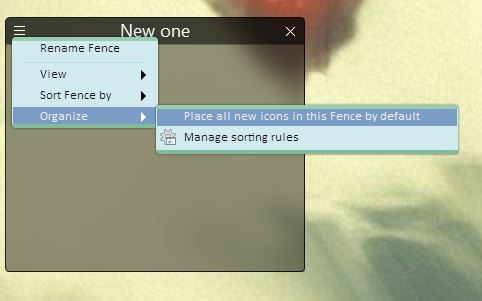
or if that don't help you. You can set a temporary fence where all new icons on desktop will be send there for you to move to appropriate fence later. Here how you do it:-
1) Create a new fence. Give it a name.
2) Click on the 3 bar menu -> Organize -> Place all new icons in this Fences by default.
3) With this all new icons/program on the desktop will automatically move into that Fence. And you can then move it to anywhere you like later or leave it there.
Thank you,
Basj
Stardock Community Assistant.
Welcome Guest! Please take the time to register with us.
Select a reason for giving karma:
You're about to visit an external site:
Sign up here to get the latest news, updates, and special offers delivered directly to your inbox.