( Solved ) I can't move my icons when Fences is activated on Windows 10

Windows Version: Windows Pro 1909


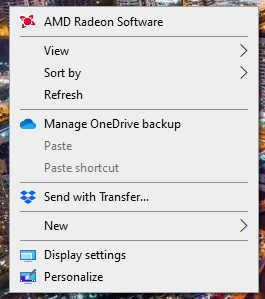
Whenever Fences is activated, my other Icons on my desktop automatically sort themselves and I can't move them, if I press right click and try to un-tick the Automatic Sorting option, it appears as if it was already deactivated and if I try to tick it nothing happens. When I turn off Fences and try that again it lets me Tick and Un-tick both sorting options.

Is there a solution for this?

20,521 views 9 replies
Reply #1 Top

Hello,
Sorry to hear you are having issues. Please check if you have Fences Locker. If you do please unlock it and try again.

Basj,
Stardock Community Assistant.

Reply #3 Top

Please try the purge and reinstall steps as mentioned here : https://forums.stardock.com/486084/fences-support-faq#reinstalling

Just make sure to re-download the latest version from your account. Reboot after the purge. Reinstall using the latest version you just downloaded. Reboot after the installation. Retest and report back.

Thank you,

Basj
Stardock Community Assistant.

Reply #4 Top

I can't uninstall Fences now, I don't know what to do. I've used the file to purge, rebooted many times, it keeps being there and it won't let me delete the folder nor the files, saying the program is in use, when I don't have it open or running at all

Reply #5 Top

Now I have Fences, but my Desktop is completely screwed, it's the opposite of what was happening. Everything can overlap, it doesn't align to the grid, switching Fences on and off doesn't make a difference, help please!

Reply #6 Top

Hello, Need more information.

1) Windows version, please use winver.exe for full version numbers.

2) Fences version.

3) Post a video on what is happening on your system. Post it on video sharing site. and share the link here.

Thank you,

Basj
Stardock Community Assistant.

Reply #7 Top

I've solved it! Whenever I turned on my PC Fences would run and there was no way to close it, so you had to go to the task manager, disable Fences next time Windows boots up again and then you can delete every Fences and Stardock folder in your PC. Rebooted again, everythin was working fine so I installed it again and everything is working well!

Reply #8 Top

Great, glad you make it work.

Thank you,

Basj
Stardock Community Assistant.

Reply #9 Top

right click on icon and drag to where you want it.  Click on create shortcut.  New icon will appear.  delete old one and then rename new one.  pretty easy.