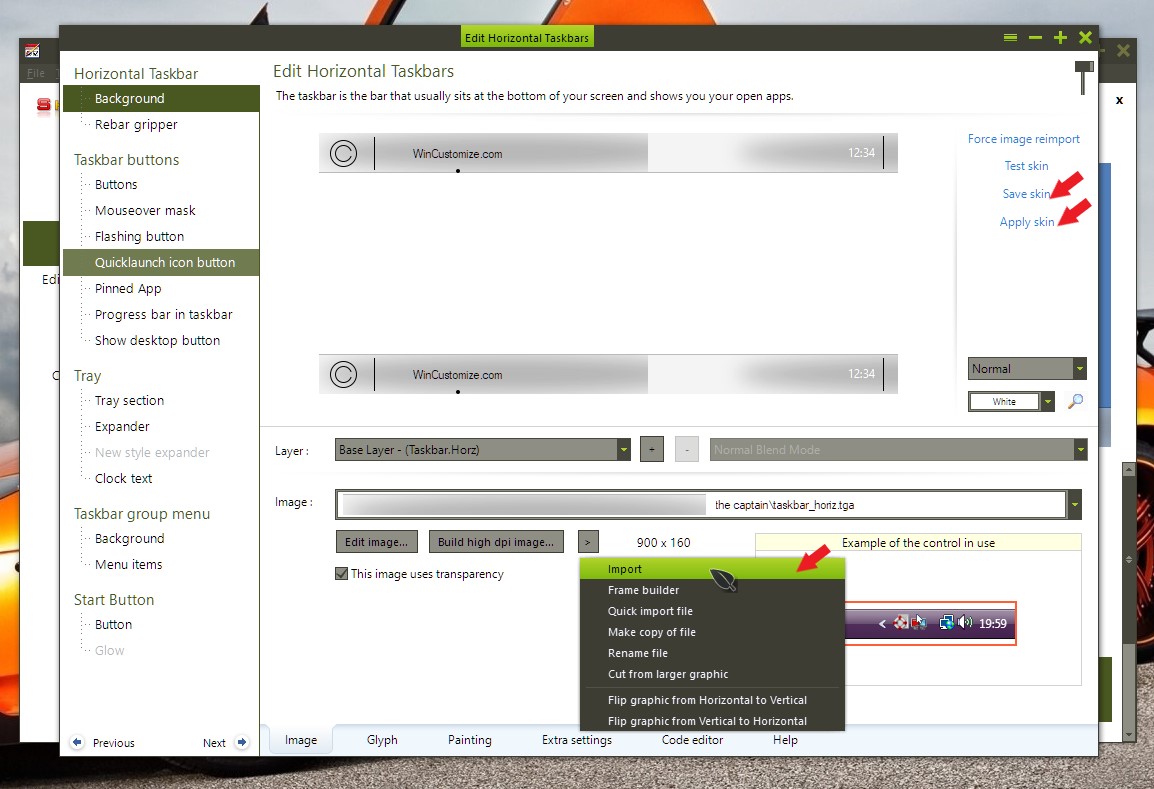
Modify Taskbar color with Change System Colors in 'The Captain' style

You guys have done a great job with this software.  Until now I've dinking with  Win10 Settings and other color control software (in the registry) to customize desktop/windows colors.

I see there is no registry entry (used in the theme) for controlling the Taskbar bar color - any other way to do it?

Thanks!


R

11,196 views 14 replies
Reply #1 Top

Hello,
You can do it by using Skinstudios, theme editor for Windowblinds. It should be available in your account. Or you can download it from here : https://stardock.cachefly.net/SkinStudio_10_setup_sd.exe

You can than edit all of that theme component.

To change the taskbar you will need to supply your own graphics with the color of your choice.

Basj,
Stardock Community Assistant.

Reply #2 Top

Thanks, got the editor, can isolate the taskbar, looks like we are down to the molecules and will need to 'edit' the taskbar color using MS Paint, correct?

Reply #3 Top

Yes, MS Paint or anything that can edit tga/pga files

Thank you,

Basj
Stardock Community Assistant.

Reply #4 Top

You can also add textures/colors to the taskbar using WindowBlinds Config.

Reply #5 Top

I must be missing something.

I replaced this file 'taskbar_horiz_win8.tga' using PS for the color I wanted.

No cigar (I logged off/on)

I don't see how to attach files here or insert images....

Thanks

Reply #6 Top

Hello,

You will need to.

1) Save that file you have change somewhere.

2) Import that new file into skinstudios.

3) Save the theme.

4) Apply the theme.

No need to log off and on.

Thank you,

Basj
Stardock Community Assistant.

Reply #7 Top

Yes, I managed to figure out those steps in Skin Studio.

Looks like only the 'Show Desktop' icon in the rightmost corner of the taskbar took the new color, rest of taskbar is as before for 'The Captain'.  You also see the new 'image color' in the Window Blinds UI (at the bottom where you would expect it).

On a another topic, why are the choices on the Settings/Color page greyed out?  Transparency, Start, taskbar and action center checkboxes?


Thanks

(Is there a user guide for theme/skin customization?)

Reply #8 Top

Quoting littlefooch, reply 7

(Is there a user guide for theme/skin customization?)
End of littlefooch's quote

You can refer to this for guide :

https://forums.stardock.com/486023/windowblinds-support-faq#makeskins

Thank you,

Basj
Stardock Community Assistant.


Reply #9 Top

Thanks.

I created the skin I wanted (only changing the taskbar color.

Looks right in Skin Studio

Looks right within WindowBlinds when skin and revised theme are applied.

No change to REAL taskbar when applied.

Suggestions?

Reply #10 Top

Hello,

Please post a screenshot or a video grab of your taskbar. And also please check if you have Start Menu apps such as OpenShell/Classic Shell running in the background? And if you want you can send me the modified ".wba" file so I can see what is wrong with it.

Thank you,

Basj
Stardock Community Assistant.

Reply #11 Top

I got it to work; all I did was to disable High contrast in the theme; I then set the colors in settings; the rest of the look provided by the skins remains - works!  thanks

Reply #12 Top

Great, glad you solved it.

Thank you,

Basj
Stardock Community Assistant.

Reply #13 Top

Hello all, I have a question about going from the regular Winstep Nexus to the upgraded Winstep Xtreme. I thought it would be okay to just download the new one and it would take over and replace the regular Nexus one. What actually happened was I downloaded the Xtreme and now my old nexus dock keeps popping up on startup. I am running Win 10. They almost have seemed to morph (I have always wanted to use that word in a sentence) into one program and the original can't be deleted. I have unchecked the box for "run at startup" I have removed all the icons that were in it. I am not sure what else to do. Please any help would be great!

Reply #14 Top

Quoting bmatt114, reply 13

Hello all, I have a question about going from the regular Winstep Nexus to the upgraded Winstep Xtreme. I thought it would be okay to just download the new one and it would take over and replace the regular Nexus one. What actually happened was I downloaded the Xtreme and now my old nexus dock keeps popping up on startup. I am running Win 10. They almost have seemed to morph (I have always wanted to use that word in a sentence) into one program and the original can't be deleted. I have unchecked the box for "run at startup" I have removed all the icons that were in it. I am not sure what else to do. Please any help would be great!
End of bmatt114's quote

Hello,

Sorry to hear you have issues. But, I think it best you ask your questions over winstep at winstep support page.

Thanks

Basj,

Stardock Community Assistant.