

Folders icon in Windows Explorer changed to text file icon
 Stardock Forums
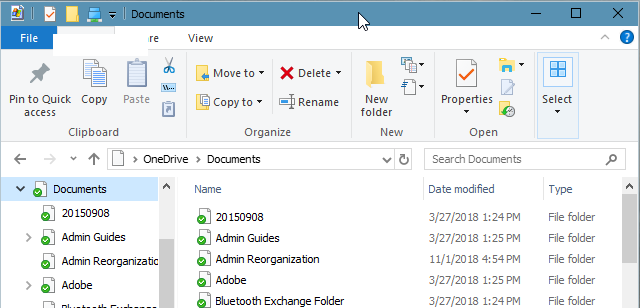
I am running Windows 10. After installing Fences, the icon for all folders icon, as they appear in Windows Explorer, were changed to text file icons. The folder icons still appear correctly in Fences, just not in Windows explorer. this makes it extremely difficult to navigate folder hierarchies with Windows Explorer.
I uninstalled Fences and the folder icon in Windows Explorer was restored. When I reinstalled Fences, the folder icon disappeared and was replaced with a text file icon. So, all my folders appear to be text files. I am guessing that since the folder icon goes away only when Fences is installed, Fences must be involved in some way. Is there a Fences setting somewhere that is causing this behavior? Is there a checkbox that I can check or uncheck to fix this problem?
Here is what folders look like in Windows Explorer:
Here is what folders look like in Fences:

Any help would be greatly appreciated.
--Jaunderw