Need to deactivate Multiplicity and Other apps

deactivate

Can't get anyone On The phone. Been through all the forums, Spent last 3 hours trying all the links some look very simple but the screens are not as represented in the posts. I love the apps but support Sucks BIG TIME, Sucks BIG TIME,Sucks BIG TIME!!!! Upgraded to An SSD and now Cant activate My favorite. KVM, or any other of the apps I Purchased a month or so back. If this doesn't get me up and running I'm through with Stardock , They'll play hell getting me to pay for another useless app. NOTHING, I Mean NOTHING needs to be this difficult. Can anyone give me the real scoop on how to deactivate these apps

3,640 views 9 replies
Reply #2 Top

As I said, been trying all that for three hours, Can't get any page with the screens presented in the "examples". Is this info up to date??   

Reply #3 Top

Can't try the "from in the app method because, the Hard drive was replaced.

Reply #4 Top

Hello,

I have forwarded your report to the Stardock support team for their review and recommendations.

Please keep an eye on this thread for any updates.

We really do appreciate your feedback, thanks.

AzDude
Stardock Community Assistant

Reply #5 Top

Hello,

Sorry to hear you are having trouble.

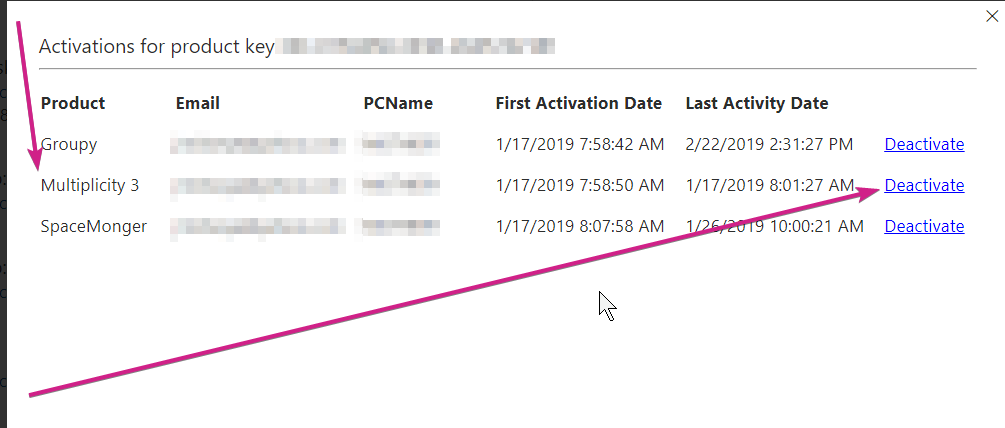
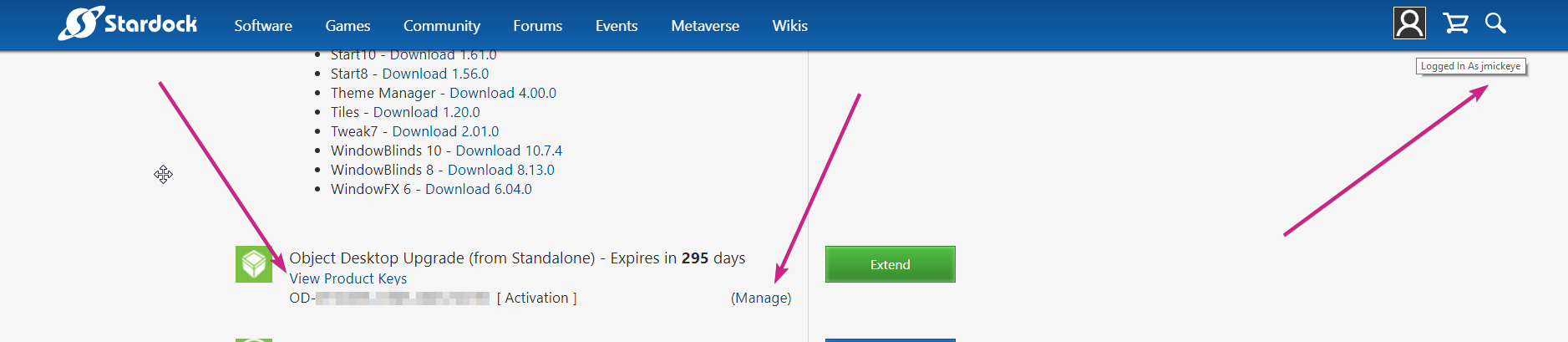
This is what you should see - need to do:

Account page:
https://store.stardock.com/myaccount/products

----------------
Sean Drohan
Stardock Customer Service Manager

Reply #6 Top

Thank you sir  !!!!!      I think I was thrown off track on that page by the "view product key" button.

My thought was 'I Have product keys coming out my ears,  I need To see a "Manage" option somewhere'

I Have eye problems (I hate using Impaired), I will go back over my path to see if I missed something.

It's a shame, this could have been resolved 8 hours earlier by a simple phone call.

Anyway, You've taken your time to address this and I commend you. I am very grateful for your help.

Thanks Again!

Reply #7 Top

Thank you sir  !!!!!      I think I was thrown off track on that page by the "view product key" button.

My thought was 'I Have product keys coming out my ears,  I need To see a "Manage" option somewhere'

I Have eye problems (I hate using Impaired), I will go back over my path to see if I missed something.

It's a shame, this could have been resolved 8 hours earlier by a simple phone call.

Anyway, You've taken your time to address this and I commend you. I am very grateful for your help.

Thanks Again! This has been resolved and all web pages work as presented  My fault !!! (Guess I'll Need A magnfying glass nearby in the future)

On My browser The examples are very, vary small)

Reply #8 Top

Quoting jmickeye, reply 6

Thank you sir  !!!!!  
End of jmickeye's quote

You are most welcome.

----------------
Sean Drohan
Stardock Customer Service Manager