Title Bar has disappeared

Title Bar has disappeared in fences. I can still move the fences but the title bar has disappeared. I have uninstalled and reinstalled it but the same thing happens. Any ideas?

11,710 views 20 replies
Reply #2 Top

I don’t get what younwant with thar suggestion of purging the forums post.

As for your solution, I’ve uninstalled the fences app and re-installed it twice with no change in the loss of the title bar for each fence. Could this have anything to do with my changing the MS system default font from segoe uinto another font?


Reply #3 Top

Hello,

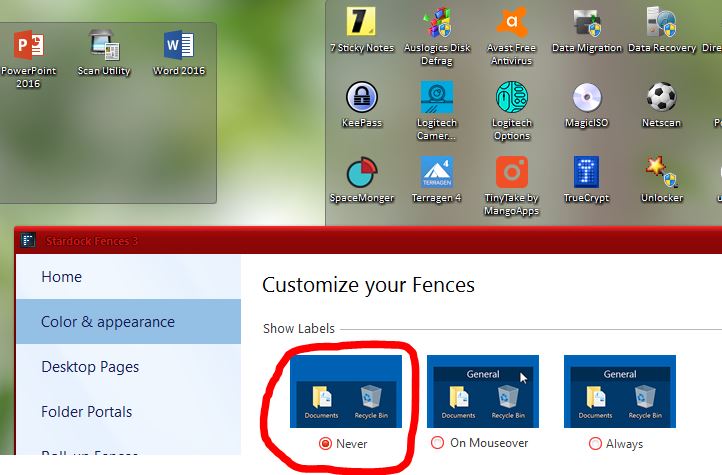
Can you check if you might have unintentionally select the labels to never show option.

Thank you,


Basj,

Stardock Community Assistant

Reply #4 Top

Thank you, Basj. I checked that and I had not checked never show labels. Somewhere on the 'net a person had suggested that not having the segoe ui font as the default operating system font might affect Fences. Is that a possibility? I changed the system default font last week. Maybe that disturbed something?

Reply #5 Top

Hello,

BTW have you tried the purge and reinstall of Fences as mentioned by Mike (AzDude). Purge and reinstall is not the same as uninstall and reinstalled. Please try it.


Basj

Stardock Community Assistant.

Reply #6 Top

OK. I’ll do what Mike (AzDude) suggested . I hadn’t understood what he meant. I’ll let you know how it goes. Many thanks.

Reply #7 Top

basj, I purged and re-installed Fences but they continue to be decapitated and still lack the title bar...… You have to wonder at how these apps can act like stubborn mules!! Thanks for your help. I hope you have another trick up your sleeve! Mayyve1

Reply #8 Top

The silence is deafening. Should I abandon any hope of a solution to this lack of a title bar in Fences?? Someone? Anyone??

Please!  Thanks!

Reply #9 Top

I am sorry, I've missed your previous post. Have you try to revert back system fonts back to "segoe ui" just to see if it indeed the issue here? 

Would also like to suggest to try the following:

-For Win8/10 Users: Open the Start Screen, and type 'cmd'. Right-click on the search result and select 'Run as administrator' from below.

-Type: sfc /scannow

-Wait for the scan to complete (this can take several minutes)

Some help on how this looks should you need it:

https://support.microsoft.com/en-us/help/929833/use-the-system-file-checker-tool-to-repair-missing-or-corrupted-system

If the SFC finds errors, but cannot fix them, please also run the following command in the same command prompt window:

dism.exe /online /Cleanup-Image /RestoreHealth

Some help on how this looks should you need it:

https://www.windowscentral.com/how-use-dism-command-line-utility-repair-windows-10-image

The above command should assist with replacing any damaged or problematic system files. Please note, however, since it may require restoring certain files, this process can take some time and you will need to be patient until it has completed. Please let me know whether this resolves your problem or if you have any additional questions.

Thank you,


Basj,

Stardock Community Assistant

Reply #10 Top

Thanks, Basj. I did the sfc /scannow but it didn't find any errors. As for reverting to the segoe ui font in the OS, if that were to be the problem, I would still keep the font I installed. The segoe ui font is too faint for my aging eyes and I would not keep it just to have title bars in Fences. Still that would be a very odd difficulty, that a font should disturb the Fences app.

Maybe I just have to live with the headless Fences...… Many thanks for trying. mayyve1

Reply #11 Top

I am asking you is to test it by reverting back to segoe ui just to confirm your initial suspect. You can change back to what ever you want after that. If that is true we can move forward and look into the problem with more information.

Thank you,


Basj,

Stardock Community Assistant

Reply #12 Top

Thanks, Basj.

    I'll do that a bit later. Don't have time right now. Will get back to you.

Reply #13 Top

As a quick slightly related warning, depending on how you did it changing your default OS font is unwise as it can have consequences for UI screen sizing.

How did you change the font?

Reply #15 Top

Neil,

   Also I much prefer the font I installed. It's much clearer to me. The segoe ui was too faint and hard to see.

Reply #16 Top

Could you tell us what font you change to?

Thank you,


Basj,

Stardock Community Assistant

Reply #18 Top

I did the system font change to Cambria Bold but on my system all my Fences still have its Title Bar. 

Please try the clean boot steps to see if there is conflicting application : https://forums.stardock.com/486084/fences-support-faq#cleanboot

Try it let us know.

Thank you,


Basj,

Stardock Community Assistant

Reply #20 Top

Basj,

   There were many steps to the clean boot command. I had to create a new admin user, then do a clean something or other. It got above my pay grade. I did create a new admin user but then I had to stop a whole bunch of startup processes, etc., etc., etc. I gave up. I'll just have to live with the headless fences. I did try to create a fence in the other admin user screen but the fence still had no title bar. This drama is probably not worth it. Many thanks for all your efforts. I appreciate your help.