OneDrive folder not being searched
from  Stardock Forums
Stardock Forums
my OneDrive folder which is inside my user folder is not being indexed
how can I enable it?

 Stardock Forums
my OneDrive folder which is inside my user folder is not being indexed
how can I enable it?
Hello,
Sorry to hear you are having issues. Please specify which Stardock product that you having issues with.
Thanks
Basj,
Stardock Community Assistant.

Please try to include your onedrive folder in indexing Options (Control Panel-> Indexing Option -> Modify button)). And than rebuild the Windows Indexing. (Indexing Option -> Advanced button -> Troubleshooting (Rebuild button))
Try it and let us know if you need more assistance.
Thank you,
Basj,
Stardock Community Assistant
AT the Indexed Options > Indexed Locations, I cannot see the OneDrive folder where I have my info
I think as long as the "users" folders is selected and your onedrive is set location inside your user folder you are all set. Just need to rebuild the indexing.
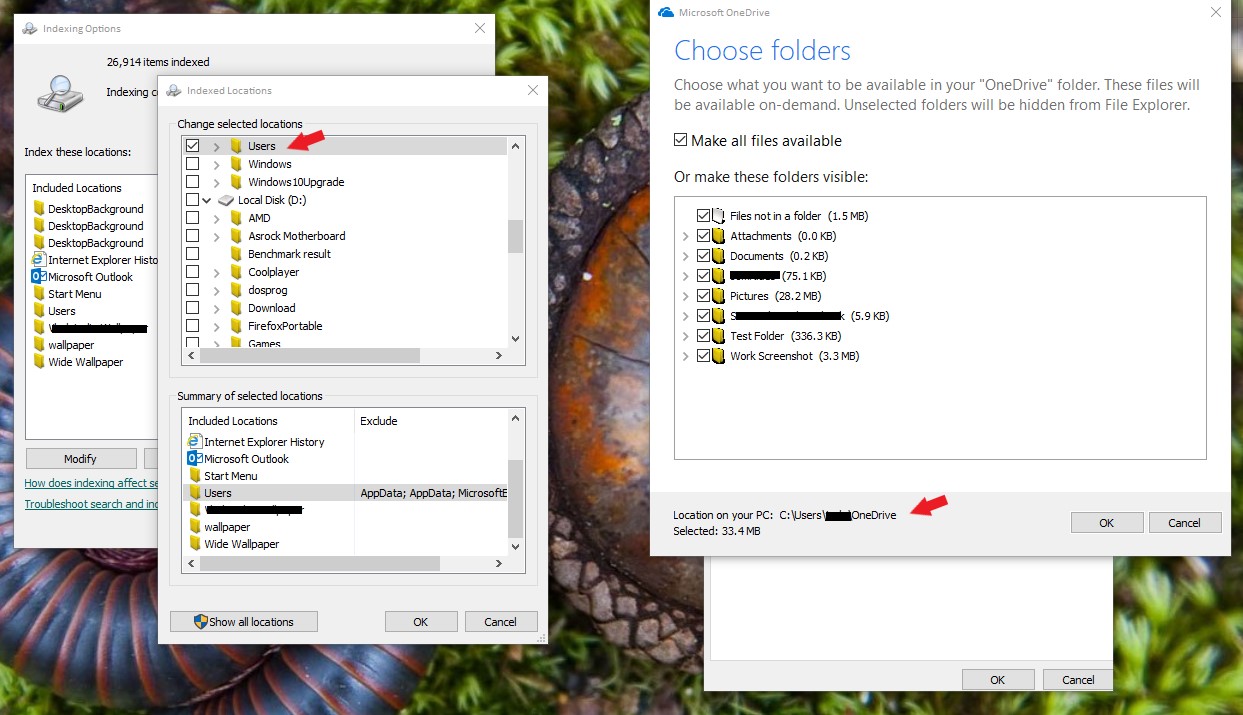
Thank you,
Basj,
Stardock Community Assistant
the problem might be related to Start10 since I do not have this problem with the start button of Windows 10.
Your help is appreciated.
at my user folder I do have two different OneDrive folders: one says just OneDrive and the other says OneDrive plus the name of my organization. At the last one I do have files. At the first one I do not have files. The last one cannot be selected for Index
Hello,
Sorry to hear you are having trouble.
Please see:
----------------
Sean Drohan
Stardock Customer Service Manager
Glad to hear it.
~Sean
Welcome Guest! Please take the time to register with us.
Select a reason for giving karma:
You're about to visit an external site:
Sign up here to get the latest news, updates, and special offers delivered directly to your inbox.