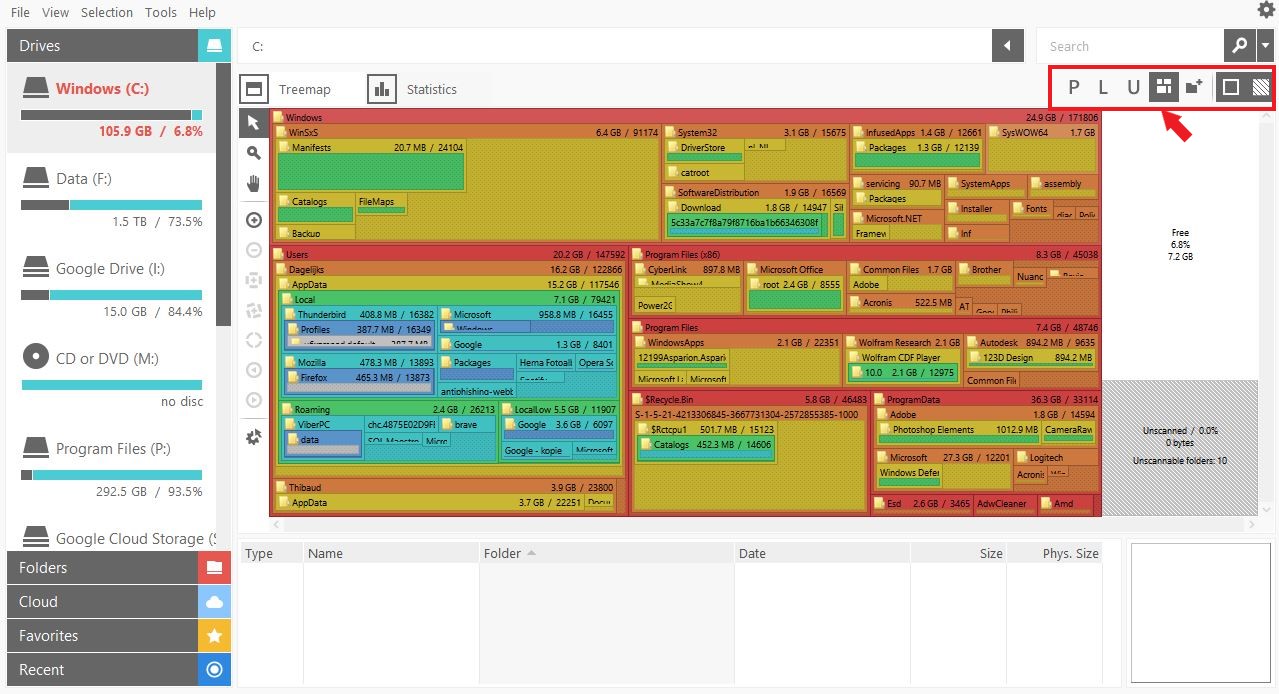
spacemonger display

Spacemonger displays used space in overlapping squares. That makes it difficult to find large files. Version 2 displayed them never overlapping.

How to change that?

3,652 views 8 replies
Reply #1 Top

Hello,

Sorry to hear you are having issues. Appreciate if you could provide a screenshot of your problem.

Thank you.

Basj,

Stardock Community Assistant.

Reply #2 Top

How to attach a screendump to my reply?

Spacemonger gives also for my C: drive that 28.7% is unscanned. Why?

Spacemonger indicates that 80 folders are unscannable. Why?

Reply #3 Top

1) How to share picture.

if you can see that insert image icon (red arrow pointing at it) you can click at it and upload a picture.

If you can't, you can share by uploading you picture to those picture sharing site like imgur and share the link here.

2) & 3) 28.7% unscanned and unscannable folders : Maybe you don't have ownership on those folders : Check this links : https://forums.techguy.org/threads/solved-spacemonger-shows-125gb-unscannable.925678/

https://community.spiceworks.com/topic/195459-c-data-profiles-are-unscannable-by-spacemonger

Thank you,


Basj,

Stardock Community Assistant

Reply #4 Top

Spacemonger is also constantly crashing.

Details of the crashlog and the requested screenprint are in:

https://www.dropbox.com/s/n9zox5ubcjkifd8/Spacemonger.zip?dl=0

Reply #5 Top

Looking at your screenshot. Not sure what is the problem. And you do know that you can change how the information display by selecting those icons in that red box in your screenshot below.

About the crashing problem. Never had it crash on me so far.

Anyway, I have forwarded your problem to Stardock Support team for their assistance. Please keep an eye on this thread for any updates. We appreciate your feedback and patience.

Thank you,


Basj,

Stardock Community Assistant

Reply #6 Top

Quoting basj, reply 5

Never had it crash on me so far.
End of basj's quote

There is a known crashing issue that still needs to be addressed that has to do with very high folder counts (not files).

----------------
Sean Drohan
Stardock Customer Service Manager

Reply #8 Top

Quoting tchabot, reply 7

I don't like that constant crashing. Is a refund possible?
End of tchabot's quote

For any refund requests, please place a ticket here:

https://esupport.stardock.com/index.php?/Tickets/Submit

----------------
Sean Drohan
Stardock Customer Service Manager