Clipboard works then stops working after sleep or long

I have Win 10 on two laptops, both running 3.44 Build 00090.  These are both work laptops so what I can do to them is somewhat limited.

Until recently, I've had no issues.  I could put either laptop into sleep and when they came back up, work as normal.

Now, when I put either one to sleep, my secondary one will not receive clipboard information.  This has also happened when I work on the weekend where I do something in the morning and come back later that afternoon.  I can copy/paste from the secondary to the primary but not from primary to secondary.  The only way that I have found to fix it is by either logging off/on on the secondary or reboot.  Once I do that, it works fine, even with VPN connected.

Any thoughts?  

6,524 views 4 replies
Reply #1 Top

Hello,

Sorry to hear you are having issues. Would help if you could state which Stardock's software you are referring to? Multiplicity?

Thanks

Basj,

Stardock Community Assistant.

Reply #3 Top

Hello,

Sorry to hear you are having trouble.

Please see:

https://forums.stardock.com/486104/multiplicity-support-faq#cantcopy

That said, not a big fan of 'sleeping' anything as it is destructive on the way down and not always ( as you have seen ) complete upon waking.

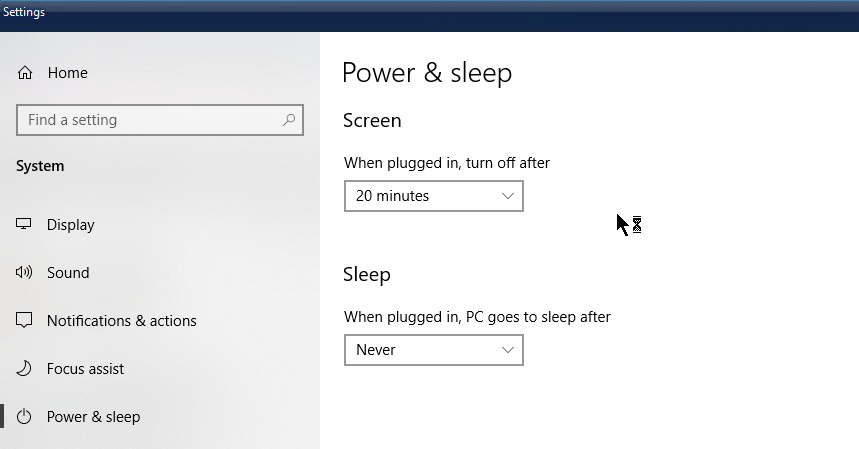
If each PC has power (laptops not on battery), consider a different "Power & Sleep; option in Windows settings, that does not have it sleep, rather, just powers down the monitor.  Example:


Reply #4 Top

Is there a specific service I can restart?

A test last night was to sleep only the primary.  Same thing, can't copy from the primary to the secondary, but can copy from the secondary to the primary.

The sleep always triggers this.  I obviously can't just walk away from work for a the day and check tonight but I'll test it tomorrow and see how long I can leave everything connected and if it does the same thing.

As I mentioned, this hasn't happened til recently.  Sleep was never an issue before.  Not sure what changed.