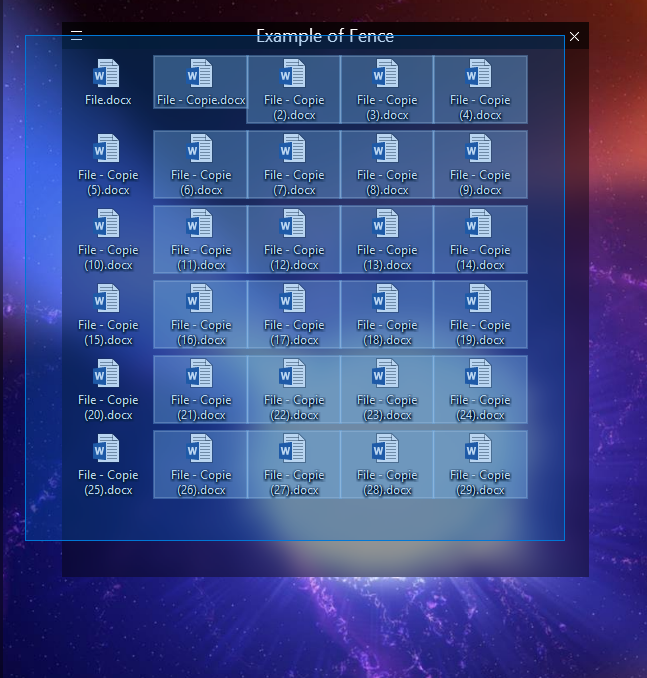
Drag & select doesn't work on first column in a fence

Hello,

I have an issue with my fences. I can use the multiple selection with the mouse (by dragging over the icons while holding left click) for every icons but the ones of the first column... The first column's icons remain always unselected unless I click on them by holding Ctrl if I want to include them. That's quite uncomfortable... Is it a bug? Or, how to use "drag & select" on all the icons including the ones of the first column?

This issue concerns fences but not portals...

Thank you,

My version: 3.0.9.11

___

Corentin
8,861 views 15 replies
Reply #1 Top

Hello,

Sorry to hear you are having issues.

I just Right-Click and drag over all the icons


AzDude
Stardock Community Assistant

Reply #2 Top

Hello AzDude,

Thank you for your answer. 

Unfortunately, right click doesn't work either...


Best Regards,

Reply #3 Top

Hello,

What version of Windows you running ? My screenshot is with Win 10 and Fences 3.0.9.11 is good

and with right click on desktop make sure your fences are unlocked ( uncheck if checked ).

Would you Please try this PURGE: https://forums.stardock.com/486084/fences-support-faq#reinstalling

Reboot and ReInstall the latest version then you can restore from a snapshot.

When you have a fences issue first thing we have to try is the Purge and go from there.

Report back here when done .


AzDude
Stardock Community Assistant

Reply #4 Top

Thank you AzDude,

I'm on Windows 10 too.

I tried to reinstall the classic way, then I tried also with the bat method you provided me, both with system restart...

I could restore my configuration but I lost all the colors of my portals.

Unfortunately, it didn't help about the issue, I still can't select the first column :/

Reply #5 Top

Hello,

I have forwarded your report to the Stardock support team for their review and recommendations.

Please keep an eye on this thread for any updates.

We really do appreciate your feedback, thanks.


AzDude
Stardock Community Assistant

Reply #7 Top

Hello,

I'll check with another guy later when he comes on duty or the 

support office tomorrow when they are open .

See who has an idea for a fix .


AzDude
Stardock Community Assistant

Reply #8 Top

Hello,

Sorry to hear you are having issues. Unfortunately, I can't reproduce your problem on my pc. I can select all or any icon on my first column using left click and drag across. What version or Windows 10 you have on? Please use the "Winver" to get the full version information. I am on Windows 10 Pro Version 1803 (Build 17134.228)

Thank you.

Basj,

Stardock Community Assistant.

Reply #9 Top

Hello Basj,

Thank you for your answer and your tests.

I have Windows 10 Pro:
Version 1803 (Build 17134.285)

Best Regards,

Reply #10 Top

Quoting corentin34, reply 9

Hello Basj,

Thank you for your answer and your tests.

I have Windows 10 Pro:
Version 1803 (Build 17134.285)

Best Regards,
End of corentin34's quote

Hello , I am using Win 10 Home ver. 17134.285

Here is the Screen Video from Basj we both can play with the icons in fences 1st row left or right click

video link https://www.youtube.com/watch?v=3cCzKxE-g-4&feature=youtu.be

we'll check more with support but now into the weekend might not be able for more help till monday , we'll see.

Reply #11 Top

Hello,

I think you can try these solution.

1. Select by starting your mouse within the fence itself : Click within the fence and drag.

or

2. Change Icons size to "Medium Icons".

Here a video I make to show how it work on my system.

https://youtu.be/_crBpjN19Yw

Thank you,


Basj,

Stardock Community Assistant

Reply #12 Top

Hello,

Thank you to both of you.

Basj,

The solution 1 didn't work... But the solution 2 is a strong lead! Selecting "Medium Icons" makes the icons bigger and enables me to drag also over the first column! I was on "Classic Icons" (less big) - so the issue is clearly related to this choice...

Reply #13 Top

You can still use "Ctrl" + mouse scroll down to shrink down those icons a little.

Thank you,


Basj,

Stardock Community Assistant

Reply #15 Top

Great. Glad to help. :thumbsup:  

Thank you,


Basj,

Stardock Comunity Assistant