Mystery Icons

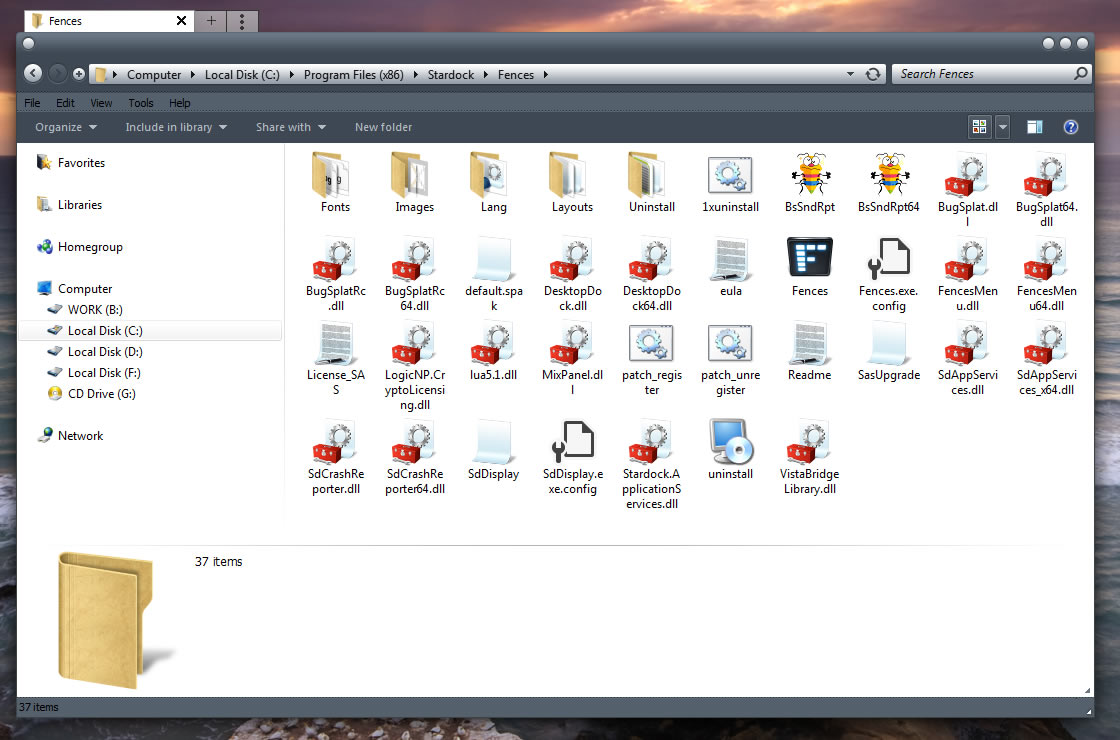
Just installed Fences 3 BUT my desktop now has 33 icons with titles such as Vista Bridge, Bug Splat, Scd Service, Fonts, Eula. I have no idea what they are nor where they originated They will not delete.   In some cases there are often warnings that continuing deletion attempts will result in damage to my whole system.

Help please - what's the solution or should I just uninstal the Fences program?


8,405 views 4 replies
Reply #1 Top

Hello,

Sorry to hear your problem. I think your Fences get installed on your desktop.  I am not sure where your problem originate from. But yes you can try uninstall fences to see if those icons gone after uninstall.

Try these steps to purge https://forums.stardock.com/486084/fences-support-faq#reinstalling


Reply #2 Top

Is it possible these icons are related to that Ransomfree program?  Unless 'Show Hidden Files' is ticked, these file are not usually seen, but some of the file names you describe sound much like those Ransomfee downloads to the desktop, and maybe Fences has arranged them to appear when organising the desktop icons.

Just a guess.   However, try going to File Explorer Options and 'View' to see if hidden files and drives are ticked to be shown.  If so, unchecking that option may remove the unwanted icons in Fences.

|-)

Reply #3 Top

No, actually what he/she listed was the files from fences directory. Which by default should be at C:/Program Files (x86)/Stardock/Fences. Unless he/she change it upon installing to Desktop.

Reply #4 Top

Okay,, it's just that Ransomfree has files with similar sorts of names, and as I recall they can't be deleted, either.  Oh well, as I said, it was just a guess.