Cursor FX compatibility

Windows 8/8.1

Many many people have upgraded to Windows 8/8.1. It`s surprising that Cursor FX has not been made compatible. Is it something that soon will happen? O:)

27,588 views 12 replies
Reply #1 Top

It IS compatible :cylon: ;)

Reply #3 Top

Quoting RedneckDude, reply 2

We already had this discussion.   :S


https://forums.wincustomize.com/460115/page/1/#3513271


End of RedneckDude's quote
Ok, but the following is a reply to me from Brad Ather technical...

Hello,

Sorry for the delayed response. Over the holidays, Stardock has had limited support hours.

You may try their work around's or try it out yourself, but we cannot officially support it on Windows 8/8.1

Please let me know if you have any further questions/concerns.

Brad Ather
Customer Care

Ticket Details


Ticket ID: GYW-910-37635
Department: CursorFX
Type: Issue
Status: Closed
Priority: Support

Reply #4 Top

OK, so it isn't yet "Officially" supported, but you said you have it working, I do, as well as others. A second thread was unnecessary. It works. Who cares if it isn't official.

Reply #5 Top

Quoting RedneckDude, reply 4

OK, so it isn't yet "Officially" supported, but you said you have it working, I do, as well as others. A second thread was unnecessary. It works. Who cares if it isn't official.
End of RedneckDude's quote
Somehow i got a Cursor FX cursor, i`m not sure how and had difficulty.  System requirements at the bottom of the following (Stardock site) regarding compatibility is interesting. Have a look. <_< Create custom mouse cursors with CursorFX Get it Now

Create custom mouse cursors with CursorFX

CursorFX Skin - Nitro tech by Libardoscreenshot

Key Features
  • Customize over 12 anti-aliased 32-bit cursors
  • Create your own cursors
  • Animated cursors and special effects
  • Sound effects for your mouse clicks
  • And more!
 

Features

Create stunning animated Windows mouse cursors for your PC with CursorFX.

Easily apply skins, shadows, motion trails and sounds to your cursors. CursorFX comes complete with over 12 unique cursors.

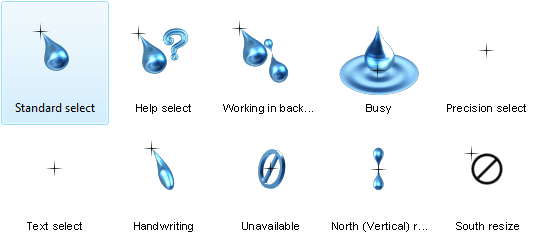
CursorFX Control Panel
CursorFX skin - Drop Plus by Renzo Riccio

Apply

CursorFX is easy to use, simply choose a cursor from the preview list and click apply to begin using your new cursor.

Return the default Windows cursor at any time from the control panel or by pressing ctrl+shift+c on your keyboard.


Customize

Quickly change the size, color or drop shadow of any cursor from the settings menu. Personalize your mouse clicks with cool sounds effects. Add a unique visual style to your cursors by applying different combinations of special effects and motion trails that are included with CursorFX.

CursorFX settings menu
CursorFX Effects

Create

Import your own .PNG files into the CursorFX theme editor to easily create a new cursor from scratch.


Thousands of additional custom cursors are available for download from our community at WinCustomize.com

WinCustomize Back to Top

Create stunning animated Windows mouse cursors.

Get it Now

System Requirements

  • Windows 7 / Vista / XP 32
  • CursorFX is not compatible with Windows 8
  • 100MB free drive space
  • 512MB RAM
Reply #6 Top

Works perfectly on Windows 8.1 here.

Reply #7 Top

Quoting jamginger, reply 5

CursorFX is not compatible with Windows 8
End of jamginger's quote
As Redneck said:

Quoting RedneckDude, reply 4

It works. Who cares if it isn't official.
End of RedneckDude's quote

Quoting LightStar, reply 6

Works perfectly on Windows 8.1 here.
End of LightStar's quote

Works for me too...and most of all the other people without other issues on their machines :sun:


Reply #8 Top

Quoting neone6, reply 7


Quoting jamginger,

CursorFX is not compatible with Windows 8

As Redneck said:


Quoting RedneckDude,

It works. Who cares if it isn't official.


Quoting LightStar,

Works perfectly on Windows 8.1 here.


Works for me too...and most of all the other people without other issues on their machines :sun:


End of neone6's quote
Happy to hear it. :moon:

Reply #9 Top

[quote who="neone6" reply="7" id="3514122"]

Quoting jamginger,

CursorFX is not compatible with Windows 8

As Redneck said:


Quoting RedneckDude,

It works. Who cares if it isn't official.


Quoting LightStar,

Works perfectly on Windows 8.1 here.


Works for me too...and most of all the other people without other issues on their machines :sun:

 
[/quote Would you show me your procedure please? |-)

Reply #10 Top

Quoting jamginger, reply 9

[/quote Would you show me your procedure please?
End of jamginger's quote

Download it, install it and use it. -Worked fine for me with that old regular procedure ;)

Reply #11 Top

Quoting neone6, reply 10

Download it, install it and use it. -Worked fine for me with that old regular procedure
End of neone6's quote
Ditto. Just use it, nothing special.


Download it, install it (maybe install as administrator if it gives you trouble) choose a cursor, apply.   That's it.

+1 Loading…
Reply #12 Top

Quoting RedneckDude, reply 11


Quoting neone6,

Download it, install it and use it. -Worked fine for me with that old regular procedure

Ditto. Just use it, nothing special.


Download it, install it (maybe install as administrator if it gives you trouble) choose a cursor, apply.   That's it.

End of RedneckDude's quote
Thank You.
