Font Color For Places List
SKS Help
from  WinCustomize Forums
WinCustomize Forums
Hey guys, can someone tell me where the setting is to change this font color?



SKS Help
WinCustomize Forums
Hey guys, can someone tell me where the setting is to change this font color?
That would be under the item mouseover for the places list, you need to define an image for it to work though.
Sorry RND, you can use the item mouseover settings for programs list as long as you want both sides the same.

whatever you choose to do, your settings will have an impact on the jump list settings as well (mouseover image and text color)
I need yellow by default, and black on mouseover. There is already a mouseover image in use.
I changed the font color, but it didn't take.
Jim. Make sure the item mouseover images or images are set to OS Default color. Now you can change the left side color and right side color to be different
Yes Dave, thanks from me also. Always a confusing area with text issues.Sorry RND.
However,no matter what I try. I can not achieve a normal color of BLUE and a Mouseover color of white in all areas of the start menu.
I have item mouseover images, FYI, I tried everything. The best I get is the normal BLUEI want and White mouseover everyplace except on places side. When I say everywhere I meam: Programs; Places All Programes and all programs includes the arrow and the ap list. Any insight?
With all my items set to os default and start from scratch, all is good until I try to achieve a mouseover of white on the places list, as soon as I change that, the programs list changes. Internal problem perhaps?
And, without the item mouseover images I can achieve the Blue normal and White mouseover on the programs side while leaving the places side as OS default and get BLUE and white on the programs side with black{os default} and white mouseover{os default} on the places side. Then as soon as I set the places normal color, it takes away the white mouseover on the programs side...Am I stupid? Waity, do not answer that, just the rest of my questions. DT1
You are not stupid DT. ( Ooops! Sorry, I answered it.) 
If you use an image for mouseover you cannot do what you want, period. Using text only is the only way you can do what you want with the text colors. The setting of "Mouseover (Text settings only)" on the Programs and Places panels means exactly that, it only works with text only (without mouseover image) sadly.
I'm confused as to exactly what you are trying to do. (which isn't hard to do.
First you don't actually need a MO image on the right side as it will use the left side. Go back and use the OS default as I mentioned. The color that controls the Places mouseover is in the color section "Buttons-Default"
What you have to keep in mind is changing this also changes many buttons in the WB. It is possible to change this color and have it go with the WB in the other areas. You just have to pick a color try it and make sure you can live with it on buttons and other places that are controlled by that color. So if you highlight the Buttons-Default you will see on the right side in the colors it will tell you what it controls. EX: button image-left most tab- places list- tabs. It doesn't mention the places MO but as long as you set the normal places color as I mentioned above it does control the mouseover also.
So mess with it and you may come up with the combination you are looking for. Hope this helps.
Sorry Tom I was writing and posted before seeing your post.
Couldn't SKS be simpler? If I go in there and get lost who's gonna find me? 
Unless he doesn't want the same image for mouseover on both the left and right (different color....)
Jim as you know I always struggle with getting the text colors to behave as I think they should, but I you haven't fixed it yet, just DB it for me and I may be able to work it out.
Ross, I've been using SKS for years and even I still get lost sometimes.
Years ago when I used to skin for .msstyles, TGTSoft had a product called StyleBuilder. It was designed with a very intuitive interface, all you did was click on the image you wanted to modify and all the settings for that image came up, you did not have to go anywhere else to change the settings for that image, everything was right there. I often wish SkinStudio was like that, it would make it so much easier to use, especially for beginners.
Don't know about 4, never used it, but I thought 5 was basically the same as 7 and now 8 wasn't it?
When I think about it, my first may have been sks5. But, no......sks 6 showed a radical change in the skinning UI....we all had to basically learn all over again! It was a huge uproar!
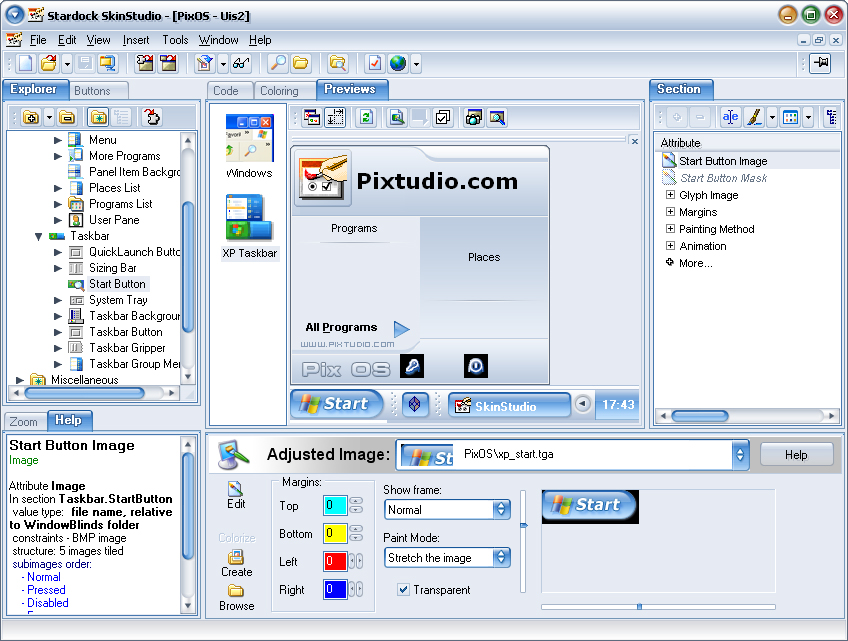
Sorry about the thread highjack, Jim.....just wanted to show a screeny of what sks5 looked like.
One nice thing about that UI was that you could click on the bits on the preview image and it would bring you to that section. One of the few things I still miss.
Attempting another. I have a few unfinished ones I gave up on. Thanks, Greg. 
NP, Tim. I got the info I needed from Dave.
Here it is now.
Moving along.

Thanks everyone for the input. Lightstar is somewhat on the same page except that the places list mouseover image I aam using is the same, but even if I remove the mouseover from the skin, I get that cross text usage. I did set all back to os default as I said and I also tried without the moseover on either side with the same result.
The os default is black normal and white mouseover, I want blue and white. SO , I guess its a code thing, no biggie, just trying to straighten myself out some on things. Bottom line was, no matter how it is achieved, I would like on the start menu, all portions, to be BLUE with WHITE mouseover, that simple. If someone accomplishes this, please share. Thanks again all of you.  Ten stars each for helping.
RND, very cool looking start menu, hope you finish, looks tasty!Very bold and usable looking, with nice color mix.
Ok, DT, My turn. I'm simply illustrating what Dave told me, I tested it, it works.
First make sure the mouseover item, text tab, is set to OS default, as per pic. All states.

Then, set your colors as below.

Then the mouseover state.

Welcome Guest! Please take the time to register with us.
Select a reason for giving karma:
You're about to visit an external site:
Sign up here to get the latest news, updates, and special offers delivered directly to your inbox.