Hey,
so i recently downloaded SoaSE Rebellion from steam, tweaked around with the graphics, and accidentaly set my gamma to super dark. now I cant sse anything when i play.
I've tried redownloading, but the problem persists.
Please Help!!
Look in the Rebellion mod Folder for a settings folder.C:\Users\[username]\Documents\My Games\Ironclad Games\Sins of a Solar Empire Rebellion\
I dont own and this is from Diplomacy and should be the same or close. One of the user.settings
TXT
Version 1194PlayerName "Osama Bin Ladin"PlayerThemeIndex 83PlayerPictureIndex 50PlayerColorIndex 0LastGameAddressConnectedTo "ji·had.com"LastGameHostPortConnectedTo 6112GameHostPort 6112GameBroadcastPort 6000EnableUPnPPortForwarding TRUEVideoAdapterOrdinal 0VideoIsWindowed TRUEVideoRefreshRate 60VideoFullScreenWidth 1920VideoFullScreenHeight 1080VideoWindowedWidth 1024VideoWindowedHeight 768VideoMultiSampleType 2TextureCompressionEnabled TRUETextureQualityForShipColor 3TextureQualityForShipData 2TextureQualityForShipBump 0TextureQualityForModuleColor 3TextureQualityForModuleData 2TextureQualityForModuleBump 0TextureQualityForPlanetColor 3Gamma 0.500000SoundMusicVolume 0.300000SoundEffectVolume 0.700000SoundDialogueVolume 0.500000SoundUIVolume 0.300000
I tried, but all it said in the Text file was
Version 0
And something about there beeing 0 enabled mods
Wrong file. You want the settings folder.
Ya I copied the mods install path from my tutorial so you probably looked at it before I trimmed the mod folder off the path. Try ...C:\Users\[username]\Documents\My Games\Ironclad Games\Sins of a Solar Empire Rebellion\Settings
mods go into ...C:\Users\[username]\Documents\My Games\Ironclad Games\Sins of a Solar Empire Rebellion\Mods-Rebellion v1.1
If that does not help try to
All I have is
C:\Dokumente und Einstellungen\user\Eigene Dateien\My Games\Ironclad Games\Sins of a Solar Empire Rebellion\Setting
(Yes, Setting, without an s)
and inside I have
rebellion.camera.setting
rebellion.user.setting
rebellion.uimappings.setting
Quoting myfist0, reply 1 One of the user.settings
search for the gamma line
Gamma 0.500000 <--- is default
if it is a slider, 0 will be off and 1 will be full. 0.5 will be middle
Its a .SETTING File, I dont know how to open it
ohhh lol, sorry
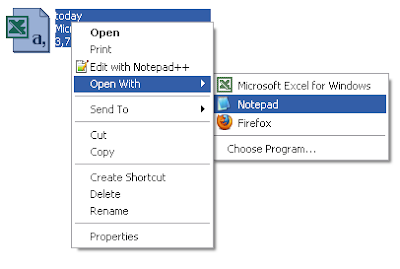
right click the file, select "Open with" and select notepad
you may need to "Choose Program" and select notepad
or
open notepad, file menu, open file, point to that directory and file
change and save
all modding files behave this way
It worked, thank you
There are many great features available to you once you register, including:
Sign in or Create Account