
Stardock's Tiles Beta for Object Desktop Subscribers

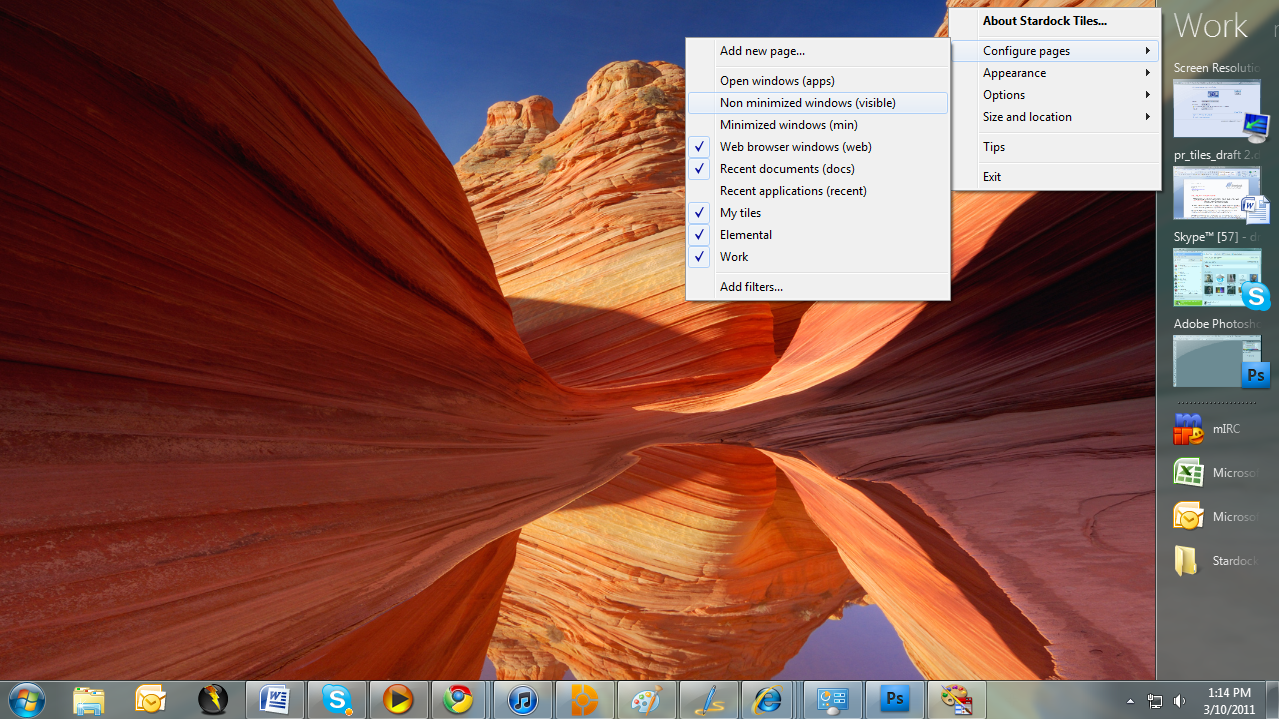
Today we are excited to release the first beta for a new desktop app called Tiles. 

https://forums.wincustomize.com/406240

“The current PC task management metaphor hasn’t really changed in over 18 years,” said Brad Wardell, President & CEO of Stardock. “In recent years, mobile devices have been able to introduce users to more modern metaphors of arranging their digital life.  Tiles has been designed to update that metaphor to the PC experience.”

Tiles works by taking advantage of the wider aspect ratios of today’s desktops. On the right side of the screen, a page of tiles is displayed. Users may have multiple pages that they organize as they see fit or make use of several sample page filters such as displaying only active windows or only web pages. Users can then switch between pages either by clicking on the page title or on touch systems by sweeping their finger across the page to “turn the page”.

Also check out the getting started guide: Getting Started with Stardock Tiles

Tiles is available via Impulse for current Object Desktop subscribers!
22,947 views 45 replies
Reply #1 Top

This is one fantastic app. Couldn't have asked for a better work organizer, SD.... Thank you so very much for this!

Jeff, this was a stroke of genius. Watch the trade journals for reviews on this!  5*

Reply #2 Top

Neat application. Fun to play with at start, but I do not see it taking over the default in my case. =)

Reply #3 Top

Quoting DrJBHL, reply 1
This is one fantastic app. Couldn't have asked for a better work organizer, SD.... Thank you so very much for this!

Jeff, this was a stroke of genius. Watch the trade journals for reviews on this! 
End of DrJBHL's quote

Actually this wasn't developed by Jeff.

Reply #4 Top

Was it developed by....NB?  ;)


Reply #5 Top

Quoting DrJBHL, reply 4
Was it developed by....NB? 

 
End of DrJBHL's quote

Well, to be fair, all our programs are a team effort. There's no one person. But Neil is the lead developer on Tiles.

Reply #6 Top

Why the option to hide taskbar without providing a start button/menu option?

Reply #7 Top

Quoting Phoon, reply 6
Why the option to hide taskbar without providing a start button/menu option?
End of Phoon's quote

Because you can still access the startmenu using the windows key (or by clicking at the top right / left of the tiles bar)

Reply #8 Top

or by clicking at the top right / left of the tiles bar
End of quote

can't seem to make that work..

Reply #9 Top

nice one. the "match current system skin" option is pretty cool.

Reply #10 Top

Quoting Phoon, reply 8

or by clicking at the top right / left of the tiles bar


can't seem to make that work..
End of Phoon's quote

You need to go the very top edge, so if the bar is on the left then top left of the screen, on the right then top right of the screen.

Reply #11 Top
It works well enough with some limitations. 1. It doesn't play well with Winstep. I can't drag a shortcut from WorkShelf or NextStart, as Tiles doesn't seem to translate them well (or maybe Winstep characterizes shortcuts differently). 2. I would like to be able to place tiles (on a shortcut page, for instance) in any order I choose by some method (just dragging to a particular location, maybe). 3. I would also like to see some kind of sorting capability on each page(ie alphabetical, A to Z and Z to A).
Reply #12 Top

1. It doesn't play well with Winstep. I
End of quote

Click on the "make desktop visible" and drag whichever icon you want into Tiles.

Reply #13 Top

Quoting Neil, reply 10

You need to go the very top edge, so if the bar is on the left then top left of the screen, on the right then top right of the screen.
End of Neil's quote

Not very functional on multi-monitor systems. You have 2 monitor, set up with primary monitor on the right (2-1) and put Tiles on the right side of monitor 2. (I have it there)

It's virtually impossible to hit the right spot to open the startmenu.

Reply #14 Top

Pretty cool guys! Nice to see you coming up with new stuff! :thumbsup:

Reply #15 Top

Agree with #13. If you have it positioned anywhere but the outer edge of either monitor.. you cannot hit the magic spot to trigger start menu. It shouldn't have to be a mystery spot to do this IMO.

I did have a couple of snafu's.

Open browser and go to a site. Drag the URL from the address bar to any tile page. Now try to unpin it. I can't! I had to find it in the registry and delete the key to do it.

If I repeat the process and use a program instead of a url I CAN unpin it just fine.


Had one instance where I set the taskbar to hide. It would not come back until I rebooted.

Reply #16 Top

Okay I have tried it and it works, like the fact that it is skinable or you can use the current WB theme. 

Now I just have to see where and how it fits in with ObjectDock, Fences and even the Windows 7 Taskbar.   I'm seeing a little duplication here now between some of the software. 

How are the rest of you thinking about this, switch to using Tiles only or a combination of the software?

Reply #17 Top

Seems to me that if I dragged my taskbar to the right hand side of the screen and made it double size, I would achieve more or less the same thing........... B[]

Maybe I'm missing something? :\

Reply #18 Top

How are the rest of you thinking about this, switch to using Tiles only or a combination of the software?
End of quote

Isn't necessarily an either/or for me. It's a work application, and groups my apps. I had been using sub-docks in winstep, but this is easier.

Looks good too. It's parallel is WorkShelf... in some ways, and if I wish to use WinStep then I use WorkShelf and add a tab for "Work" and put the same apps there. BUT, if I'm working from browsers, then it's a hassle.

Reply #19 Top

Maybe I'm missing something?
End of quote

Yes.  ;)


Reply #20 Top

Quoting Phoon, reply 15
Agree with #13. If you have it positioned anywhere but the outer edge of either monitor.. you cannot hit the magic spot to trigger start menu. It shouldn't have to be a mystery spot to do this IMO.

I did have a couple of snafu's.

Open browser and go to a site. Drag the URL from the address bar to any tile page. Now try to unpin it. I can't! I had to find it in the registry and delete the key to do it.

If I repeat the process and use a program instead of a url I CAN unpin it just fine.


Had one instance where I set the taskbar to hide. It would not come back until I rebooted.
End of Phoon's quote

You should be able to unpin by holding shift and dragging it back off or using the right click menu.

The startmenu feature is just something that was added as a test feature.

Reply #21 Top

hmm fences that are at the edge of the screen when tiles is active are not moved towards the centre of the screen so they are stuck underneth when reserve desktop space is enabled

Reply #22 Top

Quoting Anakey, reply 21
hmm fences that are at the edge of the screen when tiles is active are not moved towards the centre of the screen so they are stuck underneth when reserve desktop space is enabled
End of Anakey's quote

That will be a limitation of fences.. You would need to move them first.

Reply #23 Top

Is there a way of keeping programs or files/folders on one of the pages if they are closed, or is this app just for programs that are currently open?

Reply #24 Top

Funny how something new comes out right when my subscription expires.

I smell a conspiracy.

Reply #25 Top

You should be able to unpin by holding shift and dragging it back off or using the right click menu.
End of quote

should.. yes. The right click menu option doesn't do it though.

Shift-Drag does work.
