


Island Dog Island Dog

Stardock's Tiles Beta for Object Desktop Subscribers

Stardock's Tiles Beta for Object Desktop Subscribers

Today we are excited to release the first beta for a new desktop app called Tiles. 

https://forums.wincustomize.com/406240

“The current PC task management metaphor hasn’t really changed in over 18 years,” said Brad Wardell, President & CEO of Stardock. “In recent years, mobile devices have been able to introduce users to more modern metaphors of arranging their digital life.  Tiles has been designed to update that metaphor to the PC experience.”

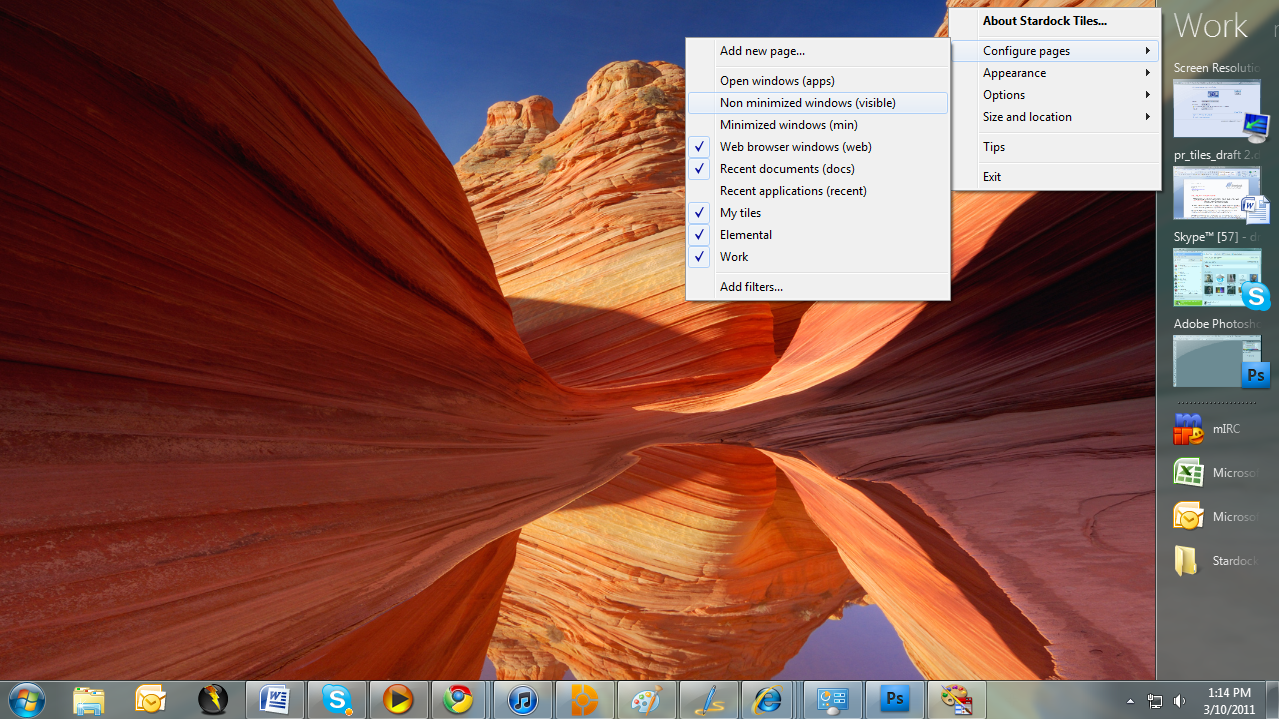
Tiles works by taking advantage of the wider aspect ratios of today’s desktops. On the right side of the screen, a page of tiles is displayed. Users may have multiple pages that they organize as they see fit or make use of several sample page filters such as displaying only active windows or only web pages. Users can then switch between pages either by clicking on the page title or on touch systems by sweeping their finger across the page to “turn the page”.

Also check out the getting started guide: Getting Started with Stardock Tiles

Tiles is available via Impulse for current Object Desktop subscribers!
22,955 views 45 replies
Reply #26 Top

Quoting PoSmedley, reply 24
Funny how something new comes out right when my subscription expires.

I smell a conspiracy.
End of PoSmedley's quote

It took a lot of careful planning to arrange it that way too you know...

Reply #27 Top

Quoting Phoon, reply 25

You should be able to unpin by holding shift and dragging it back off or using the right click menu.


should.. yes. The right click menu option doesn't do it though.

Shift-Drag does work.
End of Phoon's quote

Good to know.  Dragging URLs to it was a quite late addition so I guess that didn't get noticed.  I will look into it for the next update.

Reply #28 Top

Quoting karmat, reply 23
Is there a way of keeping programs or files/folders on one of the pages if they are closed, or is this app just for programs that are currently open?
End of karmat's quote

You can drag shortcuts to apps or documents or URLs to pages and they will be there regardless of if the app is running.

Reply #29 Top

The right click menu option doesn't do it though.
End of quote

Does for me.


But when I right click and choose configure pages, and recent apps, the thing locks up and crashes.

Reply #30 Top

cool just installed will check it out

Reply #31 Top

So far I love it! I got Object Desktop just to get this so now I've got lots to play with! :D

Reply #32 Top

Playing with tiles now.......one impression is: The end of Object Dock? Tiles seems to do everything that Object Dock does for me and more......we will see....... *_*

Reply #33 Top

It took a lot of careful planning to arrange it that way too you know...
End of quote

AHA!

Reply #34 Top

This program is freakin' awesome. fun to play with it. but, is it possible to add a filter in the tab "apps"? I added a new one for my messenger and i do not wnat my messenger in the "apps" tab. 

Reply #35 Top

Quoting Onklifiziert, reply 34
This program is freakin' awesome. fun to play with it. but, is it possible to add a filter in the tab "apps"? I added a new one for my messenger and i do not wnat my messenger in the "apps" tab. 
End of Onklifiziert's quote

The apps page is designed to include all windows.

Based on feedback we may add in the ability to exclude apps from a given tab.

Reply #36 Top

thanks for the reply, Neil

Reply #37 Top

I like that option (of being able to filter out apps)...although I also like the ability to see all running apps.

Reply #38 Top

I assume that you would be interested in constructive feedback since this is a beta? Is there any preferred feedback channel?

I really like where this app seems to be going. I imagine that it could replace the "multiple desktops for multiple contexts" paradigm that seems to be difficult to get working well in windows.

I've run into a few problems so far:

* I want to be able to pin shortcuts to folders that are related to the programs in certain tiles. Currently this leads to all Explorer windows being included in the programs listing of that tile and since I often have a good number of Explorer windows open this leads to clutter. There really should be some filtering based on the title of the window or similar so that only the relevant Explorer windows are included in a tile.

* The next problem is related. I run several applications that are java-based and with the current filtering Tiles cannot distinguish between them since the process-name is the same. Again, filtering based on the window title would solve this problem.

* Shortcuts should be copied when added to a tile. As it is, if you e.g. move a link from you quicklaunch toolbar to a tile and then remove it from the quicklaunch toolbar the link in Tiles will break!

Good work and good luck! :)

/Daniel

Reply #39 Top

I have opened a beta feedback thread so issues can more easily be contained.

https://forums.wincustomize.com/406271


Reply #40 Top

Oh, and some further suggestions that would be really helpful:

* Support for sorting and organizing the shortcuts. It's nice to be able to add all related shortcuts to a tile but some are more relevant than others and I'd like to be able to decide which ones are listed first.

* Faster switching between tiles. E.g., have the mouse-wheel change tile when hovering over the tile-names. And/or enabling keyboard shortcuts for switching, e.g., as is common with "virtual desktops".

/Daniel

Reply #41 Top

Moved my feedback to the assigned thread. Feel free to remove my posts here.

/Daniel

Reply #42 Top

Moved to feed back thread ! ;)

Reply #43 Top

Very nice little addition to the desktop.

Few things I wanted to point out, if I may. (Hey, if you love someone, you let them know about that little dab of mustard on their cheek before they go out in public)

- Doesn't seem to be a way to rename items you have added. Microsoft office in particular. (Word is visually more appealing and takes less space than Microsoft Office Word)

- Spacers? Unless I am missing something there doesn't appear to be a way to move items around. Such as having my email client showing on the bottom of the new page and internet apps showing near the top.

- Support for Gadgets? Tried to add a gadget that would be on the bottom of the page, but no go. (Yes I know it still has that new car smell from being recently released)

- Ability to rename a page? Can't seem to rename a page. Only delete and try not to error on typing.

Overall it is an awesome product! Can't wait to see more!

(Long Time Stardock junkie)

StumpMan

Reply #44 Top

Add the ability to add Windows Gadgets ala the old Vista Sidebar (which is missed by many by the way) and it will be something I am interest in.

Reply #45 Top

Wouldn't it be a Fences extra feature but another application?  :omg: The concept has interwoven,so is the usability.   :P