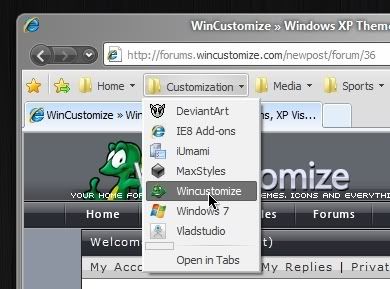
IE8 Skinning!

Are my eyes decieving me?  Or is Windowblinds skinning more of IE8 than previously?  The only thing not skinned for me right now is the actual tab... the buttons and menus and other top shelf real estate is no longer baby blue!  When did this wonderful update take place? :)

9,424 views 17 replies
Reply #1 Top

The toolbar is now gray instead of blue. But it is always gray no matter what skin is applied..........it just happens to look good with the skin you have showing there ;)

Reply #2 Top

....now, if we could just change the color ourselves.....

edit: By the way, the grey is waaaay better than than that baby blue. Thanks for that!

Reply #3 Top

Quoting 2of3, reply 1
The toolbar is now gray instead of blue. But it is always gray no matter what skin is applied..........it just happens to look good with the skin you have showing there
End of 2of3's quote

Close all copies of IE and reopen it.  There is an IE8 limitation that prevents the toolbar changing when it is open.

Reply #4 Top

Quoting Neil, reply 3

Close all copies of IE and reopen it.  There is an IE8 limitation that prevents the toolbar changing when it is open.
End of Neil's quote

That does not change it for me. It's the same grey for all skins.

Reply #5 Top

So is the new gray toolbar an IE8 change or a Windowblinds change?

Reply #6 Top

My toolbar in IE8 matches my applied WB skin just fine, and changes when a new WB is applied too.  It also changes in all copies of IE8 even if I have multiple copies open.  So don't know what the issues could possibly be here.  This is in Windows XP though.  *_*

Reply #7 Top

This is in Windows XP though
End of quote
I'm in Windows7.

Edit: I just checked Vista. Those Toolbars are properly skinned.

Edit of the edit: oops, I forgot, I still have IE7 on Vista ;P

Reply #8 Top

Quoting LightStar, reply 6
My toolbar in IE8 matches my applied WB skin just fine, and changes when a new WB is applied too.  It also changes in all copies of IE8 even if I have multiple copies open.  So don't know what the issues could possibly be here.  This is in Windows XP though. 
End of LightStar's quote

IE8 on XP is different and never had the baby blue toolbar.

On Win7/Vista WindowBlinds should now be using a colour based on the skins button face system colour.  This is not perfect but works reasonably well with most skins.  If it does not appear to be picking a similar colour then I would suggest rebooting as it should be fine then.

Reply #9 Top

I like to be able to skin ie8, any chance of this happening???

Reply #10 Top

On Win7/Vista WindowBlinds should now be using a colour based on the skins button face system colour. This is not perfect but works reasonably well with most skins. If it does not appear to be picking a similar colour then I would suggest rebooting as it should be fine then.
End of quote

This no longer seems to be the case anymore.......it was nice while it lasted

Reply #11 Top

Quoting 2of3, reply 10

On Win7/Vista WindowBlinds should now be using a colour based on the skins button face system colour. This is not perfect but works reasonably well with most skins. If it does not appear to be picking a similar colour then I would suggest rebooting as it should be fine then.


This no longer seems to be the case anymore.......it was nice while it lasted
End of 2of3's quote

The latest build works in the same way to the previous build.

The baby blue colour will not be in use.

Remember that if you have ANY IE8 copies open in taskmanager then the colour change will not be picked up until those have been closed.

Reply #12 Top

I don't know, Neil. There must be something I'm not getting. I change the color without any apparent change to the toolbar (yes I have rebooted after the change). Is it just the button face color or a combo of other items.

Reply #13 Top

Remember that if you have ANY IE8 copies open in taskmanager then the colour change will not be picked up until those have been closed.
End of quote
I'm having trouble with that too now. I didnt have IE8 open at all and I cant seem to change it.

When it changed before the update, I was toying with the button face and button light and button shadow...all three seemed to change the color, now it seems that none of them do.

Am I doing something wrong? Is there a setting somewhere that is overriding my color changes? I dunno. Help me Obi Wan!

Reply #14 Top

boink

Reply #16 Top

butmines
End of quote


gonna leave that one alone :lol:

Reply #17 Top

I noticed something that got me thinking about how to get the toolbars skinnable. When you open IE, you can see a quick flash of the skinned toolbar before the one we see all the time appears.

This suggests to me that the toolbars are being skinned but are getting covered. Am I correct?

If this is the case (and I know nothing about the coding of Windowblinds), wouldn't it be great if we could introduce an alpha to the current toolbars and make them transparent, so we can see through them to the skinned ones? Is this possible?