IconPackager on Sale for $5 This Weekend

IconPackager, the widely popular application that lets you change nearly all of your Windows icons at once using “packages” is on sale for just $4.98 this weekend on Impulse.  IconPackager is included with Object Desktop, so if you aren’t looking for the entire package and just want to change your icons, this is the time to grab it.  It would also make a great gift!

Get IconPackager 5 for just $4.98!

iconpackager

4,670 views 11 replies
Reply #1 Top
Impulse needed for IconPackager or not ? If needed , thanks for good price , but no ...
Reply #2 Top
let's try this :) @henriss: I think Impulse is required for install and activation. Then, you don't need to run impulse anymore. Or am I wrong?
Reply #3 Top
thanks for reply , yes you wrong ... IconPackager have its own activation file and generating .sid file , for what purposes needed impulse i dont know ...
Reply #4 Top

@ Henriss no sorry to say but Impulse is needed

 System Requirements

Requires: Windows XP, Windows Vista, Windows 7
Impulse must be installed in order to download and update software
IconPackager Resources
Reply #5 Top

Edit  you know what happened

Reply #7 Top

Quoting doctorwizz, reply 6
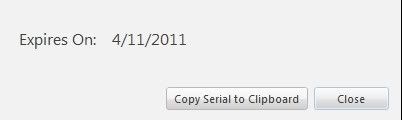
This expires after a year? WTF
End of doctorwizz's quote

Where did you get the idea from that it expires after a year?

Reply #8 Top
Same with my Fences Pro reg. Is this true? That is screenshot is from Impulse.
Reply #9 Top

only updates Expire after a year you can still use the program for life..

it's like most programs you buy it get a year of patches, update for a year but after the years you still get to use the app.

if after that year you can renew for another year at a discount and get the newest updates

Reply #10 Top

I'm not sure why Impulse is displaying that.  Typically stand-alone versions will have free updates until the next major revision.


Reply #11 Top

It's the View Registrations rmb menu that's doing it. If there's not an associated end-date, it should be leaving it blank. Instead it's putting a year from when it got added to the account (more or less). Will see about having that adjusted a little. The View Registrations section under the blue ? icon should properly show "None" for an expiration date for those.