Windows Explorer crashes using WindowBlinds 7 Shareware

Help!!

I installed WindowBlinds 7 Shareware (downloaded from Stardock site) and apply some skins, when i hover the taskbar buttons for 2 seconds or more, the system freezes completely and a window message saying "windows explorer has stopped working" appears.


My system specs:


WB Data:

Your computer has a Windows Experience Index base score of 1
Your Windows Graphics Experience score is 1

WindowBlinds version : WindowBlinds 7.0 (build 230 - Windows 7 Edition) - Shareware

WindowBlinds is installed correctly on this PC
(Monitor PnP genérico) 1 is attached to VIA/S3G UniChrome Pro IGP

Wblind.dll         2009/11/13 09:03:ll
Wbsrv.dll         2009/11/13 09:03:23
SevenConfig.exe         2009/11/13 12:27:15
Wbload.exe         2009/11/10 13:53:12
Wbhelp.dll         2009/06/04 15:14:07
Tray.dll              2009/10/23 19:12:19
Wbload.dll              2009/06/04 15:13:28
Screen.exe         2009/11/10 13:52:48

O.S. : Windows 7 Ultimate build 7600 (spanish)

Processor: P4 @ 3.0 Ghz

RAM: 1 Gb DDR 333

Video Card: VIA/S3G UniChrome Pro IGP (Integrated Video Card, 64 mb, NO AERO Support)


Help!!!!

11,660 views 23 replies
Reply #1 Top

Which skins are you trying?

I have tried with the DWM disabled and am not encountering any crashes when mouseovering the taskbar buttons.

Reply #2 Top

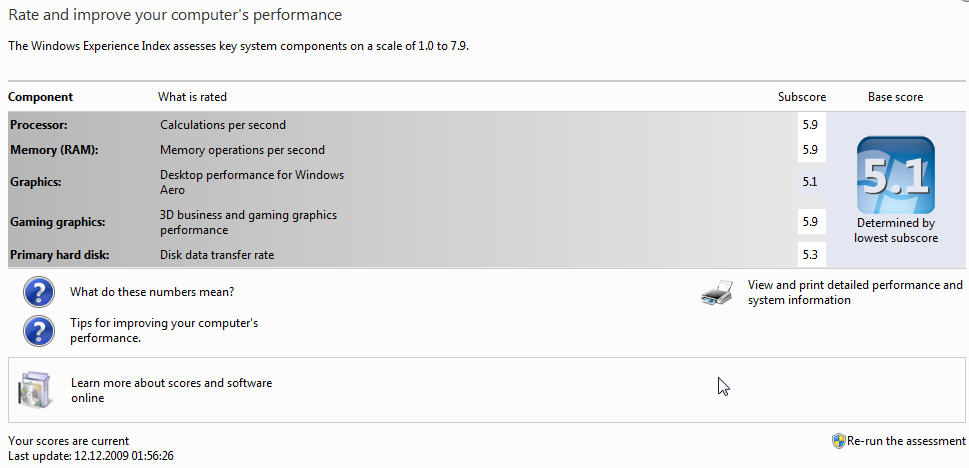
Your computer has a Windows Experience Index base score of 1

Your Windows Graphics Experience score is 1
End of quote

Update your Experience Index Score.....

Reply #3 Top

VIA/S3G UniChrome Pro IGP (Integrated Video Card, 64 mb, NO AERO Support
End of quote

Not going to help : VIA/S3G UniChrome Pro IGP (Integrated Video Card, 64 mb, NO AERO Support)

Reply #4 Top

Quoting Neil, reply 1
Which skins are you trying?

I have tried with the DWM disabled and am not encountering any crashes when mouseovering the taskbar buttons.
End of Neil's quote


Doesn't work, same error

Reply #5 Top

I have a brand new WindowBlinds for a couple of hours running on Windows 7 32bit Ultimate with countless Errors: "Windows Explorer stopped working".

Here the information from the event log:

Event 1002, Application Hang

The program explorer.exe version 6.1.7600.16404 stopped interacting with Windows and was closed. To see if more information about the problem is available, check the problem history in the Action Center control panel.
Process ID: 9b8
Start Time: 01ca7ab467b76deb
Termination Time: 0
Application Path: C:\Windows\explorer.exe
Report Id: 8c34ee5f-e6af-11de-bba5-001e3786da31

My Windows 7 installation is two weeks old and all drivers are up do date without any errors. The explorer crash happens with skins that are "Vista ready".

Is this a common problem? Any news about this?

Thanks,

Wolfgang

Reply #6 Top

Your computer has a Windows Experience Index base score of 1

Your Windows Graphics Experience score is 1
End of quote

As yrag and Neil says....that'll be your problem....;)

Reply #7 Top

I don't think so >_> :


oh, I forgot to mention that I don't have the shareware version. I just bought a new commercial version.

Reply #8 Top

I don't think so
End of quote

I was responding to the OP [ENIGMAXG2]...;)

Reply #9 Top

Drachenstein66 -

Please open the WindowBlinds configuration screen and click on 'About WindowBlinds'. Copy the information from the screen that comes up and paste that info here.

Reply #10 Top

Quoting Hankers, reply 9
Drachenstein66 -

Please open the WindowBlinds configuration screen and click on 'About WindowBlinds'. Copy the information from the screen that comes up and paste that info here.
End of Hankers's quote

Doesen't look too bad actually:


Your computer has a Windows Experience Index base score of 5.1
Your Windows Graphics Experience score is 5.1

WindowBlinds version : WindowBlinds 7.0 (build 230 - Windows 7 Edition)

WindowBlinds is installed correctly on this PC
WindowBlinds appears to be activated on this PC
(ThinkPad Display 1920x1200) 1 is attached to NVIDIA Quadro FX 570M
(Generic PnP Monitor) 2 is attached to NVIDIA Quadro FX 570M

Wblind.dll        2009/11/16 18:43:20
Wbsrv.dll         2009/11/12 15:19:07
SevenConfig.exe   2009/11/12 17:16:53
Wbload.exe        2009/11/06 18:44:12
Wbhelp.dll        2009/10/07 21:35:07
Tray.dll          2009/10/21 15:13:19
Wbload.dll        2009/09/25 14:41:29
Screen.exe        2009/11/07 18:39:26


It's not every time, but sometimes also here it crashes when hovering with the mouse over an icon in the taskbar. Then again i can hover many times without something happens. But it looks really like it has something to do with the task bar.

Thanks for any hints!

Reply #11 Top

Quoting Drachenstein66, reply 10


Quoting Hankers,
reply 9
Drachenstein66 -

Please open the WindowBlinds configuration screen and click on 'About WindowBlinds'. Copy the information from the screen that comes up and paste that info here.


Doesen't look too bad actually:

Your computer has a Windows Experience Index base score of 5.1
Your Windows Graphics Experience score is 5.1

WindowBlinds version : WindowBlinds 7.0 (build 230 - Windows 7 Edition)

WindowBlinds is installed correctly on this PC
WindowBlinds appears to be activated on this PC
(ThinkPad Display 1920x1200) 1 is attached to NVIDIA Quadro FX 570M
(Generic PnP Monitor) 2 is attached to NVIDIA Quadro FX 570M

Wblind.dll        2009/11/16 18:43:20
Wbsrv.dll         2009/11/12 15:19:07
SevenConfig.exe   2009/11/12 17:16:53
Wbload.exe        2009/11/06 18:44:12
Wbhelp.dll        2009/10/07 21:35:07
Tray.dll          2009/10/21 15:13:19
Wbload.dll        2009/09/25 14:41:29
Screen.exe        2009/11/07 18:39:26

Thanks for any hints!
End of Drachenstein66's quote

In Impulse enable show prereleases (on the menu you can open from the top left of the impulse window).

Then install the beta update which is WB 7.01.  Hopefully this will resolve your problem.

Reply #12 Top

Quoting Neil, reply 11


In Impulse enable show prereleases (on the menu you can open from the top left of the impulse window).

Then install the beta update which is WB 7.01.  Hopefully this will resolve your problem.
End of Neil's quote

Okay, prereleases are enabled. But something goes wrong, during the download it always (tried several times) seems to stop and says "File downloaded is larger than expected":

Any advice?


edit: Google search with +impulse "file downloaded is larger than expected" shows 1'520 results. It's 03:30 a.m. and I'm really tired of all of this.

Reply #13 Top

This can happen when there are security programs that interfere with the download. If you have any such programs, try adding Impulse.exe as an exclusion in them. If this does not help, try temporarily disabling them and then try again.

Also, you could uninstall WindowBlinds and then reinstall.

Reply #14 Top

Quoting Hankers, reply 13
This can happen when there are security programs that interfere with the download. If you have any such programs, try adding Impulse.exe as an exclusion in them. If this does not help, try temporarily disabling them and then try again.
End of Hankers's quote

No, in my firewall all the Starbucks (ahem, -docks) and Impulse stuff (hell, why does this require so many entries at all???) is enabled in both directions.

Quoting Hankers, reply 13

Also, you could uninstall WindowBlinds and then reinstall.
End of Hankers's quote

Or I could only uninstall.... :rolleyes:

Reply #15 Top

Try updating by clicking on the "Install All Updates" button under the help icon.

Reply #16 Top

I also tried that. It always stops when 80% reached in the status column.

So how can this thing complain about that the file is larger than expected when not even 100% downloaded?

04:00 am. Either I go to bed now or sooner or later such nice guys with the white jackets are coming to get me.... *ggg*  :waaaa:

Reply #17 Top

I also tried that. It always stops when 80% reached in the status column.

So how can this thing complain about that the file is larger than expected when not even 100% downloaded?
End of quote

Drachenstein66...I'm currently having the same issue in a vmware of win 7 ult 64bit....and running a debug....passing the info on to the 'guys in white coats'.

It's a recent problem, it seems...and will be resolved soonish....;)

Reply #18 Top

Thanks Jafo!

I've seen that there's a seperate thread dealing with the "file size" issue anyways... After this is solved and I have the 7.01 Beta I'll report here about any news regarding the "explorer crash".

Reply #19 Top

explorer crashing here too,when i right click on icon on desktop.may not be to do with windowblinds,have windows 7 64bit.have same problem whatever the skin.changed antivirus and firewall so its not that.have latest windowblinds build.

Reply #20 Top

davyandjane: Does the windows event log say what caused the crash?

Reply #21 Top

Log Name:      Application
Source:        Application Error
Date:          12/12/2009 12:11:57
Event ID:      1000
Task Category: (100)
Level:         Error
Keywords:      Classic
User:          N/A
Computer:      Davy-PC
Description:
Faulting application name: Explorer.EXE, version: 6.1.7600.16404, time stamp: 0x4a765771
Faulting module name: EXPLORERFRAME.dll, version: 6.1.7600.16385, time stamp: 0x4a5bdf82
Exception code: 0xc0000005
Fault offset: 0x000000000001d2d1
Faulting process id: 0x618
Faulting application start time: 0x01ca7b21f982faef
Faulting application path: C:\Windows\Explorer.EXE
Faulting module path: C:\Windows\system32\EXPLORERFRAME.dll
Report Id: 8a8c3b44-e717-11de-a35f-001f16f9ecaf
Event Xml:
<Event xmlns="http://schemas.microsoft.com/win/2004/08/events/event">
  <System>
    <Provider Name="Application Error" />
    <EventID Qualifiers="0">1000</EventID>
    <Level>2</Level>
    <Task>100</Task>
    <Keywords>0x80000000000000</Keywords>
    <TimeCreated SystemTime="2009-12-12T12:11:57.000000000Z" />
    <EventRecordID>2858</EventRecordID>
    <Channel>Application</Channel>
    <Computer>Davy-PC</Computer>
    <Security />
  </System>
  <EventData>
    <Data>Explorer.EXE</Data>
    <Data>6.1.7600.16404</Data>
    <Data>4a765771</Data>
    <Data>EXPLORERFRAME.dll</Data>
    <Data>6.1.7600.16385</Data>
    <Data>4a5bdf82</Data>
    <Data>c0000005</Data>
    <Data>000000000001d2d1</Data>
    <Data>618</Data>
    <Data>01ca7b21f982faef</Data>
    <Data>C:\Windows\Explorer.EXE</Data>
    <Data>C:\Windows\system32\EXPLORERFRAME.dll</Data>
    <Data>8a8c3b44-e717-11de-a35f-001f16f9ecaf</Data>
  </EventData>
</Event>

dont mean a thing to me

Reply #22 Top

dont mean a thing to me
End of quote

That's OK....I think it'll mean something to Neil....;)

Reply #23 Top

As a solution for Stardock until this Windows Explorer crash is fixed I'd suggest the following:

In the WB settings there is an option "Use the taskbar and startmenu from this skin:" but there you can't choose a windows standard scheme (or the possibility to choose "none".
I think it would be good to also have this option to prevent WB from crashing all the time.

That just came into my mind after Windows Explorer crashed two times within five minutes as I clicked on an icon in the taskbar. In Windows 7 the taskbar is quite different from vista, so for example all Internet Explorer instances are shown in one icon but located on the left side in the quick start area. Maybe WB has a problem with this new style of the taskbar.