Organize Your PC Desktop with Stardock's Fences 1.0

Stardock, the world leader in desktop customization, today released the highly anticipated version 1.0 of its popular and free desktop organization application, Fences. Fences is a one-of-a-kind program designed to organize the desktop by allowing users to customize how icons and files reside on the desktop based on user-defined preferences. Fences is the ultimate tool for those users who want to keep their PC desktop clear of clutter.

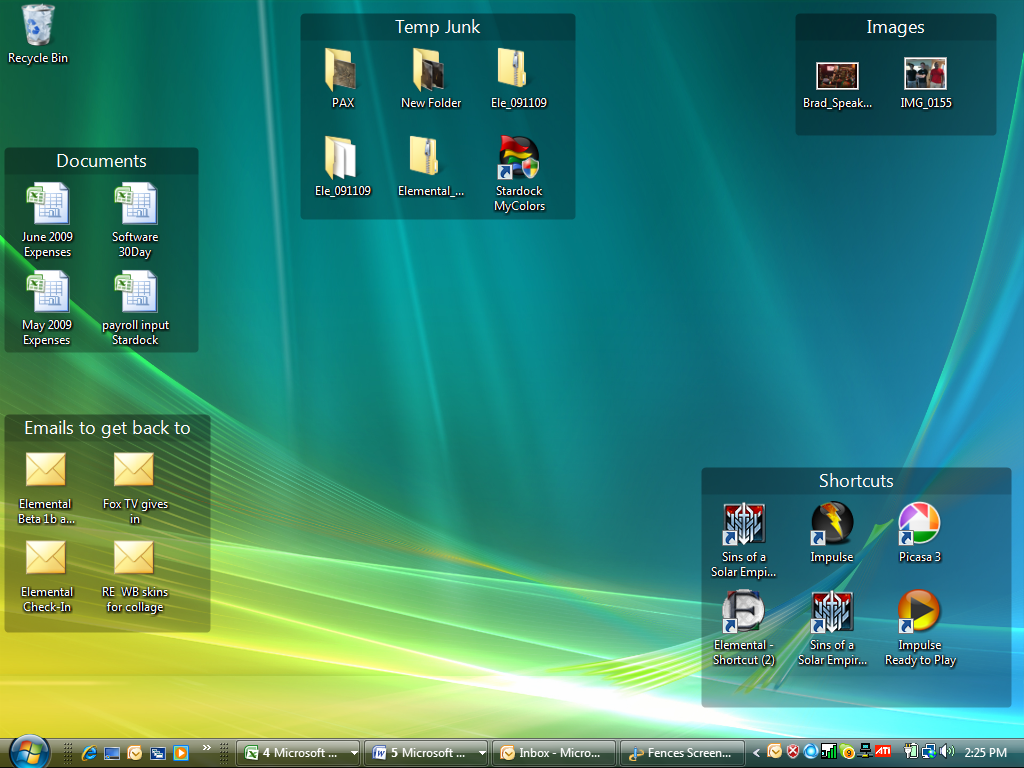
Fences works by allowing users to “draw” labeled shaded areas on the desktop, which become movable & resizable containers for any desktop icon. These groups can help bring organization and consistency to your computer's desktop, solving the "constant mess" problem that has plagued the desktop since its inception. Fences also helps users finally appreciate the wallpaper hiding behind a cluttered desktop.

In addition to its organizing features, Fences offers a quick-hide feature: Double click your desktop, and all your icons will fade out. Double click again, and they'll return.

Fences is free and can be downloaded here: https://www.stardock.com/products/fences/index.asp. Screenshots and demonstration videos are also provided.

image

System Requirements:

  • Windows XP, Windows Vista, or Windows 7
  • On Vista and Windows 7, both 32bit and 64bit versions are supported.

9,362 views 17 replies
Reply #1 Top
Thank you for the stand alone installer :CONGRAT:
Reply #2 Top

I (happy dance) for Fences!   :digichet:  

Reply #3 Top
Love this program! Question, it says next month Pro version. Will that be part of Object Desktop or will I have to purchase it separately? Just curious, thanks for the great job!
Reply #4 Top
YOU GUYS MADE C|NET!!! http://download.cnet.com/8301-2007_4-10367053-12.html
Reply #5 Top
One of my favorite programs  :CONGRAT: 
Reply #6 Top
I LOVE Fences! It's so good, I feel like I ought to be paying for it!
Reply #8 Top

/me waits for it to come on Impulse, tomorrow ;)

Reply #9 Top
+1
Reply #12 Top
Nice program. However, they still haven't incorporated my suggestion. That is, whenever you have fences hidden and you download/drag/copy something to the desktop, it's also hidden. Instead, it's the other way around and you can't see what you just placed on your desktop until you unhide your fences with a double click. Sure you can exclude anything you place on your desktop from being hidden, but you have to first unhide fences, then select what it was you just placed on your desktop to be excluded. What a pain!!! This makes the program unusable for me, since I use my desktop as a "container" for temporary things I work on. My two cents.
Reply #13 Top

Requires users to upgrade from Internet Explorer 6 or it will not run.
End of quote

No, it does not.

The version found at CNet does not require you to have Impulse or IE7 installed for it to install or work.


Reply #14 Top

It should also be available on Impulse now.  :)

Reply #15 Top
No, it does not. The version found at CNet does not require you to have Impulse or IE7 installed for it to install or work.
End of quote
Thanks for the tip. I'm checking now for my older PC.
Reply #16 Top

Unistalled the old...in with the new via Impulse. Working like a charm.