Pirate theme issue...

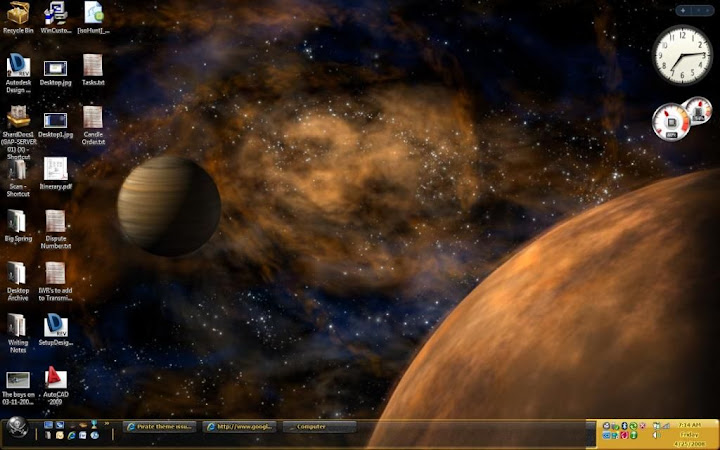
I like the pirate theme. However, the bottom-right section of the taskbar, the section that tells the date and holds the notification icons, is not transparent like the rest of the taskbar. I've tried to look past it, but the sharp difference in color is becoming too much. Is there an update to the theme? I only bought it a couple days ago. The other themes seem to work okay.

Thanks,
Paul

2,658 views 11 replies
Reply #1 Top
What OS?
Applying through MyColors?

I didn't think there was transparency in that taskbar.
Screenshots here:
https://www.stardock.com/products/mycolors/gallery.asp?p=pirate

Vista:


Can you post your screenshot?
Reply #2 Top
Mine is transparent in the middle and left sections. I'm running Vista Ultimate, and I applied it through Theme Manager.


Thanks for your help,
-Paul
Reply #3 Top
The photo didn't come out right. Let me try again:

Reply #4 Top
It's not even supposed to be transparent at default, so my guess is your doing that through WindowBlinds and the system tray isn't affected or something else is messed up.
Reply #5 Top
Are you running any other customizations?
Do you run Windowblinds and had selected teh Vista-tize option?
Reply #6 Top
You must have Windowblinds set to use transparent taskbar. The skin is not supposed to have a transparent taskbar.

Check..... Windowblinds Config> Transparency & Blur> I want to change how the taskbar looks> Set to Skin DeFault

edit: typed too slow
Reply #7 Top
I don't have any other custimizations except for the dream scene running in the background. Also, the Pirate theme isn't showing up in Windowblinds. I'm thoroughly confused.

-Paul
Reply #8 Top
Check..... Windowblinds Config> Transparency & Blur> I want to change how the taskbar looks> Set to Skin DeFault
End of quote


This is a universal setting.........even if the Pirate Theme is not showing check the setting.
Reply #9 Top
This is a universal setting.........even if the Pirate Theme is not showing check the setting.
End of quote

Then re-apply the Pirate theme through Theme Manager.
Reply #10 Top
I just received an email from stardock about re-downloading the theme through My Colors. Once I did that and re-applied the theme, it fixed itself. The bar is completely solid along the bottom. Thank you all for your help in getting that fixed. Now, if we can just convince stardock to make the bar transparent to add to the cool factor...

Also, someone should make a dream so that the supplied Pirate's Flag wallpaper blows in the wind. That would be sweet. Also, they should make the water in the other supplied wallpaper shimmer. Man, I wish I knew how to make those dreams; I would like to give it a shot myself.

Thanks again,
Paul
Reply #11 Top
Anytime! However I do recall some fantasic artist DID make a flag dream for this.... Hrm....I'll look into it.

Likely you had a predated theme manager that was casuing the trouble. However for anyone else reading this in the WindowBlinds settings (that can now affect MyColors) there is a transparent tool bar tool in your settings menu. If this is run after the MyColors is applied it will affect the settings.