Island Dog Island Dog

WindowBlinds 6 Released!

WindowBlinds 6 Released!

The Next Generation of WindowBlinds Is Here

Stardock is pleased to announced the official release of WindowBlinds 6. WindowBlinds is a utility that allows users to change the look and feel of the Windows desktop experience by applying skins to the user interface in both Windows Vista and XP. WindowBlinds can change title bars, push buttons, Start bars, scrollbars and nearly every other element of the Windows user interface.

WindowBlinds 6 adds the ability to have "blurred glass" window borders on Windows XP which allows artists to make skins that could make Windows XP look virtually identical to Windows Vista.

WindowBlinds 6 also adds full support for customizing Microsoft’s new Windows Vista operating system. Everything from Internet Explorer 7 skinning, Sidebar skinning to explorer backgrounds, WindowBlinds 6 skins virtually every element of Windows Vista while making full use of the hardware acceleration features on Windows Vista for maximum performance.

The new version also adds a host of other features including advanced animation support in skins, user-creatable skin sub-styles, a new, easy to use configuration program, user customization options of fonts and colors in skins and much more.

Users who purchased WindowBlinds after February 1, 2007 will receive the update for free. The enhanced registered version is $19.95 or can be purchased as part of
Object Desktop, Stardock's flagship suite of desktop enhancement programs which includes IconPackager, DesktopX, ObjectBar, DeskScapes, LogonStudio Vista, and more.

Buy ObjectDesktop (Includes WindowBlinds) - $49.95
Buy WindowBlinds 6 Standalone - $19.95


Requires: Windows XP or Windows Vista (32-bit and 64-bit)
Download a free trial at www.windowblinds.net


51,710 views 111 replies
Reply #76 Top
koolet22: I have heard that ThemeManager needs a small tweak to handle WB6 and that this is currently in testing.
Reply #77 Top
Awesome!!!! been waiting for WB6.... now all we need is I.R. Brainiac to update Knot Vista for WB6 and I'll be in 7th heaven
Reply #78 Top
You are right about the edit of a wb with animations Neil. But no matter I've gotten past that and this is truely a new experience! GREAT WORK Team~!

SGT  
Reply #79 Top
I forgot to mentioned about the other problem I encountered with WB6 aside from molten wb, once I apply other theme, the min max close button dissapear!!!!  
Reply #80 Top
Cool, a public beta testing group. I'm happy I can be part of something.
Reply #81 Top
Also.. there is still a bad area all the way left on taskbar when using blur\trans on it.

lastly..having some areas go trans and not others sorta defeats the purpose. Seems like it should be all or nothing. Trans frames with big opaque buttons looks bad.


Same here...I can see the strange diagonal gradients too(vista)...and the taskbar blurring quits after a short while,comes back if you lock the taskbar(sometimes),quits again if you unlock it.(xp)

Window frame blurring in vista is darker than blurring in Start menu or taskbar.

Window frame blurring in XP still dosnt blur other window frames...just the windows contents.


Reply #82 Top
now all we need is I.R. Brainiac to update Knot Vista for WB6 and I'll be in 7th heaven


Busy right now but it will happen.  
Reply #83 Top
skins for XP are are located under C:/Documents and Settings/ALL users/Documents/Stardock/windowblinds
End of quote

Now THAT'S what I needed! Thanks!!  

 
The design doesn't call for a user icon.
End of quote

aha!

So far, excellent, reboots and all, 2nd day. Still sniffing for glitches, beer-bumps and whiskey-crunches...none. Runs like a new Beemer. Thanks, everyone who had a hand in this. It's rockin'!   

[what's up w/ funky quote-gadget here? No cool color-highlights showing, only{"quote..."]
Reply #84 Top
So far, excellent, reboots and all, 2nd day. Still sniffing for glitches, beer-bumps and whiskey-crunches...none. Runs like a new Beemer. Thanks, everyone who had a hand in this. It's rockin'!


I would like to come up with a better reply then seldomseen, but I can't! Very nice work evryone.  
Reply #85 Top
What styles come with the registered version?

How do we get updates/bug fixes?

I tried the trial version and some WB5 styles seem to appear a little differently than using WB5. One example is the Vectra style. Is this because I use the trial version?
Reply #86 Top
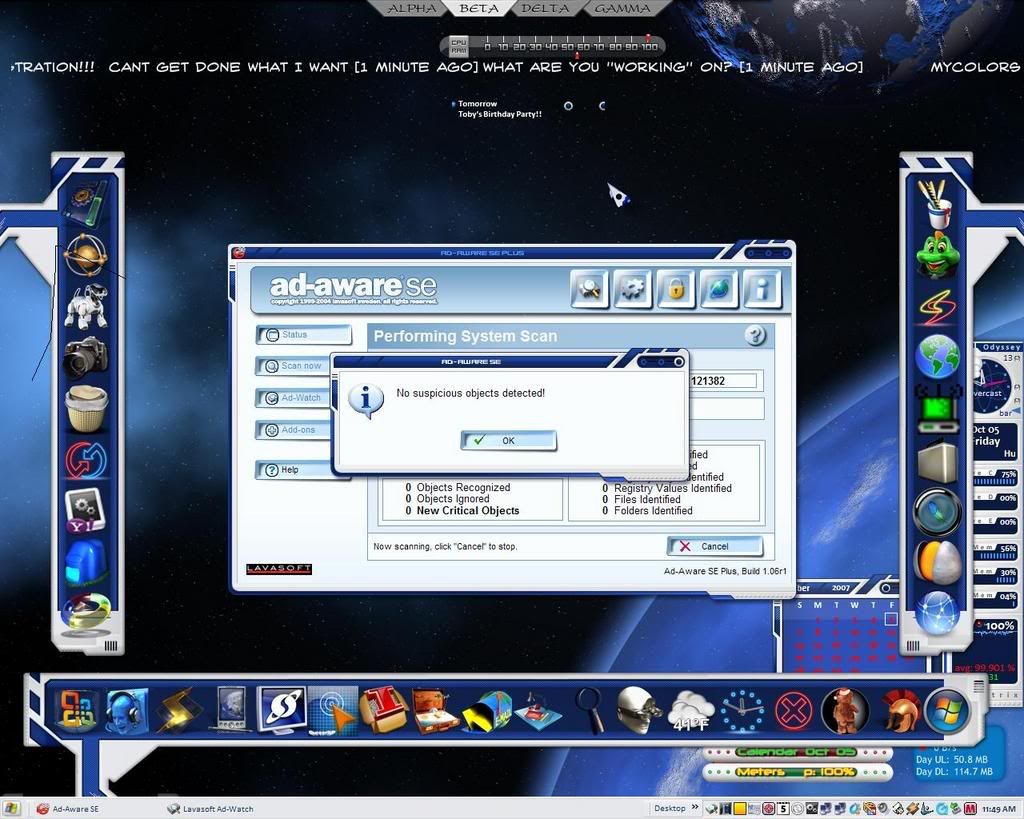
Ohh Kay... Just rebooted and no skinned taskbar, no skinned start menu, no taskbar showing in wbconfig. Opened Theme Mgr/Visual Styles, selected Odyssey.wba, and skin installed correctly. However, even tho taskbar and start menu are now skinned, there's still no taskbar visible in the preview pane of wbconfig, and selecting that to install results in an unskinned taskbar and start menu. Now going to Theme Mgr. and install Odyssey via TM again. Puzzling, eh?   

[later] Went to TM, two(!) copies of Odyssey shown in Visual Styles" section of TM. Installed one, skinned o.k. Deleted other copy shown in window of TM. Selected remaining Odyssey showing, and it installed except for taskbar and start menu. After choosing another .wba, deleted remaining copy of Odyssey, chose "add" from TM window, chose Odyssey.wba from my original download folder, and it's running correctly at the moment. Haven't yet rebooted.

Just looked in wbconfig and, even though I'm running Odyssey, start menu and taskbar skinned, Odyssey doesn't show in wbcofig at all...?

I'll get a screenshot...
Reply #87 Top
Hi Seldom! try: skin options> rebuild skin list..
Reply #88 Top
Thanks, Bilbo! Tried Rebuild Skin List and nada, zip, nothing. Dunno what's happening. Currently showing Odyssey as my theme in use, as I look at the desktop.

Just tried Rebuild Skin List and Odyssey popped into wbconfig again, taskbar and all. Went from above screenshot to normal wbconfig preview pane. Selected it and Odyssey reapplied per usual.

Will now reboot and see what I get.
Reply #89 Top
I am one of the unlucky who cannot upgrade. I have XP 64. Not supported. Not sure why? WB 5 supported XP 64.
Reply #90 Top
Will now reboot and see what I get.

got this:

"Refresh skin list" had no result this time, as far as making Odyssey taskbar appear in wbconfig....

Will reinstall Odyssey now, cross my fingers, have some pie and find my blankie. Try again manana.
Reply #91 Top
Boot Shot next day (today), Oct 5


>WBconfig>switch skins>delete Odyssey>"Add new visual styles">Odyssey...[now taskbar and start panel show in preview]...Apply>...[waits for next hiccup or reboot...waits... shhhh h h ]
Reply #92 Top
Sorry to see you having probs Seldomseen, at least we know the skin is functional, otherwise I might be concerned.   
Reply #93 Top
i hope good for now seldom!
indeed nice shot!
Reply #94 Top
seldomseen, the problem we get is not a "skin" problem. I get that with about 90 % off my skins (and i've a lot ...) as said on the thread "Weird problem ..."
Reply #95 Top
Yes, neophil, we've caught a bug, no doubt. If I uninstall WB6 and go back to 5.51 is the only thing I know to do. If I do that, all is well. And yes, this issue is in no way "skin-specific". All themes behave the same for me under WB6.       
Staying with WB6 for now, just in case a solution is found.
Reply #96 Top
Have you guys trid the ODNT Zapper before installing? Could be some renegade registry entry.

When I run into crap like this I always assume it's system specific and I repair windows or format.
Reply #97 Top
seldomseen, the problem we get is not a "skin" problem. I get that with about 90 % off my skins (and i've a lot ...) as said on the thread "Weird problem ..."


... and i just verified, i also have this problem as well with "Odyssey" ...

Reply #98 Top
Have you guys trid the ODNT Zapper before installing? Could be some renegade registry entry.

When I run into crap like this I always assume it's system specific and I repair windows or format.


Hey man, just have a look at the thread Weird problem since updating to WB 5.92.090 WWW Link and you'll see i've done everything and much more (reparing XP as well ...) to try to see where that problem comes from (and i get it on 2 different PC's ...   ) so it's not a problem of my PC's and it's neither a problem of other software running on it because this problem did not exist before the WB6 beta version update (the one which moved the files ...)

... And it can not be a PC problem when different people have exactly the same trouble ... (i will count how many have declared the same thing only in that specific thead - because there's quiet a lot of probabilities some others have the same problem but they did not point on to it and/or mention it on any other thread ...)
Reply #100 Top
So, my shutdown process is, for now, open wbconfig, choose a lesser-used skin to render incomplete, apply it, shut down.

Upon reboot, there's the theme, sans skinned taskbar and start menu...'til I delete/reinstall that theme...
...open wbconfig, choose skin I wanted to save all along, apply it, and try not to have to shutdown or reboot. If necessary, repeat process. I'll wager I go fuzzy in the crumpet about the third time I have to do this, and revert to good ol' WB5.51 ... for me, WB6 has a hitch in its git-a-long for now.


[edit: Hours Later... Just upgraded WB6, via SDC, it said to restart and I did...Voila!


Mebbe this time...if I hold my mouth just right... concentrate on the point between inbreath and outbreath, grasshopper....