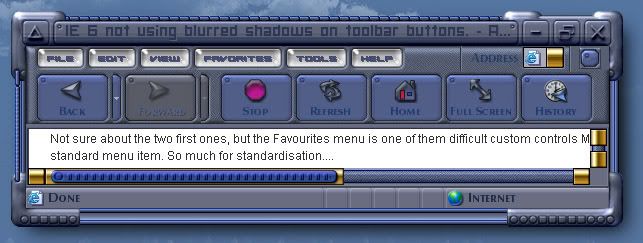
IE 6 not using blurred shadows on toolbar buttons.

I so want this to work.

Is there a reason for this behavior?



8,619 views 49 replies
Reply #1 Top
These buttons dont use the assigned font or colors either...'use own colors' is activated.

Reply #2 Top
Favorites menu...cant move text or icons?...and what is that grey line cutting across the bottom of the menu?(I see it in other skins as well)    

Reply #3 Top
Not sure about the two first ones, but the Favourites menu is one of them difficult custom controls MS has implemented. It's not a standard menu item. So much for standardisation....
Reply #4 Top
I redesigned the menu background...no biggie,but whats with the grey line?
Reply #5 Top
Status bar not using text effect either(blurred shadow again)    

Reply #6 Top
Also,why does the vertical toolbar divider still show if I skinned it with magic pink?The horizontal one works fine.  
Reply #7 Top
email the skin to me I.R. I'll find the problem.
craig at cdoman dot com
Reply #8 Top
Done...and thanks Craig.  
Reply #9 Top
Posting here so anyone can correct my mistakes.

dont forget to turn off the "please wait" text.

The gray line can be changed. It is a common problem with favorite menus. Go to Classic colors/Menus/Background-menu. You can change it to match the menu background. Because you built the skin for 4.6 frames the menu background shouldn't come into play. I haven't run into any issues yet while running the skin with the color changed. It might be a shadow on some odd menu text but I can't be sure.

Favorites menu icons and text don't move. I think that's why they gave the option for it's own menu.


try assigning a shadow to your font at Controls/Menus/Bar background/Bar items. Do the same for Bar items - toolbar like. Does that fix it? Those fonts are picky. I use per pixel framed skins so I'm not up to speed on those buttons in 4.6. changing the fonts I said made a difference but I got the skin all screwed up now. I'm gonna have to redownload and start over. LOL

I don't see any problem with the vertical divider so I will assume you fixed that.


Awesome skin. Love your style. Working out the text colors and fonts is gonna be a bumpy road. I'll be around if you need a tow.

Reply #10 Top
DOH!I think I sent you the wrong version Craig...I gotta check Skinstudio and package you the one with the fonts assignrd correctly...  
Reply #11 Top
Headed your way...check the two fonts closely,one is not a truetypebut a type 1,you may need to install it to your fonts folder.It should appear LMOST SYSTEM WI like it a lot,it looks like I print...All caps just different heights for capitals.  
Reply #12 Top
That should say'almost system wide'
The please wait is left over from the old skin...will be redesigned.
Thanks for the tip on the grey line...I will look into that and the button font settings closer.  
Reply #13 Top
Reply #14 Top
Craig,do you not see the vertical divider on your system?
Reply #15 Top
I need the skin again I.R. I deleted the other version in prep for the latest version.   
Reply #16 Top
Sent...9:45 mountain time  
Reply #17 Top
So what do you know amigo?Did you get it,or would you like an even newer version?  
Reply #18 Top
While I have you all hanging on my every word...  
Start menu item buttons display incorrectly...you can see the actual image pasted just above the SkinStudio mouseover.Looks like its not using translucency correctly.

Reply #19 Top
And when are we ever going to get content margins for that graphic...the icons are always pushed up against the left edge.  
Reply #20 Top
3 days and I have fixed only one prob...by redesigning the favorites menu(it still has the line ,I just blended it the best I could)...but not a clue about any of the others.  
Reply #21 Top
The Start panel should never be acting anything like that. Try killing explorer.exe and restarting.

Did you get my return email? Was tired and forgot to post here.
Reply #22 Top
No I didnt get your emaul Craig.  
Killing explorer had no effect.  
Reply #23 Top
All I got is...Try changing the fonts for classic widgets to a normal font and size, reboot.
Adam N has warned pretty clearly that messing with fonts for classic widgets can go nutty.
Seeing mIkeB's skin without any settings has really scrambled my nuggets.
Reply #24 Top
And...why dosnt the mouseover text color change...how hard is that to make work?  
Reply #25 Top
why dosnt the mouseover text color change...


It just doesn't. Wish it did, but it doesn't.