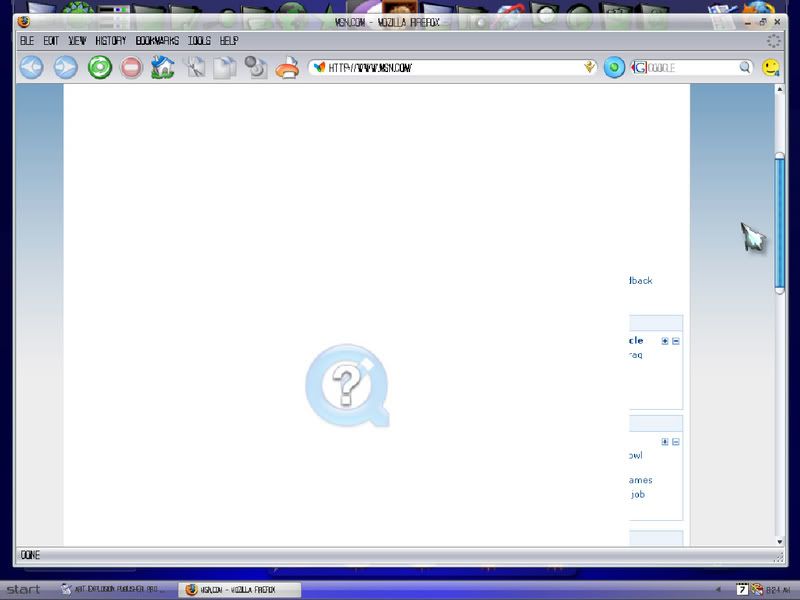
I cant browse... :(

Can anyone help me with this? Below is a shot of my browser when i open it...nearly every site i visit is like this...(Thank god wincustomize isnt this way) but its driving me crazy and i dont know what to do? if anyone can help...i will be eternally grateful...

2,861 views 21 replies
Reply #1 Top
That sucks My Firefox is working fine. My only suggestion is did you update or add any new extensions or themes? I know that Firefox has a built in compatibility for extensions but it does not take into account certain ext. that mess with other ext.
I have had to uninstall 4 different extensions that installed perfectly but seriously messed up either my browser or the actions of other extensions. So if you did add or update anything disable each & restart....

Hope that helps

Is that quicktime in your screenie?...is it running or did you recently start it?..There have been issues with old versions & javascript vulnerabilities ...just another thought.

It's My Secret
Reply #2 Top
thing is it happens on IE7 for me as well....and when i try to update Quicktime plugin, it says its already up to date....
Reply #3 Top
Give this a try. I have heard of this and this was the cure. Although I'm not sure about the Quick Time part or you being able to see WC.I hope it works.
WWW Link
Reply #4 Top
Let us know if that works

It's My Secret
Reply #5 Top
thanks for your time ladies...

did you update or add any new extensions or themes?


no.


Is that quicktime in your screenie?...is it running or did you recently start it?


no.that pops up when i open my browser.

Give this a try. I have heard of this and this was the cure.


i tried it. to no avail....

Reply #6 Top
Have you tried deleting Quicktime and rebooting?
Reply #7 Top
well ive opened up explorer again and it seems to be working? but i really prefer firefox, beggars cant be choosers now can they....any help is greatly appreciated.
Reply #8 Top
The last update to FireFox was bad for me. It caused all kinds of problems. I had to disable all my extensions and put them up one by one again. I don't have half the ones up that I did. Maybe you should uninstall FF, reboot and try a fresh install.

The extensions I am no longer using are show IP, Gmail skins, smiley extras and Broadband test. Everything is fine now.
Reply #9 Top
god I hate quicktime almost as much as real player. They both think that they should take over all aspects of media handling when all I want them to do is play either .mov files or real media files.
I suspect it is a direct result of viewing yourself and Po in compromising poses. Your browser is pissed! (and sickened)

Seriously though..
I would suggest uninstalling quicktime, rebooting and see if the issue goes away. If it does, then re-install quicktime (customize the installation and scale it down wherever possible), reboot and try again.
Reply #10 Top
thanks you two..i'll give it a shot and get back to you...
Reply #11 Top
i opened firefox and it was gone...dont know why or how...
Reply #12 Top
and now its back
Reply #13 Top
Zubaz suspects Po'
Reply #14 Top
Security: Update QuickTime Now!
The QuickTime media player has multiple security flaws that is putting your Windows computer (and if you have a Mac) at risk for malicious attack according to Apple. Hackers can create maliciously crafted movie and image files that could be used to execute harmful code on vulnerable machines by utilizing a buffer overflow error.

QuickTime 7.1.3 has been released as a high-priority update. This update fixes all the recent known vulnerabilities. If you have not already updated your computer, I would highly recommend that you download it and update it now.

Bonus Tip: If you select the 'QuickTime 7.1.3 for Windows 2000/XP' option on the download page, you can get Quicktime without iTunes.

I agree with Phoon...I hate quicktime & will not use it on my putter but if you must be sure to uninstall the plugin as well as the player. You may be infected. Something that comes & goes And affecting both browsers...and Ya use FireFox if you can...its safer

I would suggest running some scans on your system. Beside antivirus I use A-squared free. Adaware Se 7 & Spybot Search & Destroy *may pick it up. The online scanner at Trend Micro is quite good as well. Another good one to use is the ewidio.net online scan. I may be completely wrong but a good scan of with all of the above will eliminate that possibility.

Appreciate you keeping us informed. I know how frustrating it can be. After trying the basics I always scan my system well and go from there. And as you know 1 program will not catch everything.

It's My Secret

Reply #16 Top
well ive updated quicktime and so far so good...starting a full scan now...thanks for everyones help...white pearl over and out
Reply #17 Top
Glad to hear it. Hope it stays that way!
Reply #18 Top
thanks CL
Reply #19 Top
Just got a note from Secunia regarding QuickTime. Seems a fix is avail. for Apple-users, but not Windows...yet... Secunia Blog Link
Reply #20 Top
excellent seldom...please let me know as soon as its available..thanks sir...