
more noob questions

how do i remove the tabbed dock and why isnt it as cool as the docklets?

how do i remove a subfolder in a flyout menu?
for example in a startmenu flyout i have admin.tools, i have that removed in xp so obviously dont need it there.

how do i remove text being shown with icons?

why cant i drag the docklet where i want despite "lock docklet" being unchecked?

i put themes in themes folder, yet they wont show when i try to change it, do they need to be zipped?

why does od+ give me more headaches than the worst symantec program ever could?
4,834 views 9 replies
Reply #1 Top
how do i remove the tabbed dock

rightclick on any dock (NOT icon/docklet)->Dock Settings->My Docks

why isnt it as cool as the docklets

Huh?

how do i remove a subfolder in a flyout menu

Guessing: it probably caches the folder tree which it points to on startup so if you change it while OD is running it maybe doesn't update until next startup. Find out.

how do i remove text being shown with icons

You can't AFAIK. It's been requested as a future feature to be able to be switched off if desired.

why cant i drag the docklet where i want despite "lock docklet" being unchecked

Works here...

i put themes in themes folder, yet they wont show when i try to change it, do they need to be zipped

I know the forums aren't easy to search but there are lots of threads on this already. Themes are only good for saving something you customised yourself. Backgrounds you unzip to the Backgrounds folder below ObjectDock - make sure they're unzipped to individually names folders just like what's there already!

why does od+ give me more headaches than the worst symantec program ever could

You obviously didn't actually install the Symantec programs


Posted via WinCustomize Browser/Stardock Central
Reply #2 Top
Since above poster has answered pretty much all the only other thing i'll add is symantec products don't like being loaded onto an already buggy comp just like any software
Reply #3 Top
You obviously didn't actually install the Symantec programs


Reply #4 Top
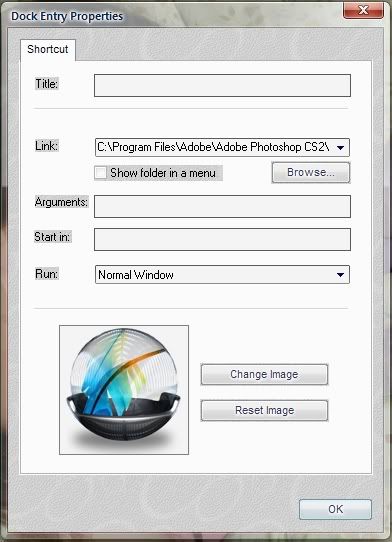
You can remove text shown with icons >_>. I do so with my seperators. Well, with a tabbed dock you can do it. Not sure about regular docks cause I never use them. Here is how to do it with a tabbed dock:
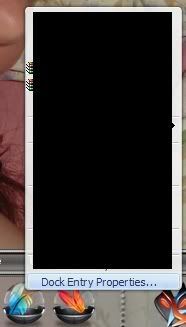
Regular icon with text:


Right click and select Dock Entry properties:


Clear the 'title' feild so it is blank:


Viola, no text :


Sorry if I misunderstood the question
Reply #5 Top


Comparing ANY Stardock product to Symantec?

Reply #6 Top
Sorry if I misunderstood the question


I reckon you nailed it!

I bet there'll still be complaints about 'running tasks' and 'systray' docks because that option is greyed out on those...


Posted via WinCustomize Browser/Stardock Central
Reply #7 Top
the only other thing i'll add is symantec products don't like being loaded onto an already buggy comp


Ooohh a Symantec fanboy (JK! )

I have to say I've got no problem with Symantec's PC Anywhere. Been using it for years and it's amazing to see it going over 64k ISDN from Europe to Australia!

OTOH, Symantec's AntiVirus and System tools (formerly Norton's), well that's a bit too off-topic for this thread


Posted via WinCustomize Browser/Stardock Central
Reply #8 Top
Guessing: it probably caches the folder tree which it points to on startup so if you change it while OD is running it maybe doesn't update until next startup. Find out.


huh?...i use the word noob for a reason btw.

got the tab docks removed, thanks however i have found no way of moving the docklets around, all it lets me do is move to the 4 edges of screen regardless of lockdraggin checked or not.

my system shouldnt be buggy, this winxp install is only 4 days old if that on a high end rig.

my opinions of symantec were just that, didnt mean to pizz anyone off.
Reply #9 Top
thanks however i have found no way of moving the docklets around


There's a control under the 'Positioning' option to move it away from the edge a fixed amount. Don't think you can just drag it anywhere...

my opinions of symantec were just that, didnt mean to pizz anyone off.


No-one got 'pizzed', just messing wit ya...


Posted via WinCustomize Browser/Stardock Central