

My current favorite desktop utilities
or, what's littering my desktop right now...
from  JoeUser Forums
JoeUser Forums
The first thing to mention is Konfabulator which I discussed in my previous post. I won't belabor why but for the time being, it works and does exactly what I want it to do. It's pretty and no-nonsense.

The second thing that I've recently started using is True Launch Bar which also simply works. It's a taskbar add-on that adds a lot of functionality to the task bar. It is like the quick launch bar but on steroids with many grouping and menu options, a variety of useful plugins, and some skinning abilities. One of my main reasons for getting it was the fact that it had a pretty neat battery monitor. I hate the fact that after all this time, Windows' charging/battery task tray item is essentially useless. It basically shows you full, half and nearly empty. Is it that difficult to give a more accurate reading? The battery monitor plugin for TLB can display percentage, time remaining, and a more accurate visual indication depending on the skin you're using. I made my own skin to simply display the battery and time remaining and another with just the battery as shown above. I don't care about the percentage as much since the battery indicates 10% increments which is way better than 50% increments. I've also created a skin for the wireless monitor plugin that shows signal strength and transfer lights. I'm still learning how to optimally use the other plugins but so far it's been worth the money and easy to use.
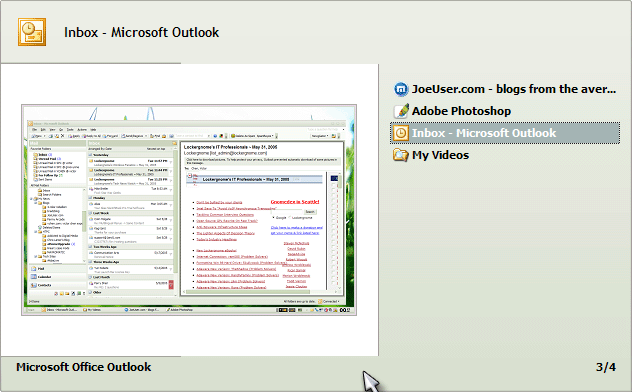
Finally, I started trying out TaskSwitchXP which is an enhanced ALT+TAB task switcher. I find it to be more informative than the standard and Powertoy task switchers and it only uses a little bit of memory (~1.2MB). Since I tend to keep a lot of things open, I like being able to quickly jump through open applications and windows and visually see everything. It's neat and free and very configurable so it's worth taking a look at.
So, what are the rest of you using? Any hidden gems you care to share?
The second thing that I've recently started using is True Launch Bar which also simply works. It's a taskbar add-on that adds a lot of functionality to the task bar. It is like the quick launch bar but on steroids with many grouping and menu options, a variety of useful plugins, and some skinning abilities. One of my main reasons for getting it was the fact that it had a pretty neat battery monitor. I hate the fact that after all this time, Windows' charging/battery task tray item is essentially useless. It basically shows you full, half and nearly empty. Is it that difficult to give a more accurate reading? The battery monitor plugin for TLB can display percentage, time remaining, and a more accurate visual indication depending on the skin you're using. I made my own skin to simply display the battery and time remaining and another with just the battery as shown above. I don't care about the percentage as much since the battery indicates 10% increments which is way better than 50% increments. I've also created a skin for the wireless monitor plugin that shows signal strength and transfer lights. I'm still learning how to optimally use the other plugins but so far it's been worth the money and easy to use.
Finally, I started trying out TaskSwitchXP which is an enhanced ALT+TAB task switcher. I find it to be more informative than the standard and Powertoy task switchers and it only uses a little bit of memory (~1.2MB). Since I tend to keep a lot of things open, I like being able to quickly jump through open applications and windows and visually see everything. It's neat and free and very configurable so it's worth taking a look at.
So, what are the rest of you using? Any hidden gems you care to share?
 WinCustomize Forums